
web3_provider
该项目支持 Dapp 和应用内 webview 之间的消息发送和接收“仅支持 EIP-1193 标准”
概述
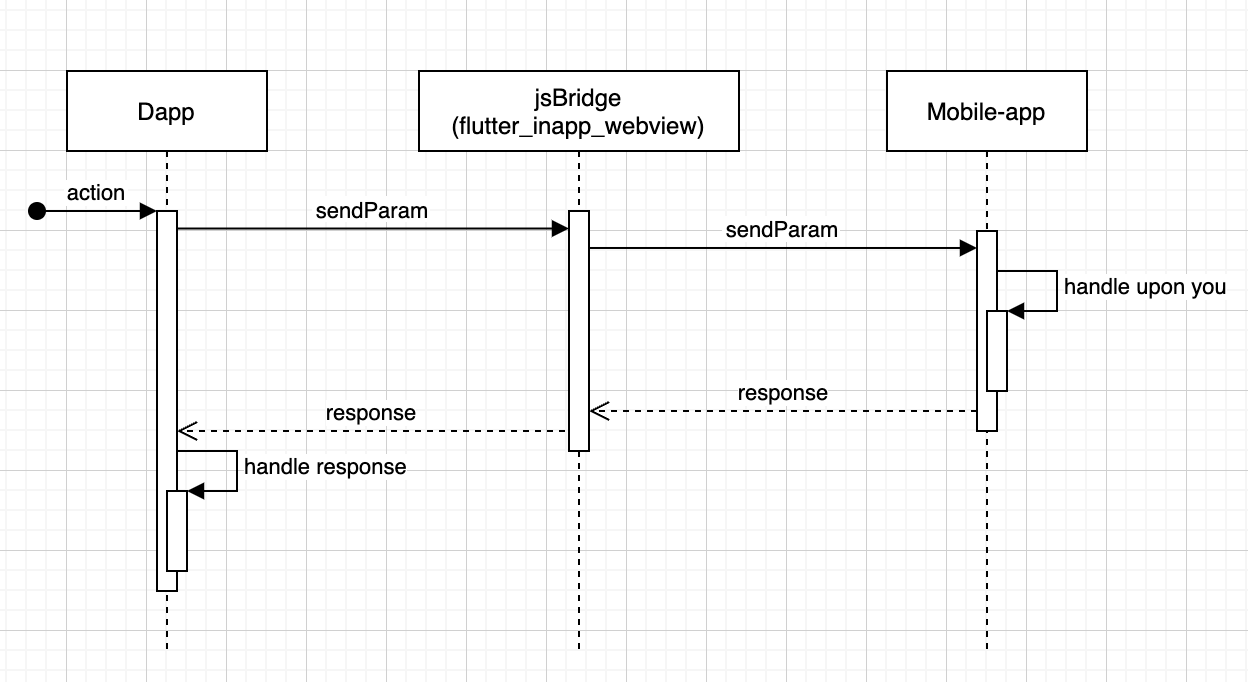
- 在 dapp 和您的应用程序之间进行通信。
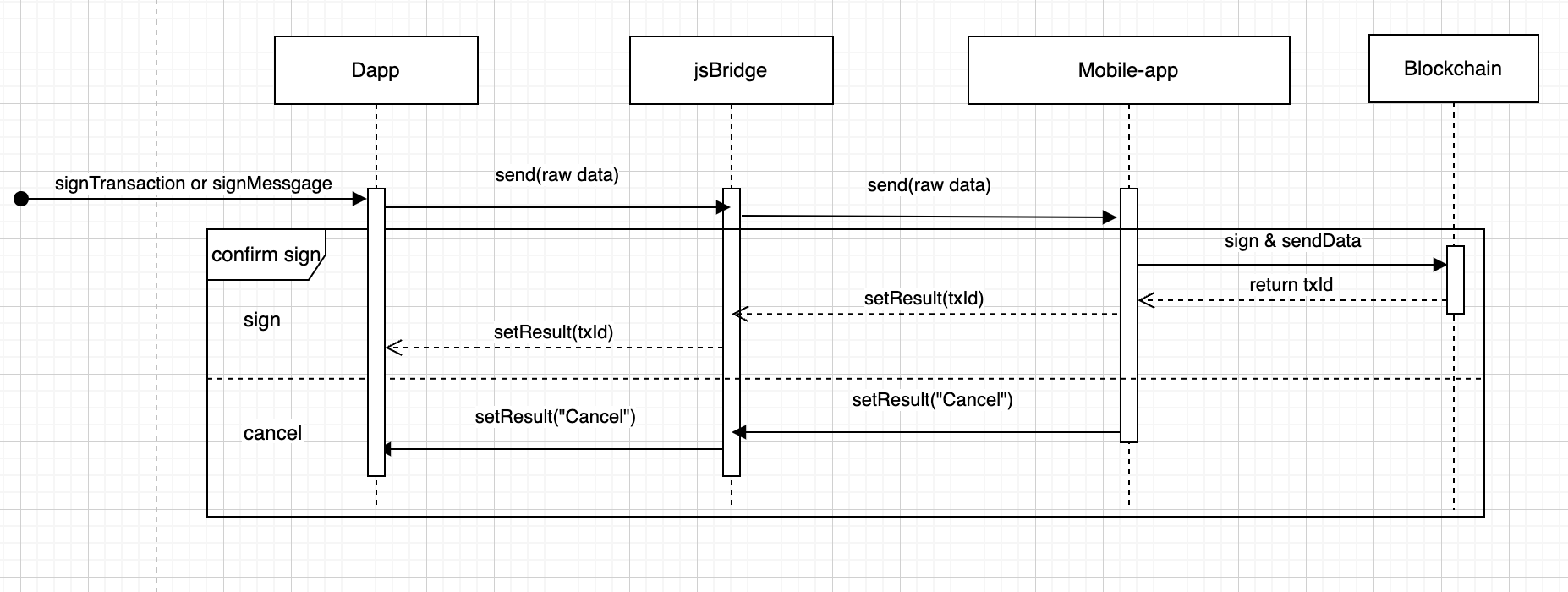
- Dapp 与区块链交互。
用法
import 'package:web3_provider/web3_provider.dart';

InAppWebViewGroupOptions options = InAppWebViewGroupOptions(
  crossPlatform: InAppWebViewOptions(
    useShouldOverrideUrlLoading: true,
    mediaPlaybackRequiresUserGesture: false,
    userAgent:
    "Mozilla/5.0 (Linux; Android 4.4.4; SAMSUNG-SM-N900A Build/tt) AppleWebKit/537.36 (KHTML, like Gecko) Version/4.0 Chrome/33.0.0.0 Mobile Safari/537.36",
  ),
  android: AndroidInAppWebViewOptions(
    useHybridComposition: true,
    domStorageEnabled: true,
  ),
  ios: IOSInAppWebViewOptions(
    allowsInlineMediaPlayback: true,
  ),
);

/// By default config
InAppWebViewEIP1193(
    chainId: 56, // Replace your chain id network you want connect
    rpcUrl: 'https://bsc-dataseed.binance.org/', // Replace your rpc url network you want connect
    walletAddress: walletAddress,
    signCallback: (rawData, eip1193, controller) {
      // Handler callback when dapp interact with blockchain
      switch (eip1193) {
        case EIP1193.requestAccounts:
          controller?.setAddress(walletAddress, id);
          print('requestAccounts');
          break;
        case EIP1193.signTransaction:
          print('signTransaction');
          break;
        case EIP1193.signMessage:
          print('signMessage');
          break;
        case EIP1193.signPersonalMessage:
          print('signPersonalMessage');
          break;
        case EIP1193.signTypedMessage:
          print('addEthereumChain');
          break;
        case EIP1193.addEthereumChain:
          print('addEthereumChain');
          break;
    },
    initialUrlRequest: URLRequest(
        url: Uri.parse(
        'https://position.exchange', // Replace your dapp domain
        ),
    ),
    initialOptions: options
);
如果您想使用您提供的提供商脚本,请提供 [customPathProvider] 和 [customWalletName]
signCallback: (rawData, eip1193, controller):当 dapp 与区块链交互时会调用此回调。
rawData:收到的数据。eip1193:支持的函数类型。- requestAccounts: 当 web 应用连接钱包时传递
- signTransaction: 当 web 应用批准合约或发送交易时传递
- signMessage: 当 web 应用签名消息时传递
- signPersonalMessage: 当 web 应用签名个人消息时传递
- signTypedMessage: 当 web 应用签名类型消息时传递
- addEthereumChain: 当 web 应用添加新链时传递
当您将数据从 dapp 传递到您的应用时
const args = {/* Pass data you want */};
if (window.flutter_inappwebview.callHandler) {
    window.flutter_inappwebview.callHandler('functionName', args)
        .then(function(result) {
          /// Receive data from your app
    });
}
并在您的应用中接收
onWebViewCreated: (controller) {
    controller.addJavaScriptHandler(
        handlerName: 'functionName',
        callback: (args) {
          /// Receive data from dapp


          /// Send data to dapp;
          return /* anything */;
        },
    );
},


