
Starlight 通知
显示通知的最简单方法。
功能
☑️ 显示通知
☑️ 取消通知
☑️ 取消所有通知
观看视频
安装
将 starlight_notification 添加为 pubspec 文件中的依赖项。
starlight_notification:
    git:
      url: https://github.com/YeMyoAung/starlight_notification.git
Android 设置
您需要将 ic_launcher 放入 app/src/main/res/drawable 文件夹。
截图
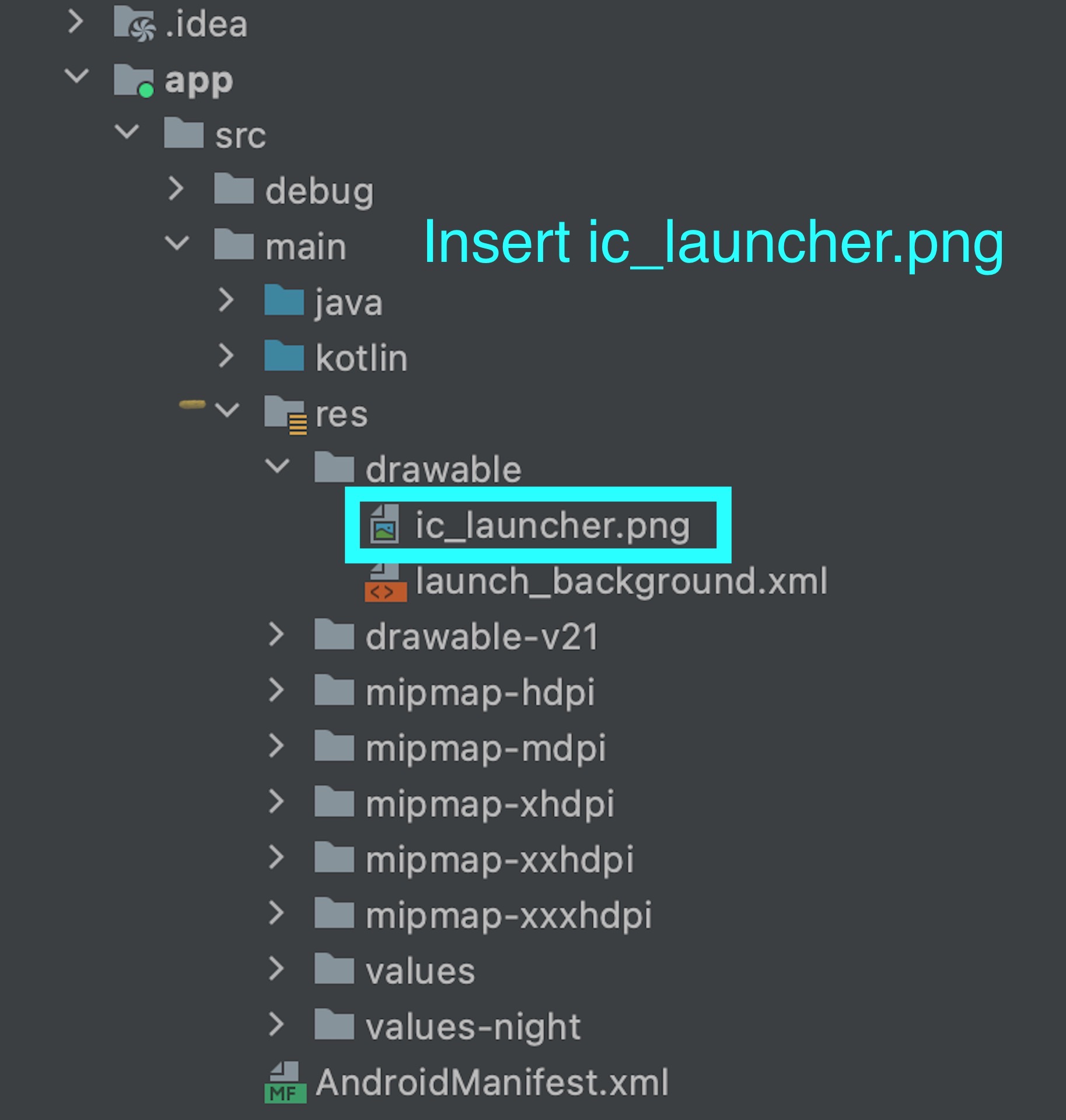
将以下属性添加到 activity
   <activity
    android:showWhenLocked="true"
    android:turnScreenOn="true">
iOS 设置
将以下行添加到 iOS 项目的 AppDelegate.swift 文件中的 didFinishLaunchingWithOptions 方法中
if #available(iOS 10.0, *) {
  UNUserNotificationCenter.current().delegate = self as? UNUserNotificationCenterDelegate
}
用法
首先,您需要导入我们的包。
import 'package:starlight_notification/starlight_notification.dart';
初始化 StarlightNotification
要初始化 StarlightNotificationService,请调用 StarlightNotificationService 类上的实例方法
await StarlightNotificationService.setup();
您也可以传递此回调
 await StarlightNotificationService.setup(
    onSelectNotification: (e){
      ///ToDo
    }
  );
然后您可以在需要时随时随地调用。您也可以与 FirebaseMessaging 一起使用。
显示通知
import 'package:flutter/material.dart';
import 'package:starlight_notification/starlight_notification.dart';

Future<void> main() async {
  ///important
  WidgetsFlutterBinding.ensureInitialized();

  ///important
  await StarlightNotificationService.setup(
    onSelectNotification: (e){
      ///ToDo
    }
  );

  ///and then you can invoke anytime,anywhere when you need
  ///you can also use with firebasemessaging

  ///show notification
  await StarlightNotificationService.show(
    StarlightNotification(
      title: 'hello',
      body: 'hi',
      payload: '{"name":"mg mg","age":20}',
    ),
  );
}
取消通知
import 'package:flutter/material.dart';
import 'package:starlight_notification/starlight_notification.dart';

Future<void> main() async {
  ///important
  WidgetsFlutterBinding.ensureInitialized();

  ///important
  await StarlightNotificationService.setup(
    onSelectNotification: (e){
      ///ToDo
    }
  );

  ///and then you can invoke anytime,anywhere when you need
  ///you can also use with firebasemessaging

  ///cancel notification
  await StarlightNotificationService.cancel('hello');
}
取消所有通知
import 'package:flutter/material.dart';
import 'package:starlight_notification/starlight_notification.dart';

Future<void> main() async {
  ///important
  WidgetsFlutterBinding.ensureInitialized();

  ///important
  await StarlightNotificationService.setup(
    onSelectNotification: (e){
      ///ToDo
    }
  );

  ///and then you can invoke anytime,anywhere when you need
  ///you can also use with firebasemessaging

  ///cancel all notification
  await StarlightNotificationService.cancelAll();
}


