基于流的、状态机驱动的动画控制器和评估库,适用于 Flutter。
它提供了响应式和基于实体的动画定义,通过关键帧评估和插值,这些动画可以处于各种状态、过渡以及介于两者之间的所有可能的混合状态。
目标
状态机动画旨在解决当您为单个元素使用数十个独立的动画控制器并试图根据它们之间的关系来保持同步时,代码复杂度呈指数级增长且难以处理的问题。
虽然目前的最佳实践是当复杂性达到该级别时,让 Rive (Flare) 等专用动画运行时接管,但您将失去许多 Flutter 特定的功能,例如当这种情况发生时,您将无法精细地控制动画如何根据您的应用程序状态表现。
该库旨在提供:
- 最简单的表面 API,您可以以可读性、清晰性和可维护性实现几乎所有行为,并以声明式和命令式编程方法的精确组合。
- 最简单的实现,可以让用户轻松理解其代码库,fork 存储库,并根据其独特的需求进行调整。
因此,推迟对动画运行时的需求,直到您需要动画绑定和网格等功能,这些功能需要专用的用户界面来实现,并仅将它们的使用限制在这些功能上。
功能
- 关键帧评估与插值,
- 持续时间和曲线评估,可以为动画定义的各种分层提供默认值和函数评估,
- 动画模型容器,用于处理特定实体的多个动画属性。
- 确保连续性的响应式方法,可以处理过渡层叠在一起,并提供不同的过渡反应类型以响应应用程序状态的并发选项。
入门
目前,表面级 API 编写为与基于流的状态管理技术(如 BLOC)配合良好。
该库使用 BehaviorSubject 实例(可以具有当前值的流)来处理所有级别的状态。因此,熟悉流概念及其操作将很有帮助。
话虽如此,我们鼓励大家克隆存储库并调整一些类以使用不同的模式,例如使用 Flutter 动画类使用的更高效、同步的 ValueNotifier 实例,或者使用更声明式的方法来处理状态机实例,而不是对象继承。
基本的 estatal 机表示
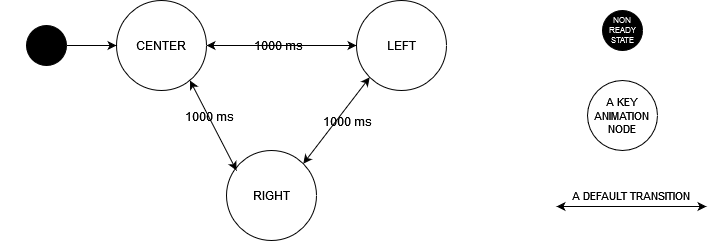
用法
它通过三个不同的流级别进行思考。
- 实体状态流,它是状态机的输入。它的值需要包含动画应响应的所有信息。
- 状态机输出流,代表动画控制器状态。
- 动画属性或动画模型流,它评估控制器状态,您的应用程序可以使用该状态来渲染动画对象。
以下是所有三者的示例用法
void main() {

  // A simple extension of the TickerProvider, that gives implementers the responsibility of managing a ticker's disposal along with its creation.
  final AppTickerManager tickerManager = AppTickerManager();

  // The entity state stream of the object that should be animated.
  // In this case, the AppState can be in one of three Position values.
  final BehaviorSubject<AppState> stateSubject = BehaviorSubject<AppState>.seeded(AppState(Position.center));

  // The State Machine Controller instance which tells the state-machine stream how to react to the changes in the entity state stream.
  // This class represents the meat and bones of our animation definition.
  final ExampleAFSM stateMachine = ExampleAFSM(stateSubject, tickerManager);

  // The final animation stream that evaluates the state-machine controller stream.
  // In this case it's a single double property that we provide its value for the each keyframe of its state machine.
  final animation = DoubleAnimationProperty<AppState>(
    keyEvaluator: (key, sourceState) {
      if( key == "LEFT" ){
        return -100;
      } else if( key == "CENTER" ){
        return 0;
      } else if( key == "RIGHT" ){
        return 100;
      }
    }
  ).getAnimation(stateMachine.output);

  // The stream subscription that we use to expose the values of the animation.
  animation.listen((animationProperty) {
    print("${animationProperty.time}: ${animationProperty.value}");
  });

  // We change the the value of the input stream to center to right, so the state-machine can react and transition to some other state.
  stateSubject.add(AppState(Position.left));

}

/**
  Source state implementation
 */
enum Position {
  left,
  center,
  right;
}

class AppState extends Equatable {

  final Position position;

  const AppState(this.position);

  @override
  List<Object?> get props => [position];

}

/**
  State machine definition.
  Implementing this abstract class means implementing the following 3 hook methods which gets called when the input state changes
 */

class ExampleSM extends AnimationStateMachine<AppState> {

  ExampleAFSM(super.input, super.tickerManager);

  // A readiness hook that returns bool.
  // If your source state has certain values that the state-machine shouldn't try to react to and evaluate, make sure to change the implementation accordingly from the following.
  @override
  bool isReady(state) => true;

  // The configuration of your state machine based on the source state.
  // It should provide the starting point for a state-machine that is ready, and the durations for how long it takes to transition from one state to another.
  @override
  AnimationStateMachineConfig<AppState> getConfig(state) => const AnimationStateMachineConfig(
    nodes: ["LEFT", "CENTER", "RIGHT"],
    initialState: Idle("CENTER"),
    defaultDuration: 1000
  );

  // The the most important hook where you define how your state machine should react to changes in the source state.
  // You can jump or transition to any state, which can be nodes or specific points in a transition between two nodes.
  @override
  void reactToStateChanges(state, previous) {
    transitionTo(Idle(state.position.name.toUpperCase()));
  }

}

// A Basic ticker manager implementation. If you have a game loop, it should be probably the one to implement this interface.
class AppTickerManager implements TickerManager {

  final List<Ticker> _tickers = <Ticker>[];

  @override
  Ticker createTicker(TickerCallback onTick) {
    final ticker = Ticker(onTick);
    _tickers.add(ticker);
    return ticker;
  }

  @override
  void disposeTicker(Ticker ticker){
    ticker.dispose();
    _tickers.remove(ticker);
  }

}
文档
AnimationStateMachine 用法
AnimationStateMachine 是一个抽象类,通过扩展它来使用。
它负责处理状态机根据源状态的行为。
- 源状态的就绪检查,
- 动画节点,
- 节点之间的过渡持续时间,
- 状态机如何响应节点变化,
- 以及可选的过渡中的默认关键帧覆盖,
应通过此实例上的相关钩子进行配置。一个值得注意的例外是过渡的曲线,它不像本地 Flutter 动画控制器那样,在动画实例中确定。
isReady 钩子
getConfig 钩子
reactToStateChanges 钩子
[解释] 用例如下
- 跳转到
Idle状态
  @override
  void reactToStateChanges(SampleSource state, SampleSource? previous) {
    jumpTo(const Idle("NODE_1"));
  }
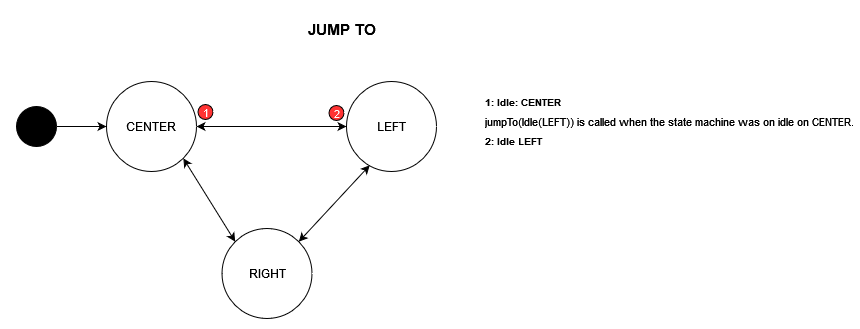
- 默认过渡到 Idle 状态
  @override
  void reactToStateChanges(SampleSource state, SampleSource? previous) {
    transitionTo(const Idle("NODE_2"));
  }
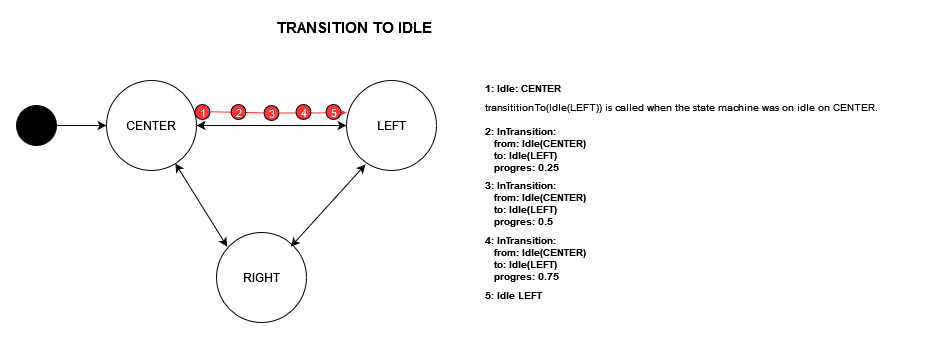
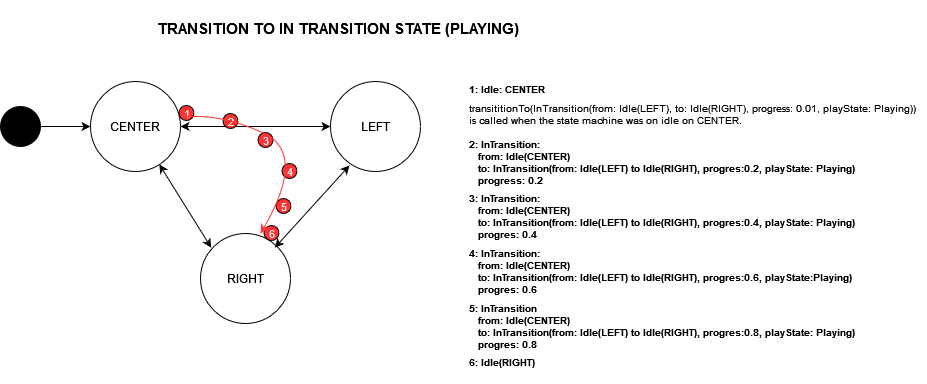
- 跳转到默认的
InTransition状态
  @override
  void reactToStateChanges(SampleSource state, SampleSource? previous) {
    jumpTo(InTransition.fromEdges(const Idle("NODE_1"), const Idle("NODE_2"), 0.5, playState: PlayState.paused));
  }
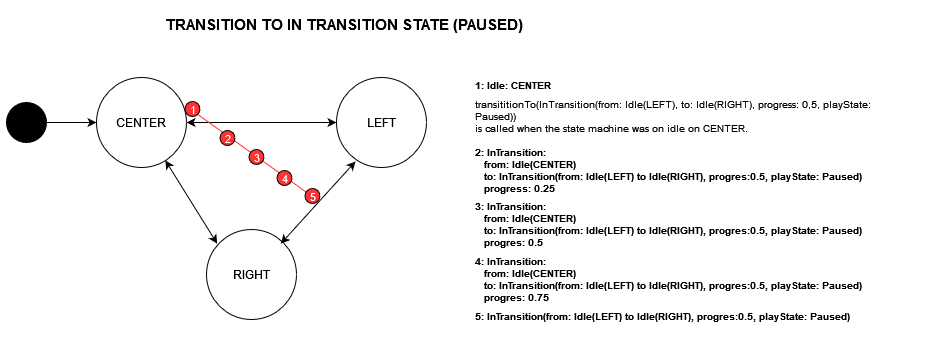
- 执行命名过渡(带自定义关键帧)到
Idle状态
  @override
  void reactToStateChanges(SampleSource state, SampleSource? previous) {
    execute(Transition.declared(
      identifier: "AN_AWESOME_TRANSITION",
      from: const Idle("NODE_1"),
      to: const Idle("NODE_2"),
      defaultInternalKeyframes: const [
        AnimationKeyframe(Idle("KEYFRAME_1"), 0.25),
        AnimationKeyframe(Idle("KEYFRAME_2"), 0.50),
        AnimationKeyframe(Idle("KEYFRAME_3"), 0.75)
      ]
    ));
  }
- 命名
SelfTransition(带自定义关键帧)
  @override
  void reactToStateChanges(SampleSource state, SampleSource? previous) {
    executeSelfTransition(SelfTransition("LOOPING", [AnimationKeyframe(Idle("MID-POINT"), 0.5)]));
  }
- 跳转到命名的
InTransition状态
  @override
  void reactToStateChanges(SampleSource state, SampleSource? previous) {
    jumpTo(
      InTransition(
        Transition.declared(
          identifier: "AN_AWESOME_TRANSITION",
          from: const Idle("NODE_1"),
          to: const Idle("NODE_2"),
          defaultInternalKeyframes: const [
            AnimationKeyframe(Idle("KEYFRAME_1"), 0.25),
            AnimationKeyframe(Idle("KEYFRAME_2"), 0.50),
            AnimationKeyframe(Idle("KEYFRAME_3"), 0.75)
          ]
        ), // named transition
        0.4, // progress
        playState: PlayState.paused
      )
    );
  }
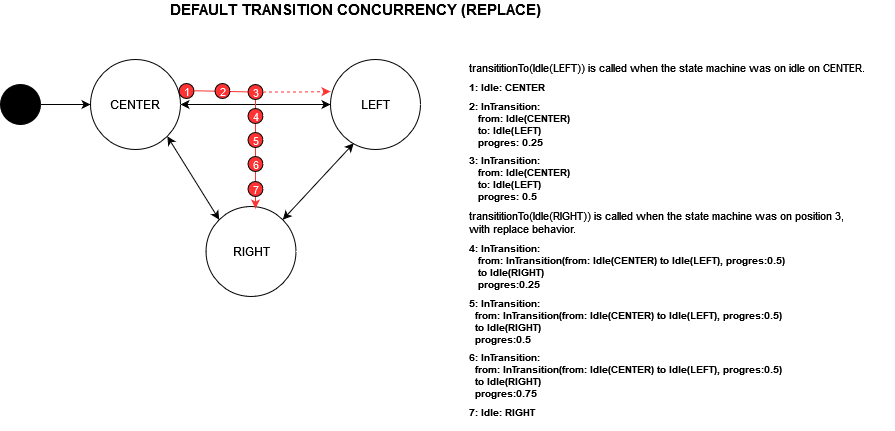
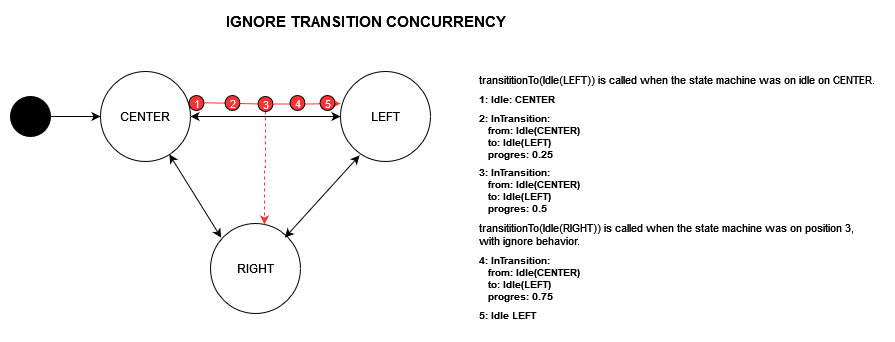
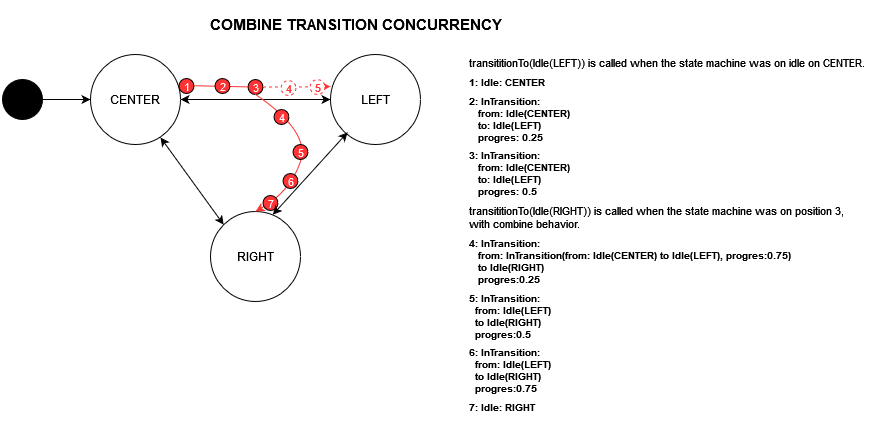
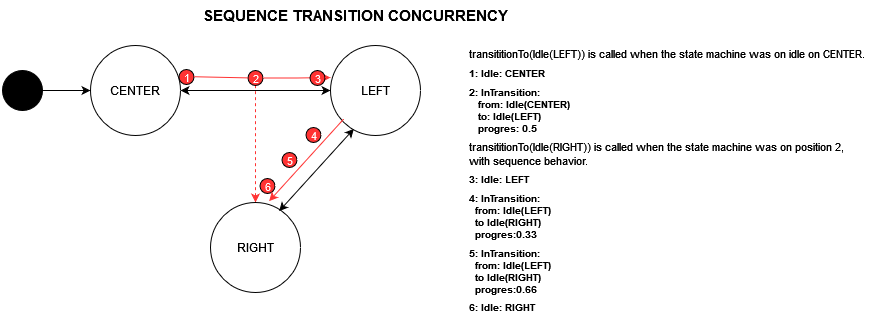
在已有正在进行的过渡时过渡到某个状态时的并发行为。
在 AnimationStateMachine 实例的 `reactToStateChanges` 钩子中调用 `transitionTo` 方法时,您可以选择提供 `TransitionConcurrencyBehavior` 值。这将改变状态机在已有正在进行的事务时对过渡尝试的反应方式。
示例
  @override
  void reactToStateChanges(SampleSource state, SampleSource? previous) {
    transitionTo(const Idle("NODE_1"), behavior: TransitionConcurrencyBehavior.sequence);
    transitionTo(const Idle("NODE_2"), behavior: TransitionConcurrencyBehavior.sequence);
  }
动画属性用法
当状态机旨在控制单个属性时,您应该使用 AnimationProperty<T, S> 类或其扩展之一作为快捷方式。
动画属性实例负责通过关键帧和插值将状态机评估为结果值,同时确定过渡将为该属性解释的曲线。
DoubleAnimationProperty 用法
  final animation = DoubleAnimationProperty<AppState>(
    keyEvaluator: (key, sourceState) {
      if( key == "NODE_1" ){
        return -100;
      } else if( key == "NODE_2" ){
        return 0;
      } else if( key == "NODE_3" ){
        return 100;
      }
    }
  ).getAnimation(stateMachine.output);
自定义 AnimationProperty 用法
  final animation = AnimationProperty<double, AppState>(
    // initialValue: ..., // to provide the default value of a property it couldn't be evaluated.
    // evaluateKeyframes: ..., // to override the default keyframes of a transition
    // tween: ..., // the tween instance to be used during interpolation
    // defaultCurve: .. //
    // evaluateCurve: .. //
    keyEvaluator: (key, sourceState) {
      if( key == "NODE_1" ){
        return -100;
      } else if( key == "NODE_2" ){
        return 0;
      }
    }
  ).getAnimation(stateMachine.output);
要接收动画流,应通过包含状态机流的动画属性定义调用 `getAnimation` 方法。
返回的 AnimationPropertyState<T> 类型的流将包含以下信息
- value
- direction
- 速度
- time
AnimationProperty 类的当前现有扩展如下:
- IntegerAnimationProperty
- DoubleAnimationProperty
- ModdedDoubleAnimationProperty
- SizeAnimationProperty
- ColorAnimationProperty
- BoolAnimationProperty
- StringAnimationProperty
动画容器用法
当状态机旨在控制由多个属性表示的元素时(大多数复杂动画都是这种情况),您应该使用 AnimationContainer 和 AnimationModel 类。
动画容器是便捷类,它们包含多个动画属性以及它们之间的通用行为。
它们负责将动画属性和源状态序列化到它们相关的 AnimationModel 类中。
它们提供 AnimationModel 的输出流。
动画模型是简单的数据类,它们实现 `copyWith` 方法,让容器知道如何将动画属性映射到其字段。
AnimationContainer 和 AnimationModel 用法
class AwesomeObjectAnimation extends AnimationContainer<AwesomeSourceState, AwesomeObject> {

  AwesomeObjectAnimation(AwesomeObjectStateMachine stateMachine) : super(
    stateMachine: stateMachine,
    initial: AwesomeObject.empty(),
    defaultCurve: Curves.easeInOutQuad,
    staticPropertySerializer: (state) => {
      "name": state.name // example of a non-animated, static property within the animation model class.
    },
    properties: [
      DoubleAnimationProperty(
        name: "x",
        keyEvaluator: (key, sourceState) {
          if ( key == "NODE_1" ) {
            return 0;
          } else if ( key == "NODE_2" ) {
            return 100;
          }
        }
      ),
      DoubleAnimationProperty(
        name: "y",
        evaluateCurve: (transition) => transition.from == const Idle("NODE_2") && transition.to == const Idle("NODE_1") // An example of overriding curve for a property of a specific transition
          ? Curves.bounceOut
          : Curves.easeInOutQuad,
        keyEvaluator: (key, sourceState) {
          if ( key == "NODE_1" ) {
            return 0;
          } else if ( key == "NODE_2" ) {
            return 100;
          }
        }
      ),
      DoubleAnimationProperty(
        name: "scale",
        keyEvaluator: (key, sourceState) {
          if ( key == "NODE_1" ) {
            return 1;
          } else if ( key == "NODE_2" ) {
            return 2;
          }
        }
      ),
      DoubleAnimationProperty<RegularCardState>(
        name: "opacity",
        evaluateKeyframes: (transition, sourceState) => const [
          AnimationKeyframe(Idle("NODE_1"), 0),
          AnimationKeyframe(Idle("KEYFRAME_1"), 0.2),
          AnimationKeyframe(Idle("KEYFRAME_2"), 0.4),
          AnimationKeyframe(Idle("NODE_2"), 1)
        ],
        keyEvaluator: (key, sourceState){
          if ( key == "NODE_1" ) {
            return 0.5;
          } else if ( key == "KEYFRAME_1" ) {
            return 0.6;
          } else if ( key == "KEYFRAME_2" ) {
            return 0.7;
          } else if ( key == "NODE_2" ) {
            return 1;
          }
        }
      )
    ]
  );
}

class AwesomeObject extends AnimationModel {

  final double name;
  final double x;
  final double y;
  final double scale;
  final double opacity;

  AwesomeObject(
    this.name,
    this.x,
    this.y,
    this.scale,
    this.opacity,
  );

  AwesomeObject.empty() :
    name = "",
    x = 0,
    y = 0,
    scale = 1,
    opacity = 1;

  @override List<Object?> get props => [name, x, y, scale, opacity];

  @override
  AwesomeObject copyWith(Map<String, dynamic> valueMap) => AwesomeObject(
    valueMap["name"] ?? name,
    valueMap["x"] ?? x,
    valueMap["y"] ?? y,
    valueMap["scale"] ?? scale,
    valueMap["opacity"] ?? opacity
  );

}
使用 BehaviorSubjectBuilder 渲染动画
BehaviorSubjectBuilder 是 StreamBuilder 小部件的一个简单扩展,方便使用。
class ExampleWidget extends StatelessWidget {
  const ExampleWidget({Key? key}) : super(key: key);

  @override
  Widget build(BuildContext context) {
    return BehaviorSubjectBuilder(
      subject: context.read<AwesomeObjectAnimation>(),
      subjectBuilder: (context, awesomeObject) => Container(
       /*.... */
      )
    );
  }
}
订阅动画事件的回调
  // ...
  final ExampleAFSM stateMachine = ExampleAFSM(stateSubject, tickerManager);
  //...
  stateMachine.output.firstWhere((state) => state?.state.fromKey == "NODE_2").then((value){
    print("ON NODE_2");
  });


