
VersionComparator

简洁、有趣且可自定义的比较器
一个用于比较商店版本与本地版本的 Flutter 包。
- ? 比较所有商店的应用版本。(PlayStore, AppStore, AppGallery 和自定义)
- ⚡ 可自定义且易于管理
- ❤️ 简洁、强大且易于管理的结构
- ? 可更改的错误和信息消息,用您自己的。
- ? 比较版本时显示 AlertDialog 或自定义小部件。
应用版本比较平台
| Android | iOS | 华为 | 自定义 |
|---|---|---|---|
| ✔ | ✔ | ✔ | ✔ |
用法
导入 package:version_comparator/version_comparator.dart,然后使用小部件或功能。这是您所需要的。您可以与未来的操作或小部件进行比较。这里有一些简单的比较器示例
与未来操作进行比较
import 'package:version_comparator/version_comparator.dart';

final response = await VersionComparator.instance.versionCompare();

print(response?.data?.toJson() ?? '-');

////////PRINT////////
//{
//  "localVersion":"1.0.0",
//  "storeVersion":"1.0.1",
//  "updateLink:"https://your_store_link.com,
//  "isAppVersionOld:"true
//}
与小部件进行比较
import 'package:version_comparator/version_comparator.dart';

  @override
  Widget build(BuildContext context) {
    return Scaffold(
      appBar: AppBar(title: Text(widget.title)),
      body: AppVersionComparatorView.widget(
        errorPageBuilder: (context, error) => Center(child: Text(error)),
        onCompareSuccess: (data) => debugPrint('Success: ${data.storeVersion}'),
        outOfDateVersionPageBuilder: (context, error, data) => _buildOutOfDateWidget(error, data),
        child: _buildBody(),
      ),
    );
  }
| 应用版本与 AlertDialog 比较 | 应用版本与小部件比较 |
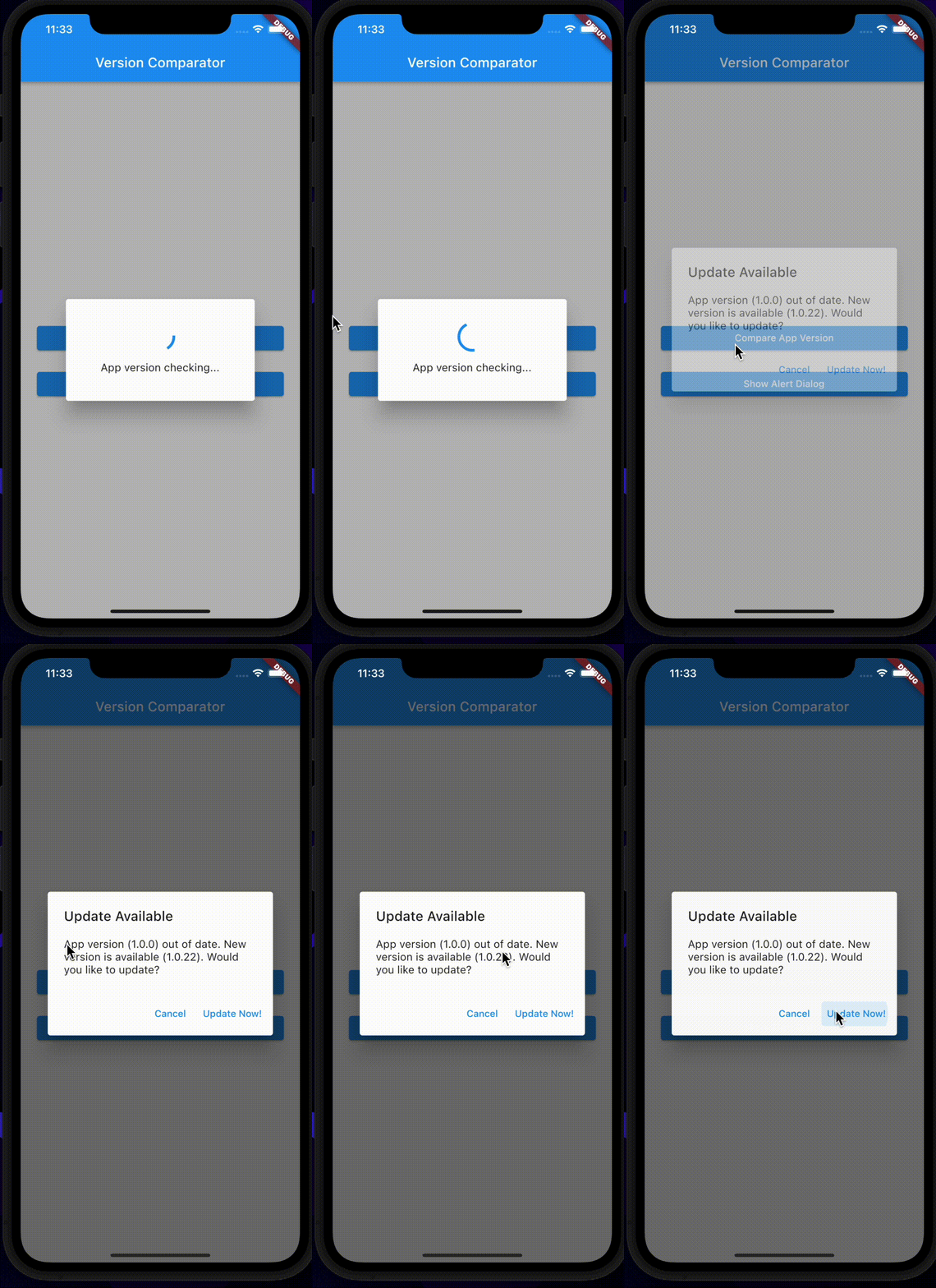
|

|
功能
版本比较有许多功能。(VersionComparator 小部件、未来操作、alertDialog 管理器、自定义版本比较器)。
平台特定比较
import 'package:version_comparator/version_comparator.dart';

  Future<void> compareVersion() async {
    //set loading state
    _setLoading(true);

    // get store and local version result
    final response = await VersionComparator.instance.versionCompare();

    //set loading state
    _setLoading(false);

    //display response
    print(result?.data?.toJson() ?? '-');
  }
自定义比较
    await VersionComparator.instance.customCompare(
      localVersion: 'YOUR_APP_VERSION', //example: 1.0.0
      store: MyStoreModel(appId: 'YOUR_APP_BUNDLE_ID'), //example: com.example.app
      customUpdateLink: (body) => 'YOU CAN ADD CUSTOM UPDATE LINK', //example: https://pub.dev/

      //Convert store version and return it from response.body
      onConvertVersion: (responseBody) {
        final result = MyVersionConvertManager().convert(MyVersionResponseModel.fromResponse(responseBody));
        return result.data;
      },
    );
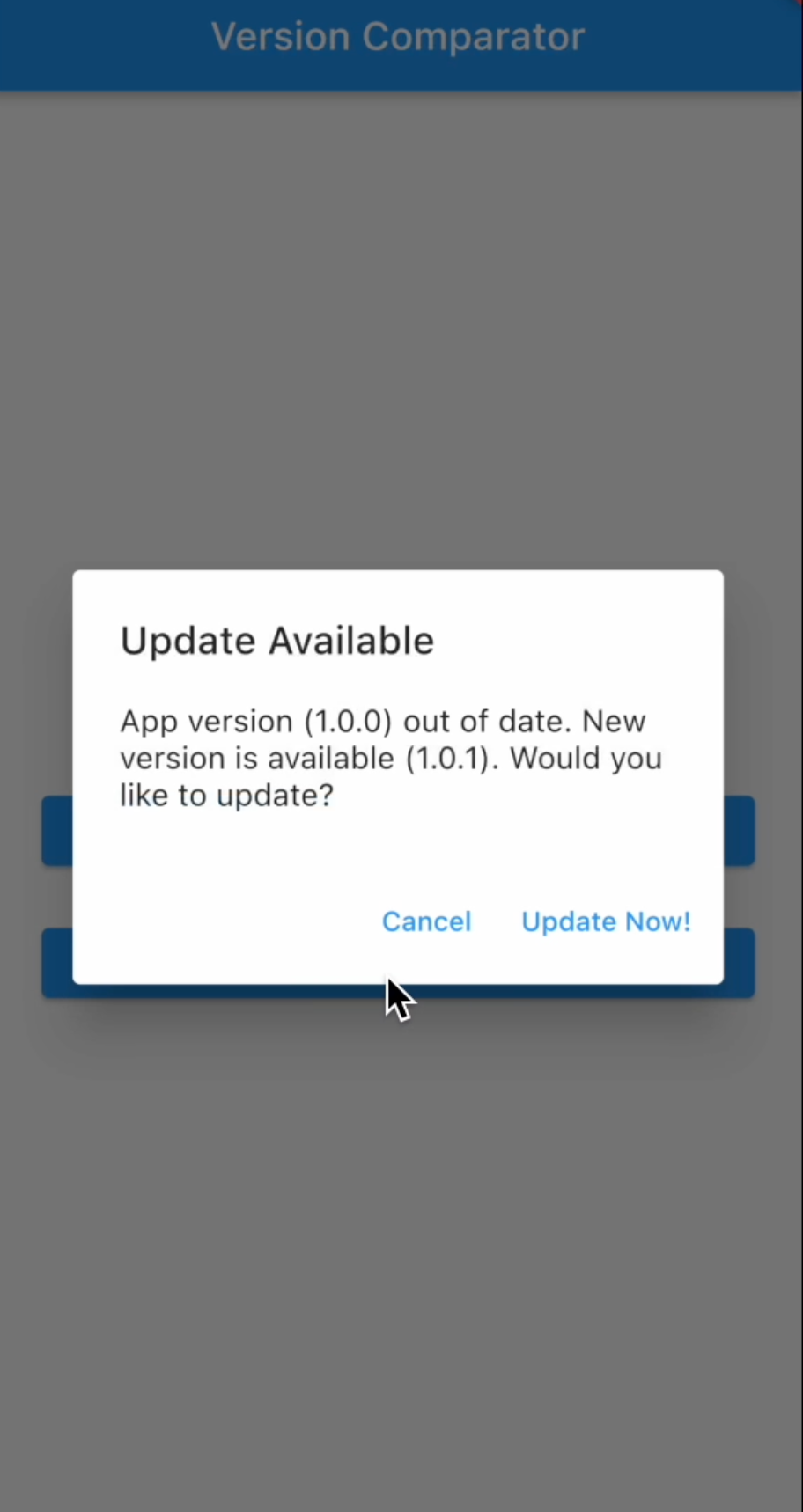
显示版本警告对话框
  await VersionComparator.instance.showSimpleVersionDialog(
      context,
      versionResponseModel,
      isUpdateRequired: isRequired,
  );
平台特定比较小部件
      AppVersionComparatorView.widget(
        errorPageBuilder: (context, error) => Center(child: Text(error)),
        onCompareSuccess: (data) => debugPrint('Success: ${data.storeVersion}'),
        outOfDateVersionPageBuilder: (context, error, data) => _buildOutOfDateWidget(error, data),
        child: _buildBody(),
      )
平台特定比较警告对话框
      AppVersionComparatorView.alertDialog(
        onCompareSuccess: (data) => debugPrint('Success: ${data.storeVersion}'),
        onOutOfDateVersionError: (message, data) => debugPrint('Error: $message'),
        child: _buildBody(),
      )
其他功能
如果需要,您还可以使用这些功能
//Gets bundle id
final bundleResult = await VersionComparator.instance.getBundleId();

//Gets current platform (Android, iOS, Huawei or Undefined)
final platformResult = await VersionComparator.instance.getPlatform();

//Gets current app version
final versionResult = await VersionComparator.instance.getCurrentAppVersion();
设置自定义消息
您还可以用您自己的方式自定义包的错误和信息消息。非常简单。如果您想更改消息,只需创建一个类并从 ComparatorErrorMessage 或 ComparatorInfoMessage 继承它。之后,用您自己的消息覆盖它们。在开始使用比较器之前,设置您的自定义消息类。
设置比较器错误消息
VersionComparator.instance.setErrorMessages(MyCustomErrorMessage());
设置比较器信息消息
VersionComparator.instance.setInfoMessages(MyCustomInfoMessage());
别忘了。如果您想设置少量消息,请使用 extends;如果您想设置所有消息,请使用 implements。这是一个简单的例子
//set specific messages extend base class.
class MyCustomErrorMessage extends ComparatorErrorMessage{
  @override
  String get appNotFound => 'App not found in the store.';

  @override
  String get appVersionFetchError => 'app version info couldn\'t fetch.';
}
//For set all messages just implement base class like this
class ClassName implements ComparatorInfoMessage {
  @override
  String get checkVersionErrorDialogTitle => 'custom message;

  @override
  String get checkVersionLoadingMessage => 'custom message;

  //..//
}
自定义
如果您想从其他商店比较应用程序版本,可以通过自定义比较方法来实现。只需按照以下步骤操作。
创建 StoreModel
自定义比较方法需要一个商店模型。请记住,您的模型必须继承自 BaseStoreModel。
class MyStoreModel extends BaseStoreModel{

  @override
  String get appId => 'YOUR_BUNDLE_ID_OR_APP_ID'; //for example: 'com.example.app'

  @override
  String get storeUrl => 'YOUR_CUSTOM_STORE_URL_WITH_ENDPOINT'; //for example: 'https://your-store.com/apps/details'

  @override
  String get versionQuery => 'QUERY_OF_STORE_URL_FOR_COMPARE'; //for example: 'appId=com.example.app&lang=en'
}
创建一个应用版本转换器函数
自定义比较器向商店发送请求并获取 JSON 响应。您必须创建一个应用版本转换器函数。这是一个简单的 Android 版本转换器示例
class MyVersionConvertManager extends VersionConvertService<MyVersionResponseModel> {
  @override
  DataResult<String> convert(EntityModel<MyVersionResponseModel> entity) {
    final firstMatch = RegExpHelper.androidVersionRegExp.firstMatch(entity.responseBody);

    return _checkRegExpVersion(firstMatch);
  }

  DataResult<String> _checkRegExpVersion(RegExpMatch? regExpMatch) {
    if (regExpMatch == null || regExpMatch.groupCount < 1) {
      return DataResult.error(message: 'Version not matched');
    }

    final version = regExpMatch.group(1);
    return version == null || version.isEmpty
        ? DataResult.error(message: 'Version not matched')
        : DataResult.success(data: version);
  }
}
设置 CustomComparator 参数
最后,只需为自定义比较器设置参数。例如
  Future<DataResult<VersionResponseModel>> customCompareVersion() async {
    return await VersionComparator.instance.customCompare(
      localVersion: 'YOUR_APP_VERSION',
      store: MyStoreModel(appId: 'YOUR_APP_BUNDLE_ID'),
      customUpdateLink: (body) => 'YOU CAN ADD CUSTOM UPDATE LINK (OPTIONAL)',
      onConvertVersion: (responseBody) {
        //Converter function. It returns app version from store.
        final result = MyVersionConvertManager().convert(MyVersionResponseModel.fromResponse(responseBody));
        return result.data;
      },
    );
  }
参数详情
导入 package:version_comparator/version_comparator.dart,然后使用小部件或功能。
如果您不想管理 Future 操作和状态,只需调用 AppVersionComparatorView 或 CustomVersionComparatorView 小部件。这些小部件管理获取商店版本和本地版本、状态(加载、错误和成功)以及版本比较。此外,这些小部件有两种模式(AlertDialog 和 Widget)。
AlertDialog 模式在警告对话框中显示所有状态更改,其他模式则在小部件树中显示。
通过小部件模式比较应用版本的示例
import 'package:version_comparator/version_comparator.dart';

  @override
  Widget build(BuildContext context) {
    return Scaffold(
      appBar: AppBar(title: Text(widget.title)),
      //All changes will be display on the screen instead of child.
      body: AppVersionComparatorView.widget(
        //If your app id is different to current app than fill this parameter.
        //For example AppGallery (Huawei store) has different app id from app bundle id.
        customAppId: 'CUSTOM_APP_OR_BUNDLE_ID',
        //If any error happens (like socket exception) this builder calls. If this builder is null than it returns child widget.
        errorPageBuilder: (_, error) => Center(child: Text(error)),
        //When fetching data from store this text will be override. If you don't want to any text just pass empty or null.
        loadingText: 'Loading',
        isLoadingTextVisible: true,
        //If you want to required app version upgrade set true.
        isUpdateRequired: true,
        //You can set loading widget size
        loadingWidgetSize: 36,
        //Custom loading widget
        loadingWidget: const CircularProgressIndicator(),
        //Its calling when version comparing (like null data)
        onCompareError: (message) => debugPrint(message),
        //Its calling when app is up to date.
        onCompareSuccess: (data) => debugPrint('Success: ${data.storeVersion}'),
        //Its calling when app is out of date.
        onOutOfDateVersionError: (message, data) => debugPrint(message),
        //When state changes this method calls
        onStateChanged: (state) => debugPrint('State is: ${state.runtimeType}'),
        //Your page or view.
        child: _buildBody(),
        //When app version is out of date you can set widget with this builder.
        outOfDateVersionPageBuilder: (_, error, data) {
          return Column(
            mainAxisSize: MainAxisSize.max,
            crossAxisAlignment: CrossAxisAlignment.center,
            mainAxisAlignment: MainAxisAlignment.center,
            children: [
              Text(error, textAlign: TextAlign.center),
              const SizedBox(height: 16),
              Text('Out of date version: ${data.localVersion}'),
              Text('New version: ${data.storeVersion}'),
            ],
          );
        },
      ),
    );
  }
通过 AlertDialog 模式比较应用版本的示例
import 'package:version_comparator/version_comparator.dart';

  @override
  Widget build(BuildContext context) {
    return Scaffold(
      appBar: AppBar(title: Text(widget.title)),
      //All changes will be display on the screen instead of child.
      body: AppVersionComparatorView.widget(
        //If your app id is different to current app than fill this parameter.
        //For example AppGallery (Huawei store) has different app id from app bundle id.
        huaweiAppId: 'HUAWEI_APP_STORE_ID',
        //If any error happens (like socket exception) this builder calls.
        invalidVersionDialogContentBuilder: (context, message) => Center(child: Text(message)),
        //When fetching data from store this text will be override. If you don't want to any text just pass empty or null.
        loadingText: 'Loading',
        isLoadingTextVisible: true,
        //If you want to required app version upgrade set true.
        isUpdateRequired: true,
        //You can set loading widget size
        loadingWidgetSize: 36,
        //Custom loading widget
        loadingWidget: const CircularProgressIndicator(),
        //Sets alert cancel button visibility.
        isCancelActionVisible: true,
        //Sets dismissible of alert dialog.
        isDismissibleWhenGetDataError: true,
        //After pop alert dialog this method runs.
        onAfterPopDialog: (result) => debugPrint('alert pop'),
        //Its calling when version comparing (like null data)
        onCompareError: (message) => debugPrint(message),
        //Its calling when app is up to date.
        onCompareSuccess: (data) => debugPrint('Success: ${data.storeVersion}'),
        //Its calling when app is out of date.
        onOutOfDateVersionError: (message, data) => debugPrint(message),
        //When state changes this method calls
        onStateChanged: (state) => debugPrint('State is: ${state.runtimeType}'),
        //Your page or view.
        child: _buildBody(),
      ),
    );
  }
通过小部件模式自定义版本比较的示例
import 'package:version_comparator/version_comparator.dart';

  @override
  Widget build(BuildContext context) {
    return Scaffold(
      appBar: AppBar(title: Text(widget.title)),
      //All changes will be display on the screen instead of child.
      body: CustomVersionComparatorView.widget(
        //It calls Future method for custom version comparing.
        //You can set your custom Future method but it should be return DataResult<VersionResponseModel>.
        onVersionCompareCallback: () async => await VersionComparator.instance.versionCompare(),
        //If your app id is different to current app than fill this parameter.
        //For example AppGallery (Huawei store) has different app id from app bundle id.
        huaweiAppId: 'HUAWEI_APP_STORE_ID',
        //If any error happens (like socket exception) this builder calls. If this builder is null than it returns child widget.
        errorPageBuilder: (_, error) => Center(child: Text(error)),
        //When fetching data from store this text will be override. If you don't want to any text just pass empty or null.
        loadingText: 'Loading',
        isLoadingTextVisible: true,
        //If you want to required app version upgrade set true.
        isUpdateRequired: true,
        //You can set loading widget size
        loadingWidgetSize: 36,
        //Custom loading widget
        loadingWidget: const CircularProgressIndicator(),
        //Its calling when version comparing (like null data)
        onCompareError: (message) => debugPrint(message),
        //Its calling when app is up to date.
        onCompareSuccess: (data) => debugPrint('Success: ${data.storeVersion}'),
        //Its calling when app is out of date.
        onOutOfDateVersionError: (message, data) => debugPrint(message),
        //When state changes this method calls
        onStateChanged: (state) => debugPrint('State is: ${state.runtimeType}'),
        //Your page or view.
        child: _buildBody(),
        //When app version is out of date you can set widget with this builder.
        outOfDateVersionPageBuilder: (_, error, data) {
          return Column(
            mainAxisSize: MainAxisSize.max,
            crossAxisAlignment: CrossAxisAlignment.center,
            mainAxisAlignment: MainAxisAlignment.center,
            children: [
              Text(error, textAlign: TextAlign.center),
              const SizedBox(height: 16),
              Text('Out of date version: ${data.localVersion}'),
              Text('New version: ${data.storeVersion}'),
            ],
          );
        },
      ),
    );
  }
通过 AlertDialog 模式自定义版本比较的示例
import 'package:version_comparator/version_comparator.dart';

  @override
  Widget build(BuildContext context) {
    return Scaffold(
      appBar: AppBar(title: Text(widget.title)),
      //All changes will be display on the screen instead of child.
      body: CustomVersionComparatorView.widget(
        //It calls Future method for custom version comparing.
        //You can set your custom Future method but it should be return DataResult<VersionResponseModel>.
        onVersionCompareCallback: () async => await VersionComparator.instance.versionCompare(),
        //If your app id is different to current app than fill this parameter.
        //For example AppGallery (Huawei store) has different app id from app bundle id.
        huaweiAppId: 'HUAWEI_APP_STORE_ID',
        //If any error happens (like socket exception) this builder calls.
        invalidVersionDialogContentBuilder: (context, message) => Center(child: Text(message)),
        //When fetching data from store this text will be override. If you don't want to any text just pass empty or null.
        loadingText: 'Loading',
        isLoadingTextVisible: true,
        //If you want to required app version upgrade set true.
        isUpdateRequired: true,
        //You can set loading widget size
        loadingWidgetSize: 36,
        //Custom loading widget
        loadingWidget: const CircularProgressIndicator(),
        //Sets alert cancel button visibility.
        isCancelActionVisible: true,
        //Sets dismissible of alert dialog.
        isDismissibleWhenGetDataError: true,
        //After pop alert dialog this method runs.
        onAfterPopDialog: (result) => debugPrint('alert pop'),
        //Its calling when version comparing (like null data)
        onCompareError: (message) => debugPrint(message),
        //Its calling when app is up to date.
        onCompareSuccess: (data) => debugPrint('Success: ${data.storeVersion}'),
        //Its calling when app is out of date.
        onOutOfDateVersionError: (message, data) => debugPrint(message),
        //When state changes this method calls
        onStateChanged: (state) => debugPrint('State is: ${state.runtimeType}'),
        //Your page or view.
        child: _buildBody(),
      ),
    );
  }


