
nostr_console
使用 Dart 的 Nostr 控制台客户端
待办
- 支持 bech32 密钥
- 添加新的中继 ( zbd)
- 修复需要返回主菜单才能更新 feed 的问题
- 从文件获取 prikey,也创建它 –genkey
- 私钥/公钥的初始创建
- 修复过时的 –help
- 显示闪电网络发票作为二维码
- 通知也应显示提及(目前还没有)
- 通知,选项 3,仅在整个线程中的一个条目中显示
- hashtag 正则表达式应包含下划线
- 添加更多默认用户。改进获取的用户。
- 进入 DM 房间后,屏幕未清除
- kind 7 标签已损坏。例如,对于反应:066cdb716e250069c4078565c9d9046af483c43bbd8497aad9c60d41ec462034 和 137289198ff1c57a14711d87b059e5fc5f9b11b257672503595ac31bad450a22
- 允许特殊字符输入,以及 256 个字符限制 信息
其他长期待办
- 在不同的 isolate 中并行连接到中继
- 为 Linux 构建 AppImage
使用 Docker 运行 Nostr Console
docker build -t nostr_console .
然后运行
docker run -it nostr_console start
使用 Docker 远程运行
使用 Nostr Terminal + Nostr Console 从浏览器远程运行 Nostr Console。
构建使用
docker build -f Dockerfile.remote -t nostr_console_remote .
然后运行
docker run -it nostr_console_remote start
请牢记安全/隐私因素。该链接基本上是一个本地终端的在线后门。相关信息 在此
使用
运行 nostr_console 的最简单方法:转到 releases 并获取适用于您平台的*.exe。*
否则,请执行以下操作
- 安装 Flutter SDK,或 Dart SDK
- git clone 此仓库
- 在项目文件夹中,运行命令
dart pub get以获取所有依赖项 - 运行命令
dart run bin/nostr_console.dart,它将以默认设置运行。 - 此外,您可以通过
dart compile exe bin/nostr_console.dart为您的平台创建可执行文件,它将为您的平台创建可执行文件。您可以使用所需的参数调用该可执行文件。在 Windows 上,您可以创建指向它的快捷方式,并在其中包含您想要的命令行参数。
用法
usage: dart run bin/nostr_console.dart [OPTIONS]

  OPTIONS

      -p, --pubkey  <public key>    The hex public key of user whose events and feed are shown. Default is a hard-coded
                                    public key derived from a well known private key. When given, posts/replies can't be sent.
      -k, --prikey  <private key>   The hex private key of user whose events and feed are shown. Also used to sign events
                                    sent. Default is same-as-above hard-coded well known private key.
      -r, --relay   <relay wss url> The relay url that is used as main relay. Default is wss://nostr-relay.untethr.me.
      -d, --days    <N as num>      The latest number of days for which events are shown. Default is 1.
      -q, --request <REQ string>    This request is sent verbatim to the default relay. It can be used to receive all events
                                    from a relay. If not provided, then events for default or given user are shown.
      -f, --file    <filename>      Read from given file, if it is present, and at the end of the program execution, write
                                    to it all the events (including the ones read, and any new received).
      -s, --disable-file            When turned on, even the default file is not read from.
      -t, --translate               Translate some of the recent posts using Google translate site ( and not api). Google
                                    is accessed for any translation request only if this flag is present, and not otherwise.
      -l, --location                The given value is added as a 'location' tag with every kind 1 post made
      -h, --help                    Print help/usage message and exit.
      -v, --version                 Print version and exit.

  UI Options
      -a, --align  <left>           When "left" is given as option to this argument, then the text is aligned to left. By default
                                    the posts or text is aligned to the center of the terminal.
      -w, --width  <width as num>   This specifies how wide you want the text to be, in number of columns. Default is 100.
                                    Can't be less than 60.
      -m, --maxdepth <depth as num> The maximum depth to which the threads can be displayed. Minimum is 2 and
                                    maximum allowed is 12.
      -c, --color  <color>          Color option can be green, cyan, white, black, red and blue.

  Advanced
      -y, --difficulty <number>     The difficulty number in bits, only for kind 1 messages. The next larger number divisible by 4 is
                                    taken as difficulty. Can't be more than 24 bits, because otherwise it typically takes too much
                                    time. Minimum and default is 0, which means no difficulty.
      -e, --overwrite               Will over write the file with all the events that were read from file, and all newly received. Is
                                    useful when the file has to be cleared of old unused events. A backup should be made just in case
                                    of original file before invoking.
命令行示例
使用私钥 K“登录”为用户
nostr_console.exe --prikey=K
获取用户 K 在过去 3 天内所有中继上的最新消息(在允许反引号执行的 bash shell 中)
nostr_console.exe --prikey=K --request=`echo "[\"REQ\",\"l\",{\"since\":$(date -d '-3 day' +%s)}]"`
屏幕截图

显示社交网络线程,并通过向左重新对齐来简化阅读。
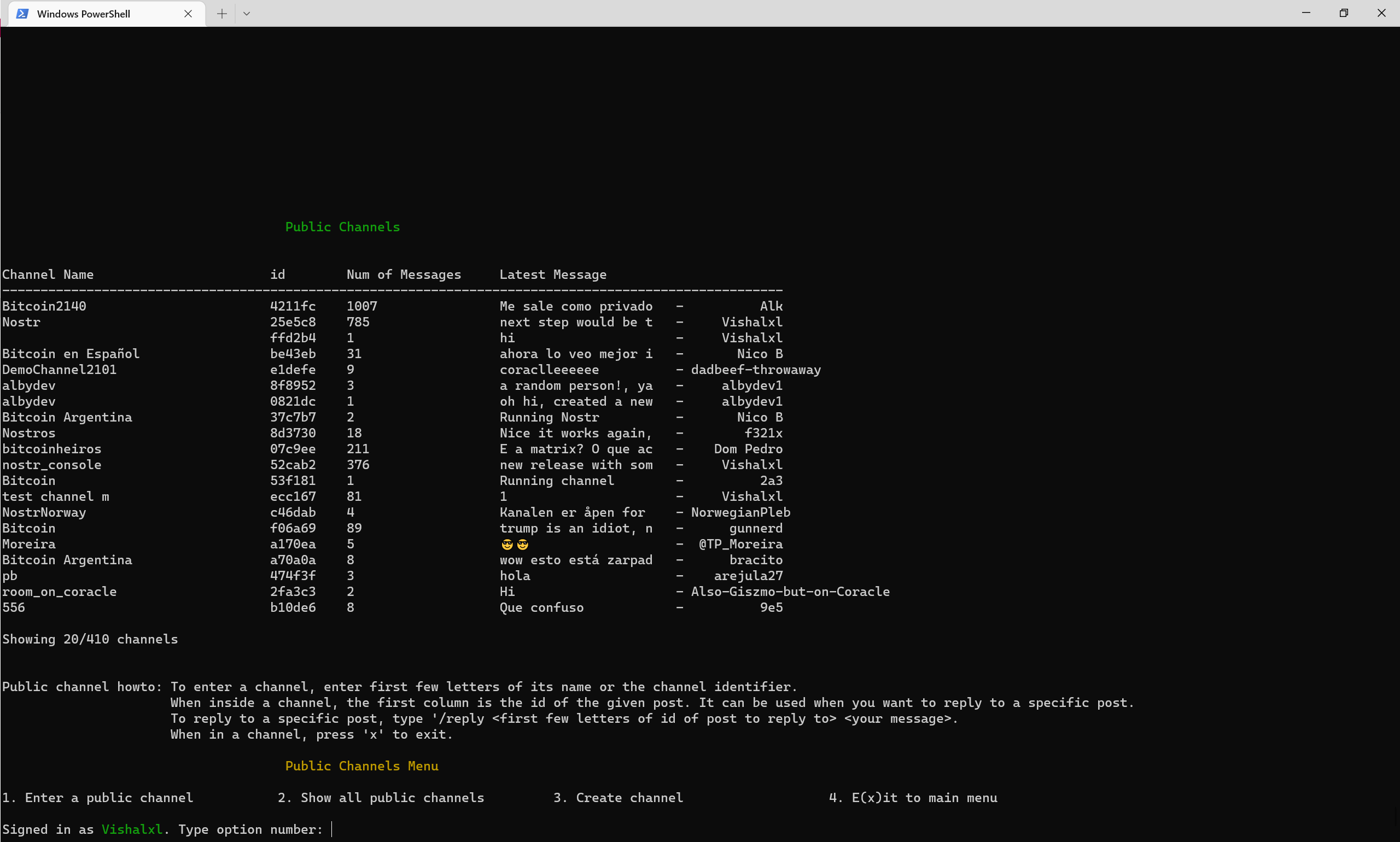
公共频道概览及菜单
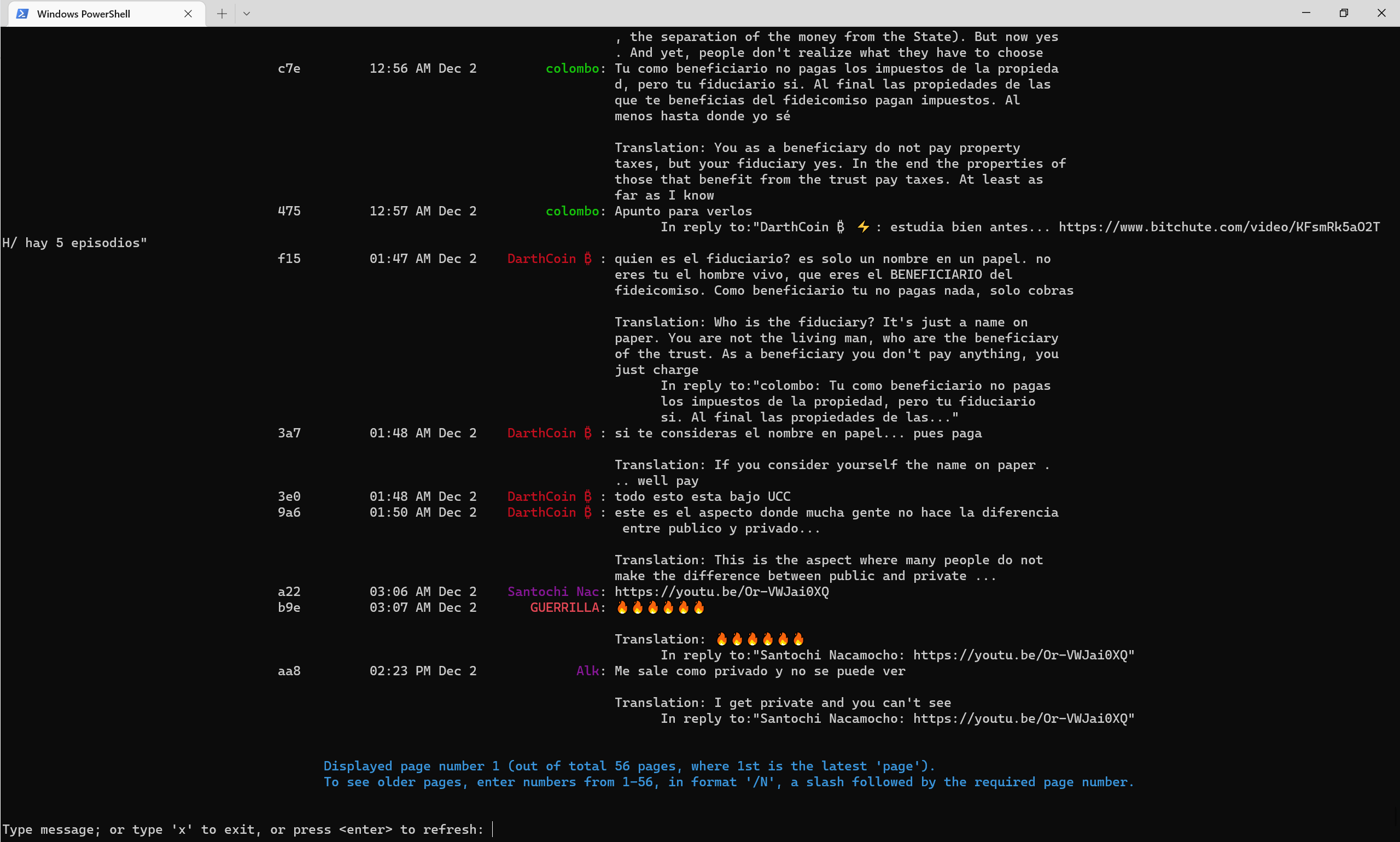
2022 年中后期公共频道的样子,使用 –translate 标志自动翻译成英文。
联系方式
Nostr 公共频道 52cab2e3e504ad6447d284b85b5cc601ca0613b151641e77facfec851c2ca816


