
just_audio
just_audio 是一个功能丰富的音频播放器,支持 Android、iOS、macOS、Web、Linux 和 Windows。
平台支持 — API文档 — 教程 — 后台音频 — 社区支持

快速摘要
import 'package:just_audio/just_audio.dart';

final player = AudioPlayer();                   // Create a player
final duration = await player.setUrl(           // Load a URL
    'https://foo.com/bar.mp3');                 // Schemes: (https: | file: | asset: )
player.play();                                  // Play without waiting for completion
await player.play();                            // Play while waiting for completion
await player.pause();                           // Pause but remain ready to play
await player.seek(Duration(second: 10));        // Jump to the 10 second position
await player.setSpeed(2.0);                     // Twice as fast
await player.setVolume(0.5);                    // Half as loud
await player.stop();                            // Stop and free resources
处理多个播放器
// Set up two players with different audio files
final player1 = AudioPlayer(); await player1.setUrl(...);
final player2 = AudioPlayer(); await player2.setUrl(...);

// Play both at the same time
player1.play();
player2.play();

// Play one after the other
await player1.play();
await player2.play();

// Loop player1 until player2 finishes
await player1.setLoopMode(LoopMode.one);
player1.play();          // Don't wait
await player2.play();    // Wait for player2 to finish
await player1.pause();   // Finish player1

// Free platform decoders and buffers for each player.
await player1.stop();
await player2.stop();
处理片段
// Play clip 2-4 seconds followed by clip 10-12 seconds
await player.setClip(start: Duration(seconds: 2), end: Duration(seconds: 4));
await player.play(); await player.pause();
await player.setClip(start: Duration(seconds: 10), end: Duration(seconds: 12));
await player.play(); await player.pause();

await player.setClip(); // Clear clip region
处理无缝播放列表
// Define the playlist
final playlist = ConcatenatingAudioSource(
  // Start loading next item just before reaching it
  useLazyPreparation: true,
  // Customise the shuffle algorithm
  shuffleOrder: DefaultShuffleOrder(),
  // Specify the playlist items
  children: [
    AudioSource.uri(Uri.parse('https://example.com/track1.mp3')),
    AudioSource.uri(Uri.parse('https://example.com/track2.mp3')),
    AudioSource.uri(Uri.parse('https://example.com/track3.mp3')),
  ],
);

// Load and play the playlist
await player.setAudioSource(playlist, initialIndex: 0, initialPosition: Duration.zero);
await player.seekToNext();                     // Skip to the next item
await player.seekToPrevious();                 // Skip to the previous item
await player.seek(Duration.zero, index: 2);    // Skip to the start of track3.mp3
await player.setLoopMode(LoopMode.all);        // Set playlist to loop (off|all|one)
await player.setShuffleModeEnabled(true);      // Shuffle playlist order (true|false)

// Update the playlist
await playlist.add(newChild1);
await playlist.insert(3, newChild2);
await playlist.removeAt(3);
处理头部信息
// Setting the HTTP user agent
final player = AudioPlayer(
  userAgent: 'myradioapp/1.0 (Linux;Android 11) https://myradioapp.com',
);

// Setting request headers
final duration = await player.setUrl('https://foo.com/bar.mp3',
    headers: {'header1': 'value1', 'header2': 'value2'});
注意:头部信息是通过本地 HTTP 代理实现的,在 Android、iOS 和 macOS 上需要启用非 HTTPS 支持。请参阅 平台特定配置。
处理缓存
// Clear the asset cache directory
await AudioPlayer.clearAssetCache();

// Download and cache audio while playing it (experimental)
final audioSource = LockCachingAudioSource('https://foo.com/bar.mp3');
await player.setAudioSource(audioSource);
// Delete the cached file
await audioSource.clearCache();
注意:LockCachingAudioSource 是通过本地 HTTP 代理实现的,在 Android、iOS 和 macOS 上需要启用非 HTTPS 支持。请参阅 平台特定配置。
处理流式音频源
// Feed your own stream of bytes into the player
class MyCustomSource extends StreamAudioSource {
  final List<int> bytes;
  MyCustomSource(this.bytes);

  @override
  Future<StreamAudioResponse> request([int? start, int? end]) async {
    start ??= 0;
    end ??= bytes.length;
    return StreamAudioResponse(
      sourceLength: bytes.length,
      contentLength: end - start,
      offset: start,
      stream: Stream.value(bytes.sublist(start, end)),
      contentType: 'audio/mpeg',
    );
  }
}

await player.setAudioSource(MyCustomSource());
player.play();
注意:StreamAudioSource 是通过本地 HTTP 代理实现的,在 Android、iOS 和 macOS 上需要启用非 HTTPS 支持。请参阅 平台特定配置。
处理错误
// Catching errors at load time
try {
  await player.setUrl("https://s3.amazonaws.com/404-file.mp3");
} on PlayerException catch (e) {
  // iOS/macOS: maps to NSError.code
  // Android: maps to ExoPlayerException.type
  // Web: maps to MediaError.code
  // Linux/Windows: maps to PlayerErrorCode.index
  print("Error code: ${e.code}");
  // iOS/macOS: maps to NSError.localizedDescription
  // Android: maps to ExoPlaybackException.getMessage()
  // Web/Linux: a generic message
  // Windows: MediaPlayerError.message
  print("Error message: ${e.message}");
} on PlayerInterruptedException catch (e) {
  // This call was interrupted since another audio source was loaded or the
  // player was stopped or disposed before this audio source could complete
  // loading.
  print("Connection aborted: ${e.message}");
} catch (e) {
  // Fallback for all other errors
  print('An error occured: $e');
}

// Catching errors during playback (e.g. lost network connection)
player.playbackEventStream.listen((event) {}, onError: (Object e, StackTrace st) {
  if (e is PlayerException) {
    print('Error code: ${e.code}');
    print('Error message: ${e.message}');
  } else {
    print('An error occurred: $e');
  }
});
处理状态流
有关详细信息,请参阅 状态模型。
player.playerStateStream.listen((state) {
  if (state.playing) ... else ...
  switch (state.processingState) {
    case ProcessingState.idle: ...
    case ProcessingState.loading: ...
    case ProcessingState.buffering: ...
    case ProcessingState.ready: ...
    case ProcessingState.completed: ...
  }
});

// See also:
// - durationStream
// - positionStream
// - bufferedPositionStream
// - sequenceStateStream
// - sequenceStream
// - currentIndexStream
// - icyMetadataStream
// - playingStream
// - processingStateStream
// - loopModeStream
// - shuffleModeEnabledStream
// - volumeStream
// - speedStream
// - playbackEventStream
鸣谢
本项目由优秀的开源社区 GitHub 贡献者 和 赞助商 支持。谢谢!
平台特定配置
Android
为使您的应用程序能够访问互联网上的音频文件,请将以下权限添加到您的 AndroidManifest.xml 文件中
<uses-permission android:name="android.permission.INTERNET"/>
如果您希望连接到非 HTTPS URL,或者使用依赖代理的功能(如头部信息、缓存或流式音频源),请同时将以下属性添加到 application 元素中
<application ... android:usesCleartextTraffic="true">
如果您需要访问播放器的 AudioSession ID,可以监听 AudioPlayer.androidAudioSessionIdStream。请注意,AudioSession ID 在您设置新的 AudioAttributes 时会发生变化。
如果您的应用中有多个插件使用 ExoPlayer 解码媒体,当这些插件使用不同版本的 ExoPlayer 时,可能会遇到 Duplicate class 错误。在这种情况下,您可以为每个相应插件报告一个问题,要求其升级到最新版本的 ExoPlayer,或者降级您应用中的一个或多个插件直到版本匹配。在某些插件使用 ExoPlayer API 中不破坏兼容性部分的情况下,您还可以尝试通过编辑您应用的 android/app/build.gradle 文件并插入所需 Exoplayer 版本的依赖项来强制所有插件使用同一版本的 ExoPlayer。
dependencies {
    def exoplayer_version = "...specify-version-here...."
    implementation "com.google.android.exoplayer:exoplayer-core:$exoplayer_version"
    implementation "com.google.android.exoplayer:exoplayer-dash:$exoplayer_version"
    implementation "com.google.android.exoplayer:exoplayer-hls:$exoplayer_version"
    implementation "com.google.android.exoplayer:exoplayer-smoothstreaming:$exoplayer_version"
}
iOS
使用默认配置,App Store 将检测到您的应用使用了 AVAudioSession API,其中包含麦克风 API,出于隐私原因,它会要求您描述应用对麦克风的使用情况。如果您的应用确实使用了麦克风,您可以通过编辑 Info.plist 文件来描述您的使用情况:
<key>NSMicrophoneUsageDescription</key>
<string>... explain why the app uses the microphone here ...</string>
但如果您的应用不使用麦克风,您可以向“编译”添加一个构建选项来“编译掉”任何麦克风代码,这样 App Store 就不会询问上述使用说明。要做到这一点,请按如下方式编辑您的 ios/Podfile:
post_install do |installer|
  installer.pods_project.targets.each do |target|
    flutter_additional_ios_build_settings(target)

    # ADD THE NEXT SECTION
    target.build_configurations.each do |config|
      config.build_settings['GCC_PREPROCESSOR_DEFINITIONS'] ||= [
        '$(inherited)',
        'AUDIO_SESSION_MICROPHONE=0'
      ]
    end

  end
end
如果您希望连接到非 HTTPS URL,或者使用依赖代理的功能(如头部信息、缓存或流式音频源),请将以下内容添加到您的 Info.plist 文件中:
<key>NSAppTransportSecurity</key>
<dict>
    <key>NSAllowsArbitraryLoads</key>
    <true/>
</dict>
iOS 播放器依赖服务器头部信息(例如 Content-Type、Content-Length 和 字节范围请求)来知道如何解码文件,并在适用的情况下报告其持续时间。对于文件,iOS 依赖文件扩展名。
macOS
为使您的 macOS 应用程序能够访问互联网上的音频文件,请将以下内容添加到您的 DebugProfile.entitlements 和 Release.entitlements 文件中:
    <key>com.apple.security.network.client</key>
    <true/>
如果您希望连接到非 HTTPS URL,或者使用依赖代理的功能(如头部信息、缓存或流式音频源),请将以下内容添加到您的 Info.plist 文件中:
<key>NSAppTransportSecurity</key>
<dict>
    <key>NSAllowsArbitraryLoads</key>
    <true/>
</dict>
macOS 播放器依赖服务器头部信息(例如 Content-Type、Content-Length 和 字节范围请求)来知道如何解码文件,并在适用的情况下报告其持续时间。对于文件,macOS 依赖文件扩展名。
Windows
通过在 pubspec.yaml 中与 just_audio 并列添加一个额外的依赖项来启用 Windows 支持。有多种可选方案:
示例
dependencies:
  just_audio: any # substitute version number
  just_audio_windows: any # substitute version number
对于 Windows 实现相关的问题,请在相应实现的 GitHub issues 页面上提交 issue。
Linux
通过在 pubspec.yaml 中与 just_audio 并列添加一个额外的依赖项来启用 Linux 支持。有多种可选方案:
dependencies:
  just_audio: any # substitute version number
  just_audio_mpv: any # substitute version number
对于 Linux 实现相关的问题,请在相应实现的 GitHub issues 页面上提交 issue。
混合搭配音频插件
Flutter 插件生态系统包含各种有用的音频插件。为了让它们能在单个应用中协同工作,just_audio 只负责播放音频。通过专注于单一职责,不同的音频插件可以安全地协同工作,而不会因职责重叠而导致运行时冲突。
其他常见的音频功能由单独的插件可选提供
- just_audio_background:使用此插件可让您的应用在后台播放音频,并响应锁屏、媒体通知、耳机、AndroidAuto/CarPlay 或智能手表的控件。
- audio_service:如果您应用的后台音频需求比
just_audio_background支持的更高级,请使用此插件。 - audio_session:使用此插件可配置和管理您的应用与其他音频应用的交互方式(例如,电话或导航员中断)。
- just_waveform:使用此插件可以提取音频文件的波形,适合进行可视化渲染。
教程
- 由 @mvolpato 创作的 创建简单的 Flutter 音乐播放器应用
- 由 @suragch 创作的 在 Flutter 中使用 Just Audio 播放短音频片段
- 由 @suragch 创作的 在 Flutter 中使用 Just Audio 流式传输音频
- 由 @suragch 创作的 在 Flutter 中使用 Just Audio 管理播放列表
为即将推出的功能投票
请点击您希望投票的 GitHub issue 上的点赞图标
- 变调:#329
- 均衡器:#147
- 投屏支持(Chromecast 和 AirPlay):#211
- 音量增强和静音跳过:#307
- 所有功能请求按受欢迎程度排序
如果您希望为项目带来更多动力,请考虑在 此页面 (pub.dev) 的顶部按下点赞按钮。更多的用户将带来更多的 bug 报告和功能请求,从而提高稳定性和功能性。
平台支持
| 功能 | Android | iOS | macOS | Web | Windows | Linux |
|---|---|---|---|---|---|---|
| 从 URL 读取 | ✅ | ✅ | ✅ | ✅ | ✅ | ✅ |
| 从文件读取 | ✅ | ✅ | ✅ | ✅ | ✅ | ✅ |
| 从资源读取 | ✅ | ✅ | ✅ | ✅ | ✅ | ✅ |
| 从字节流读取 | ✅ | ✅ | ✅ | ✅ | ✅ | ✅ |
| 请求头部信息 | ✅ | ✅ | ✅ | ✅ | ✅ | |
| DASH | ✅ | ✅ | ✅ | |||
| HLS | ✅ | ✅ | ✅ | ✅ | ✅ | |
| ICY 元数据 | ✅ | ✅ | ✅ | |||
| 缓冲状态/位置 | ✅ | ✅ | ✅ | ✅ | ✅ | ✅ |
| 播放/暂停/跳转 | ✅ | ✅ | ✅ | ✅ | ✅ | ✅ |
| 设置音量/速度 | ✅ | ✅ | ✅ | ✅ | ✅ | ✅ |
| 剪辑音频 | ✅ | ✅ | ✅ | ✅ | ✅ | |
| 播放列表 | ✅ | ✅ | ✅ | ✅ | ✅ | ✅ |
| 循环/随机播放 | ✅ | ✅ | ✅ | ✅ | ✅ | ✅ |
| 组合音频 | ✅ | ✅ | ✅ | ✅ | ✅ | |
| 无缝播放 | ✅ | ✅ | ✅ | ✅ | ✅ | |
| 报告播放器错误 | ✅ | ✅ | ✅ | ✅ | ✅ | ✅ |
| 处理电话打断 | ✅ | ✅ | ||||
| 缓冲/加载选项 | ✅ | ✅ | ✅ | |||
| 设置音高 | ✅ | |||||
| 跳过静音 | ✅ | |||||
| 均衡器 | ✅ | ✅ | ||||
| 音量增强 | ✅ | ✅ |
实验性功能
| 功能 | Android | iOS | macOS | Web |
|---|---|---|---|---|
| 同步下载+缓存 | ✅ | ✅ | ✅ | |
| 波形可视化器(参见 #97) | ✅ | ✅ | ||
| FFT 可视化器(参见 #97) | ✅ | ✅ | ✅ | |
| 后台 | ✅ | ✅ | ✅ | ✅ |
请考虑将您遇到的任何错误 在此处 报告,或将拉取请求 在此处 提交。
状态模型
播放器的状态由两个正交状态组成:playing 和 processingState。playing 状态通常映射到应用程序的播放/暂停按钮,并且仅响应应用程序的直接方法调用而改变。相比之下,processingState 反映了底层音频解码器的状态,它可以响应应用程序的方法调用,也可以响应音频处理管道中异步发生的事件。下图描绘了有效的状态转换。
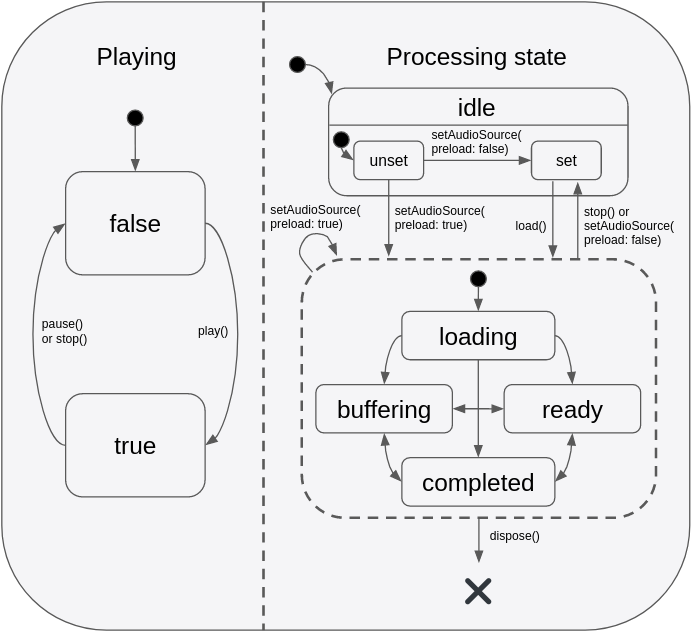
此状态模型提供了一种灵活的方式来捕捉不同状态的组合,例如 playing+buffering 与 paused+buffering,这使得状态能够更准确地在应用程序的 UI 中表示。重要的是要理解,即使 playing == true,除非 processingState == ready(表示缓冲区已满并准备好播放),否则不会有任何声音实际可闻。当想象 playing 状态映射到应用程序的播放/暂停按钮时,这在直觉上是说得通的。
- 当用户按下“播放”开始新曲目时,按钮将立即反映“playing”状态的变化,尽管在音频加载时(
processingState == loading)会有几秒钟的静默,但一旦缓冲区最终填满(即processingState == ready),音频播放就会开始。 - 在播放过程中发生缓冲时(例如由于网络连接缓慢),应用程序的播放/暂停按钮仍保持
playing状态,尽管暂时不会有声音可闻(processingState == buffering)。一旦缓冲区再次填满并且processingState == ready,声音将再次可闻。 - 当播放到达音频流的末尾时,播放器仍保持
playing状态,进度条停在曲目末尾。在应用程序将播放位置跳转到流的早期点之前,不会有任何声音可闻。某些应用程序可能会选择在此时显示一个“重播”按钮而不是播放/暂停按钮,该按钮会调用seek(Duration.zero)。点击后,由于播放从未暂停过,因此播放将从跳转点自动继续。其他应用程序可能更希望监听processingState == completed事件,并在此时以编程方式暂停和倒回音频。
希望通过单个组合流响应这两个正交状态的应用程序可以监听 playerStateStream。此流将发出包含 playing 和 processingState 最新值的事件。
配置音频会话
如果您的应用程序使用音频,您应该告诉操作系统您的应用程序属于哪种使用场景以及您的应用程序将如何与其他设备上的音频应用程序进行交互。不同的音频应用程序通常有独特的要求。例如,当导航应用程序播报驾驶指令时,音乐播放器应降低其音量,而播客播放器应暂停其音频。根据您构建的这三个应用程序中的哪一个,您将需要配置应用程序的音频设置和回调来适当地处理这些交互。
默认情况下,just_audio 会选择适合音乐播放器应用程序的设置,这意味着当导航器开始播报时,它会自动降低音频音量,但在电话呼叫或其他音乐播放器开始时会暂停。如果您正在构建播客播放器或有声读物阅读器,此行为将不合适。虽然用户可以在后台播放的音乐音量降低时理解导航员的指示,但同时收听有声读物或播客会更难理解导航员的指示。
您可以使用 audio_session 包来更改应用程序的默认音频会话配置。例如,对于播客播放器,您可以使用
final session = await AudioSession.instance;
await session.configure(AudioSessionConfiguration.speech());
注意:如果您的应用程序使用了许多不同的音频插件(例如,用于音频录制、文本转语音或后台音频),则这些插件可能会在内部覆盖彼此的音频会话设置,因此建议在所有其他音频插件加载后,使用 audio_session 应用您自己首选的配置。您可以考虑要求您使用的每个音频插件的开发人员提供一个选项,使其不覆盖这些全局设置,并允许它们由外部管理。


