
隐式动画可重排列表
这是一个分支。原始项目存储库已被删除。
一个 Flutter ListView,它使用 MyersDiff 算法隐式计算两个列表之间的变化,并为您自动进行动画。ImplicitlyAnimatedReorderableList 通过完全自定义的动画为列表项添加了重排支持。
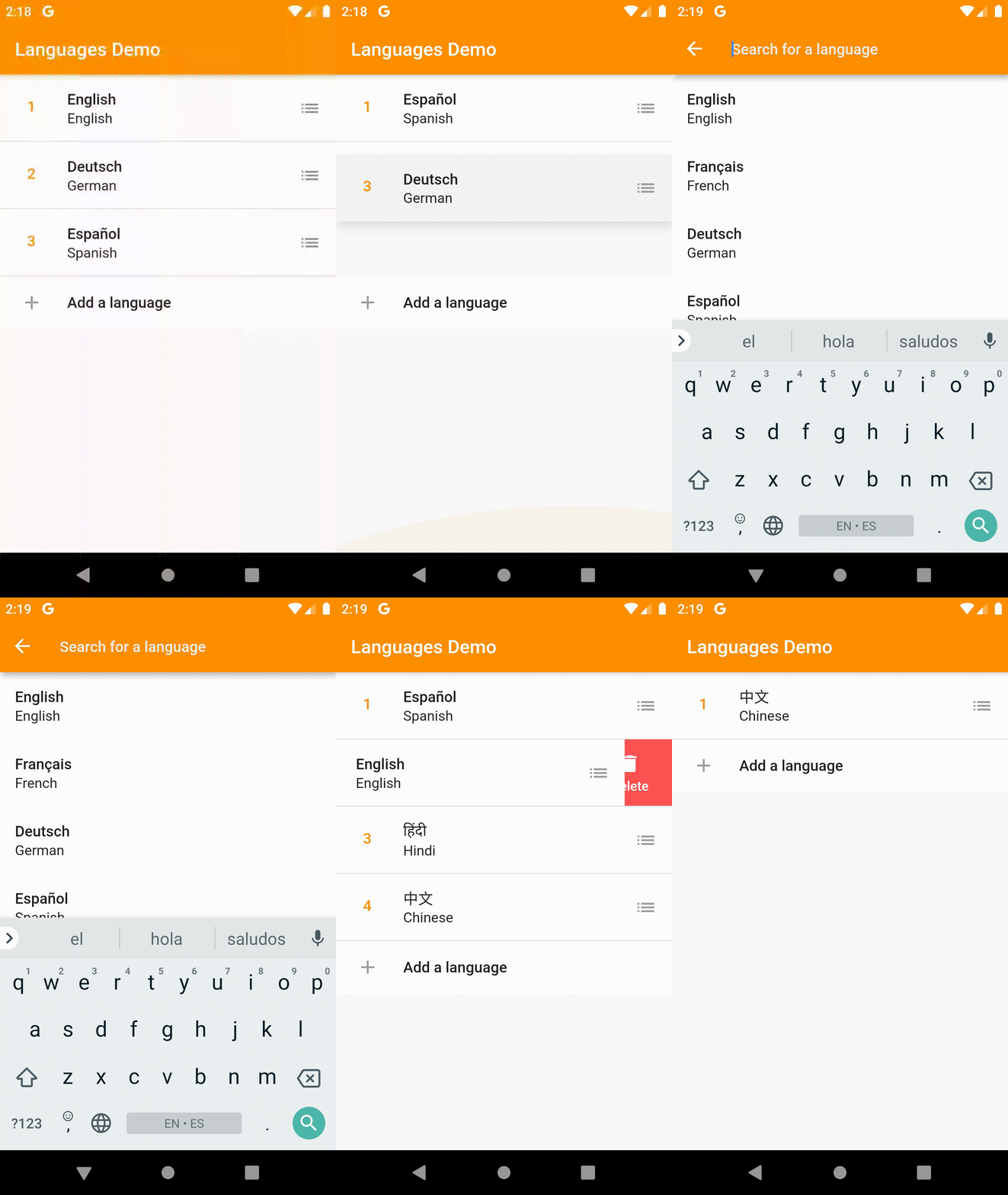
点击此处查看完整示例。
安装
将其添加到您的pubspec.yaml文件中
dependencies:
  animated_list:
    git: https://github.com/vaetas/animated_list.git
从命令行安装软件包
flutter packages get
用法
该包包含两个 ListView:ImplicitlyAnimatedList 是基类,为项目的插入、移除和更新提供隐式动画;ImplicitlyAnimatedReorderableList 扩展了 ImplicitlyAnimatedList 并为列表项添加了重排支持。请参阅下面的示例了解如何使用它们。
ImplicitlyAnimatedList
ImplicitlyAnimatedList 基于 AnimatedList,并使用 MyersDiff 算法计算两个列表之间的差异,并为您调用 AnimatedListState 上的 insertItem 和 removeItem。
示例
// Specify the generic type of the data in the list.
ImplicitlyAnimatedList<MyGenericType>(
  // The current items in the list.
  items: items,
  // Called by the DiffUtil to decide whether two object represent the same item.
  // For example, if your items have unique ids, this method should check their id equality.
  areItemsTheSame: (a, b) => a.id == b.id,
  // Called, as needed, to build list item widgets.
  // List items are only built when they're scrolled into view.
  itemBuilder: (context, animation, item, index) {
    // Specifiy a transition to be used by the ImplicitlyAnimatedList.
    // See the Transitions section on how to import this transition.
    return SizeFadeTransition(
      sizeFraction: 0.7,
      curve: Curves.easeInOut,
      animation: animation,
      child: Text(item.name),
    );
  },
  // An optional builder when an item was removed from the list.
  // If not specified, the List uses the itemBuilder with
  // the animation reversed.
  removeItemBuilder: (context, animation, oldItem) {
    return FadeTransition(
      opacity: animation,
      child: Text(oldItem.name),
    );
  },
);
如果您有
CustomScrollView,可以使用SliverImplicitlyAnimatedList。
由于
AnimatedList不支持项目移动,移动操作是通过从旧索引中删除项目并将其插入到新索引来处理的。
ImplicitlyAnimatedReorderableList
ImplicitlyAnimatedReorderableList 基于 ImplicitlyAnimatedList,并为列表添加了重排支持。
示例
ImplicitlyAnimatedReorderableList<MyGenericType>(
  items: items,
  areItemsTheSame: (oldItem, newItem) => oldItem.id == newItem.id,
  onReorderFinished: (item, from, to, newItems) {
    // Remember to update the underlying data when the list has been
    // reordered.
    setState(() {
      items
        ..clear()
        ..addAll(newItems);
    });
  },
  itemBuilder: (context, itemAnimation, item, index) {
    // Each item must be wrapped in a Reorderable widget.
    return Reorderable(
      // Each item must have an unique key.
      key: ValueKey(item),
      // The animation of the Reorderable builder can be used to
      // change to appearance of the item between dragged and normal
      // state. For example to add elevation when the item is being dragged.
      // This is not to be confused with the animation of the itemBuilder.
      // Implicit animations (like AnimatedContainer) are sadly not yet supported.
      builder: (context, dragAnimation, inDrag) {
        final t = dragAnimation.value;
        final elevation = lerpDouble(0, 8, t);
        final color = Color.lerp(Colors.white, Colors.white.withOpacity(0.8), t);

        return SizeFadeTransition(
          sizeFraction: 0.7,
          curve: Curves.easeInOut,
          animation: itemAnimation,
          child: Material(
            color: color,
            elevation: elevation,
            type: MaterialType.transparency,
            child: ListTile(
              title: Text(item.name),
              // The child of a Handle can initialize a drag/reorder.
              // This could for example be an Icon or the whole item itself. You can
              // use the delay parameter to specify the duration for how long a pointer
              // must press the child, until it can be dragged.
              trailing: Handle(
                delay: const Duration(milliseconds: 100),
                child: Icon(
                  Icons.list,
                  color: Colors.grey,
                ),
              ),
            ),
          ),
        );
      },
    );
  },
  // Since version 0.2.0 you can also display a widget
  // before the reorderable items...
  header: Container(
    height: 200,
    color: Colors.red,
  ),
  // ...and after. Note that this feature - as the list itself - is still in beta!
  footer: Container(
    height: 200,
    color: Colors.green,
  ),
  // If you want to use headers or footers, you should set shrinkWrap to true
  shrinkWrap: true,
);
如需更深入的示例,请点击此处。
过渡
通过导入过渡包,您可以使用一些自定义过渡(例如 SizeFadeTransition)来实现项目动画。
import 'package:implicitly_animated_reorderable_list/transitions.dart';
如果您想贡献您自己的自定义过渡,请随时提交一个拉取请求。
注意事项
请注意,此包仍处于非常早期阶段,尚未进行足够的测试来保证稳定性。
另请注意,计算两个非常大的列表之间的差异可能需要大量时间(尽管计算是在后台隔离中进行的,除非将 spawnIsolate 设置为 false)。
致谢
ImplicitlyAnimatedList 使用的 diff 算法由 Dawid Bota 在 GitLab 上编写。


