
geoflutterfire_plus ?
geoflutterfire_plus 允许您的 flutter 应用查询存储在 Cloud Firestore 中的地理数据。
此包是 GeoFlutterFire 的分支,并努力保持与最新的 Flutter SDK、Dart SDK 和其他依赖包的兼容性。
先决条件
Dart: '>=2.17.0 <3.0.0'
Flutter: '>=2.10.0'
安装
运行此命令
flutter pub add geoflutterfire_plus
或者将依赖项添加到您的 pubspec.yaml。
dependencies:
  geoflutterfire_plus: <latest-version>
地理查询
请参阅 Firebase 官方文档 地理查询,以了解什么是 Geohash,为什么需要将地理位置保存为 Geohash,以及如何查询它们。它还将帮助您了解使用 Geohash 查询位置的限制。
保存地理数据
为了将地理数据保存为 Cloud Firestore 的文档,请使用 GeoFirePoint。GeoFirePoint.data 提供 geopoint(cloud_firestore 包中定义的 GeoPoint 类型)和 Geohash 字符串。
// Define GeoFirePoint instance by giving latitude and longitude.
final GeoFirePoint geoFirePoint = GeoFirePoint(35.681236, 139.767125);

// Get GeoPoint instance and Geohash string as Map<String, dynamic>.
final Map<String, dynamic> data = geoFirePoint.data;

// {geopoint: Instance of 'GeoPoint', geohash: xn76urx66}
print(data);
GeoCollectionReference 实例提供 add 方法来在新集合的文档中创建文档(内部,只是调用 cloud_firestore 的 add 方法)。
// Add new documents to locations collection.
GeoCollectionReference<Map<String, dynamic>>(
  FirebaseFirestore.instance.collection('locations'),
).add(<String, dynamic>{
  'geo': geoFirePoint.data,
  'name': name,
  'isVisible': true,
});
或者,您也可以直接调用 cloud_firestore 的 add 或 set 方法来保存数据。例如,
// Add new documents to locations collection.
FirebaseFirestore.instance.collection('locations').add(
  <String, dynamic>{
    'geo': data,
    'name': 'Tokyo Station',
    'isVisible': true,
  },
);
创建的文档将如下面的截图所示。Geohash 字符串(geohash)和 Cloud Firestore GeoPoint 数据(geopoint)以地图类型保存在 geo 字段中。
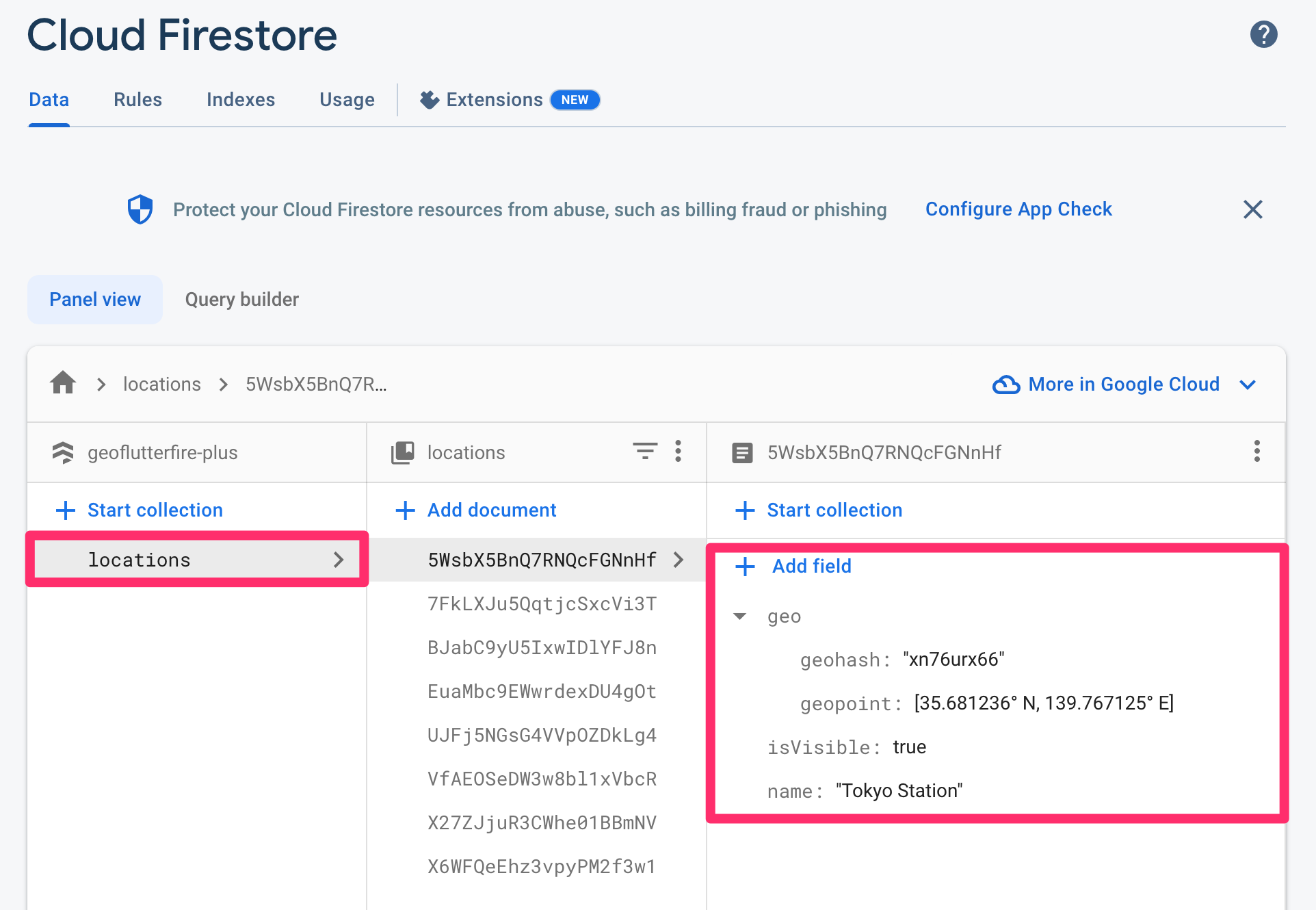
为了在指定文档的给定字段上设置或更新经纬度对作为 cloud_firestore GeoPoint 和 Geohash 字符串,可以使用 GeoCollectionReference.setPoint。
// Set or update geo field on the specified document.
GeoCollectionReference(FirebaseFirestore.instance.collection('locations'))
    .setPoint(
  id: 'your-document-id',
  field: 'geo',
  latitude: 35.681236,
  longitude: 139.767125,
);
查询地理数据
为了查询东京站 50 公里半径内的位置文档,您将编写如下查询:
基本查询
// Center of the geo query.
final GeoFirePoint center = GeoFirePoint(35.681236, 139.767125);

// Detection range from the center point.
const double radiusInKm = 50;

// Field name of Cloud Firestore documents where the geohash is saved.
const String field = 'geo';
// Reference to locations collection.
final CollectionReference<Map<String, dynamic>> collectionReference =
    FirebaseFirestore.instance.collection('locations');

// Function to get GeoPoint instance from Cloud Firestore document data.
GeoPoint geopointFrom(Map<String, dynamic> data) =>
     (data['geo'] as Map<String, dynamic>)['geopoint'] as GeoPoint;
// Streamed document snapshots of geo query under given conditions.
final Stream<List<DocumentSnapshot<Map<String, dynamic>>>> stream =
    GeoCollectionReference<Map<String, dynamic>>(collectionReference).within(
  center: center,
  radiusInKm: radiusInKm,
  field: field,
  geopointFrom: geopointFrom,
);
使用 withConverter
如果您想使用 withConverter 来进行类型安全的查询编写,首先需要定义其实体类和工厂构造函数。
/// An entity of Cloud Firestore location document.
class Location {
  Location({
    required this.geo,
    required this.name,
    required this.isVisible,
  });

  factory Location.fromJson(Map<String, dynamic> json) => Location(
        geo: Geo.fromJson(json['geo'] as Map<String, dynamic>),
        name: json['name'] as String,
        isVisible: (json['isVisible'] ?? false) as bool,
      );

  factory Location.fromDocumentSnapshot(DocumentSnapshot documentSnapshot) =>
      Location.fromJson(documentSnapshot.data()! as Map<String, dynamic>);

  final Geo geo;
  final String name;
  final bool isVisible;

  Map<String, dynamic> toJson() => <String, dynamic>{
        'geo': geo.toJson(),
        'name': name,
        'isVisible': isVisible,
      };
}

/// An entity of `geo` field of Cloud Firestore location document.
class Geo {
  Geo({
    required this.geohash,
    required this.geopoint,
  });

  factory Geo.fromJson(Map<String, dynamic> json) => Geo(
        geohash: json['geohash'] as String,
        geopoint: json['geopoint'] as GeoPoint,
      );

  final String geohash;
  final GeoPoint geopoint;

  Map<String, dynamic> toJson() => <String, dynamic>{
        'geohash': geohash,
        'geopoint': geopoint,
      };
}
然后,定义类型化的集合引用。
/// Reference to the collection where the location data is stored.
final typedCollectionReference =
    FirebaseFirestore.instance.collection('locations').withConverter(
          fromFirestore: (ds, _) => Location.fromDocumentSnapshot(ds),
          toFirestore: (obj, _) => obj.toJson(),
        );

// Function to get GeoPoint instance from Location instance.
GeoPoint geopointFrom: (Location location) => location.geo.geopoint;
您可以像第一个示例一样编写查询。
// Streamed document snapshots of geo query under given conditions.
final Stream<List<DocumentSnapshot<Location>>> stream =
    GeoCollectionReference<Location>(typedCollectionReference).within(
  center: center,
  radiusInKm: radiusInKm,
  field: field,
  geopointFrom: geopointFrom,
);
自定义查询条件
如果您想添加自定义查询条件,可以使用 within 方法的 queryBuilder 参数。
例如,当您只过滤 isVisible 字段为 true 的文档时,您的 queryBuilder 将如下所示:
// Custom query condition.
Query<Location> queryBuilder(Query<Location> query) =>
    query.where('isVisible', isNotEqualTo: true);
然后,只需将 queryBuilder 传递给 within 方法的参数即可。
? 注意:自定义查询条件可能需要复合索引。如果未创建索引,您将在 Firestore 的调试控制台中看到 “[cloud_firestore/failed-precondition] The query requires an index…” 错误。您可以通过单击错误消息中的链接来创建索引。
// Streamed document snapshots of geo query under given conditions.
final Stream<List<DocumentSnapshot<Map<String, dynamic>>>> stream =
    GeoCollectionReference<Map<String, dynamic>>(typedCollectionReference).within(
  center: center,
  radiusInKm: radiusInKm,
  field: field,
  geopointFrom: geopointFrom,
  queryBuilder: queryBuilder,
);


