Flutter DSFR


法国政府设计系统的 Flutter 实现。
完整的 the design specifications 可在此处获取: https://gouvfr.atlassian.net/wiki/spaces/DB/overview?homepageId=145359476
本项目不隶属于法国政府。
入门
- 将包添加到您的
pubspec.yaml文件
dependencies:
    flutter_dsfr: any
- 将所需的扩展添加到您的主题
import 'package:flutter_dsfr/flutter_dsfr.dart';

class MyApp extends StatelessWidget {
  const MyApp({Key? key}) : super(key: key);

  @override
  Widget build(BuildContext context) {
    return MaterialApp(
        theme: ThemeData.light().copyWith(
          extensions: dsfrExtensionsLight,
        ),
        darkTheme: ThemeData.dark().copyWith(
          extensions: dsfrExtensionsDark,
        ),
        home: const MyHomePage(),
    );
  }
}
组件
按钮
- 主要
DSFRPrimaryButton(onPressed: () {}, label: 'Label bouton');

- 次要
DSFRSecondaryButton(onPressed: () {}, label: 'Label bouton');

- FranceConnect
FranceConnectButton(onPressed: () {});

- FranceConnectPlus
FranceConnectButton(onPressed: () {}, variant: true);

警报
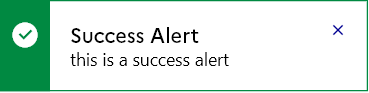
- 警报
DSFRAlert(
      type: DSFRAlertType.success,
      title: "Success Alert",
      description:
          "this is a success alert",
      onClose: () {},
    )
- 小警报
DSFRSmallAlert(
      type: DSFRAlertType.success,
      description: "this is a small alert",
      onClose: () {},
    )

手风琴
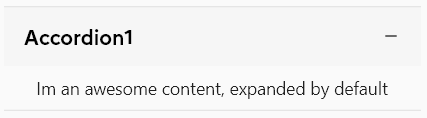
- 手风琴
DSFRAccordionData(
          title: "Accordion1",
          content: Padding(
            padding: EdgeInsets.all(8.0),
            child: Text("Im an awesome content, expanded by default"),
          ),
          isInitialyExpanded: true,
        )
徽章
- 徽章
DSFRBadge(
      type: DSFRBadgeType.success,
      label: "label",
      showIcon: true,
    )

按钮组
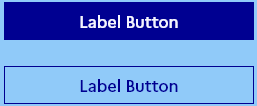
- 按钮组
DSFRButtonsGroup(
  buttons: [
    DSFRButton(
      label: "Label Button",
      onPressed: () {},
    ),
    DSFRSecondaryButton(
      label: "Label Button",
      onPressed: () {},
    ),
  ],
)
依赖项
- url_launcher:允许在浏览器中打开链接。(在
FranceConnectButton小部件中使用)
路线图
我们需要实现的小部件
- 手风琴
- FileUpload
- 警报
- 徽章
- 横幅
- 搜索栏
- 按钮
- 按钮组
- FranceConnectButton
- 广播
- RichRadio
- Checkbox
- Card
- 输入
- 引言
- 头部
- 面包屑
- ConscentBanner
- StepIndicateur
- ToggleSwitch
- 链接
- SkipLinks
- 选择
- SideMenu
- Callout
- 高亮
- 模态
- MainNavigation
- 标签页
- Display
- 分享
- Footer
- 分页
- 摘要
- Table
- Tag
- DownloadFile
- Tile


