
Catcher
Catcher 是一个 Flutter 插件,可以自动捕获和处理错误/异常。Catcher 提供了多种错误处理方式。Catcher 的灵感很大程度上来源于 ACRA:https://github.com/ACRA/acra Catcher 是为那些不想使用 Crashlytics 或 Sentry 产品而想获取错误信息数据的开发者提供的解决方案。如果你有自己的后端来存储应用程序日志,并且想以任何方式处理它们,那么它也是一个很好的选择。
Catcher 支持 Android、iOS 和 Web 平台。
安装
将此行添加到你的 pubspec.yaml 文件中
dependencies:
  catcher: ^0.3.15
然后运行此命令
$ flutter packages get
然后添加此导入
import 'package:catcher/catcher.dart';
平台支持
Catcher 支持 Android、iOS 和 Web 平台。由于 Web 框架状态和缺少插件的问题,Web 实现的功能比移动端少。这是功能支持表
| 功能 | Android | iOS | Web |
|---|---|---|---|
| 报告中的应用程序数据 | ✔️ | ✔️ | ❌ |
| 控制台处理器 | ✔️ | ✔️ | ✔️ |
| Discord 处理器 | ✔️ | ✔️ | ✔️ |
| 邮件自动处理器 | ✔️ | ✔️ | ❌ |
| 文件处理器 | ✔️ | ✔️ | ❌ |
| HTTP 处理器 | ✔️ | ✔️ | ✔️ |
| Sentry 处理器 | ✔️ | ✔️ | ✔️ |
| Slack 处理器 | ✔️ | ✔️ | ❌ |
| Toast 处理器 | ✔️ | ✔️ | ✔️ |
| Crashlytics 处理器 | ✔️ | ✔️ | ❌️ |
| 对话框报告模式 | ✔️ | ✔️ | ✔️ |
| 页面报告模式 | ✔️ | ✔️ | ✔️ |
| 静默报告模式 | ✔️ | ✔️ | ✔️ |
| 显式报告模式映射 | ✔️ | ✔️ | ✔️ |
| 显式报告处理器映射 | ✔️ | ✔️ | ✔️ |
| 错误小部件 | ✔️ | ✔️ | ✔️ |
由于 Web 框架和插件的密集开发,支持的功能可能会在未来发生变化。
基本示例
基本示例使用了 debug 配置,其中包含对话框报告模式和控制台处理器,以及 release 配置,其中包含对话框报告模式和邮件手动处理器。
要开始使用 Catcher,您需要
- 创建 Catcher 配置(开始时您只需要使用 debug 配置)
- 创建 Catcher 实例,并将您的根 Widget 与 Catcher 配置一起传递
- 为 MaterialApp 或 CupertinoApp 添加 navigatorKey
这是一个完整的示例
import 'package:flutter/material.dart';
import 'package:catcher/catcher.dart';

main() {
  /// STEP 1. Create catcher configuration.
  /// Debug configuration with dialog report mode and console handler. It will show dialog and once user accepts it, error will be shown   /// in console.
  CatcherOptions debugOptions =
      CatcherOptions(DialogReportMode(), [ConsoleHandler()]);

  /// Release configuration. Same as above, but once user accepts dialog, user will be prompted to send email with crash to support.
  CatcherOptions releaseOptions = CatcherOptions(DialogReportMode(), [
    EmailManualHandler(["[email protected]"])
  ]);

  /// STEP 2. Pass your root widget (MyApp) along with Catcher configuration:
  Catcher(MyApp(), debugConfig: debugOptions, releaseConfig: releaseOptions);
}

class MyApp extends StatefulWidget {
  @override
  _MyAppState createState() => _MyAppState();
}

class _MyAppState extends State<MyApp> {
  @override
  void initState() {
    super.initState();
  }

  @override
  Widget build(BuildContext context) {
    return MaterialApp(
      /// STEP 3. Add navigator key from Catcher. It will be used to navigate user to report page or to show dialog.
      navigatorKey: Catcher.navigatorKey,
      home: Scaffold(
          appBar: AppBar(
            title: const Text('Plugin example app'),
          ),
          body: ChildWidget()),
    );
  }
}

class ChildWidget extends StatelessWidget {
  @override
  Widget build(BuildContext context) {
    return Container(
            child: FlatButton(
                child: Text("Generate error"),
                onPressed: () => generateError()));
  }

  generateError() async {
    throw "Test exception";
  }
}
如果您运行此代码,您将在屏幕上看到一个“生成错误”按钮。
点击它后,它将生成一个测试异常,该异常将被 Catcher 处理。在 Catcher 将异常处理到处理器之前,它将
显示一个带有用户信息的对话框。此对话框显示是因为我们使用了 DialogReportHandler。用户在对话框中确认操作后,
报告将被发送到控制台处理器,该处理器将在控制台中记录错误信息。
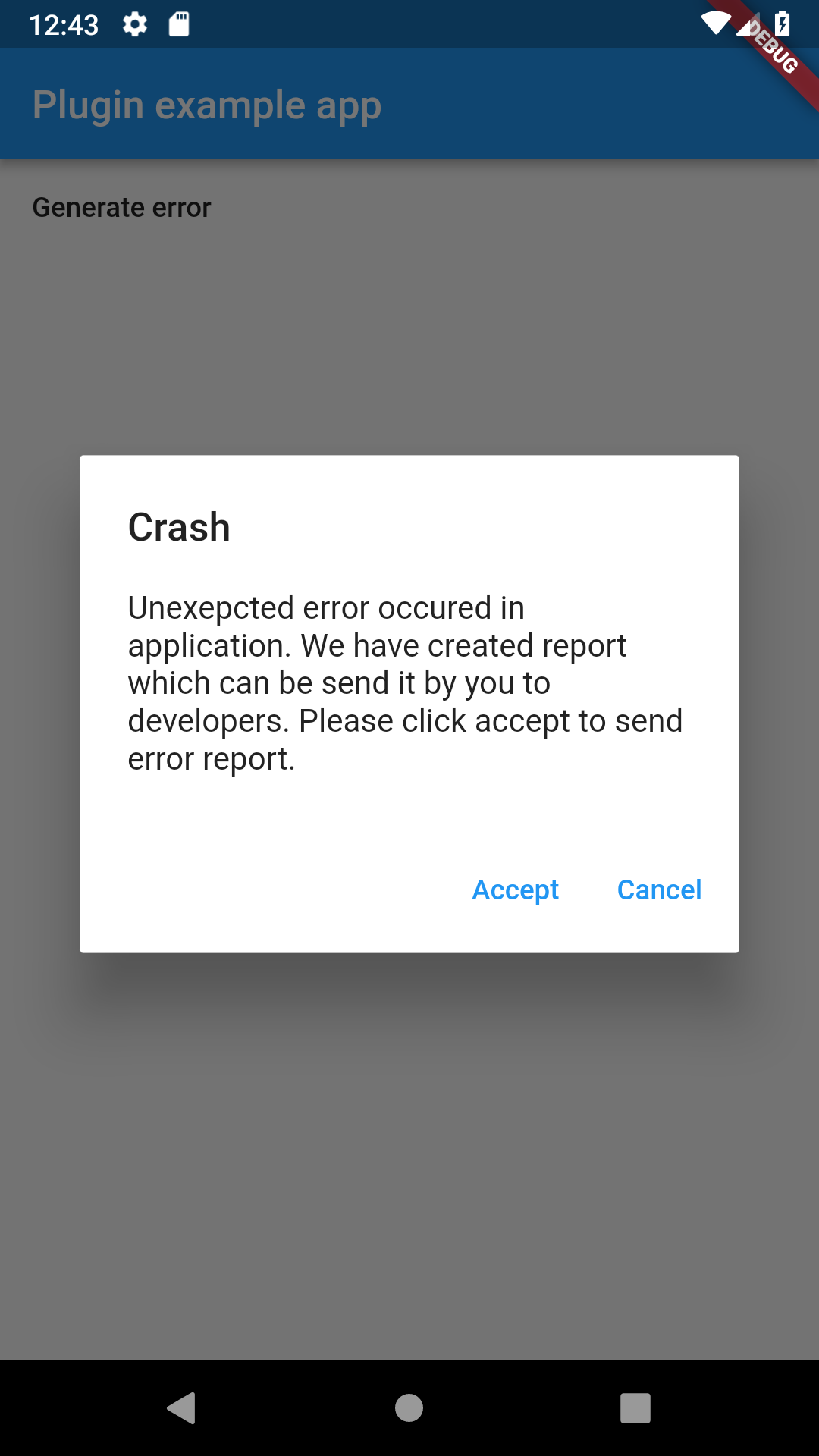
带有默认确认消息的对话框
I/flutter ( 7457): [2019-02-09 12:40:21.527271 | ConsoleHandler | INFO] ============================== CATCHER LOG ==============================
I/flutter ( 7457): [2019-02-09 12:40:21.527742 | ConsoleHandler | INFO] Crash occured on 2019-02-09 12:40:20.424286
I/flutter ( 7457): [2019-02-09 12:40:21.527827 | ConsoleHandler | INFO]
I/flutter ( 7457): [2019-02-09 12:40:21.527908 | ConsoleHandler | INFO] ------- DEVICE INFO -------
I/flutter ( 7457): [2019-02-09 12:40:21.528233 | ConsoleHandler | INFO] id: PSR1.180720.061
I/flutter ( 7457): [2019-02-09 12:40:21.528337 | ConsoleHandler | INFO] androidId: 726e4abc58dde277
I/flutter ( 7457): [2019-02-09 12:40:21.528431 | ConsoleHandler | INFO] board: goldfish_x86
I/flutter ( 7457): [2019-02-09 12:40:21.528512 | ConsoleHandler | INFO] bootloader: unknown
I/flutter ( 7457): [2019-02-09 12:40:21.528595 | ConsoleHandler | INFO] brand: google
I/flutter ( 7457): [2019-02-09 12:40:21.528694 | ConsoleHandler | INFO] device: generic_x86
I/flutter ( 7457): [2019-02-09 12:40:21.528774 | ConsoleHandler | INFO] display: sdk_gphone_x86-userdebug 9 PSR1.180720.061 5075414 dev-keys
I/flutter ( 7457): [2019-02-09 12:40:21.528855 | ConsoleHandler | INFO] fingerprint: google/sdk_gphone_x86/generic_x86:9/PSR1.180720.061/5075414:userdebug/dev-keys
I/flutter ( 7457): [2019-02-09 12:40:21.528939 | ConsoleHandler | INFO] hardware: ranchu
I/flutter ( 7457): [2019-02-09 12:40:21.529023 | ConsoleHandler | INFO] host: vped9.mtv.corp.google.com
I/flutter ( 7457): [2019-02-09 12:40:21.529813 | ConsoleHandler | INFO] isPsychicalDevice: false
I/flutter ( 7457): [2019-02-09 12:40:21.530178 | ConsoleHandler | INFO] manufacturer: Google
I/flutter ( 7457): [2019-02-09 12:40:21.530345 | ConsoleHandler | INFO] model: Android SDK built for x86
I/flutter ( 7457): [2019-02-09 12:40:21.530443 | ConsoleHandler | INFO] product: sdk_gphone_x86
I/flutter ( 7457): [2019-02-09 12:40:21.530610 | ConsoleHandler | INFO] tags: dev-keys
I/flutter ( 7457): [2019-02-09 12:40:21.530713 | ConsoleHandler | INFO] type: userdebug
I/flutter ( 7457): [2019-02-09 12:40:21.530825 | ConsoleHandler | INFO] versionBaseOs:
I/flutter ( 7457): [2019-02-09 12:40:21.530922 | ConsoleHandler | INFO] versionCodename: REL
I/flutter ( 7457): [2019-02-09 12:40:21.531074 | ConsoleHandler | INFO] versionIncremental: 5075414
I/flutter ( 7457): [2019-02-09 12:40:21.531573 | ConsoleHandler | INFO] versionPreviewSdk: 0
I/flutter ( 7457): [2019-02-09 12:40:21.531659 | ConsoleHandler | INFO] versionRelase: 9
I/flutter ( 7457): [2019-02-09 12:40:21.531740 | ConsoleHandler | INFO] versionSdk: 28
I/flutter ( 7457): [2019-02-09 12:40:21.531870 | ConsoleHandler | INFO] versionSecurityPatch: 2018-08-05
I/flutter ( 7457): [2019-02-09 12:40:21.532002 | ConsoleHandler | INFO]
I/flutter ( 7457): [2019-02-09 12:40:21.532078 | ConsoleHandler | INFO] ------- APP INFO -------
I/flutter ( 7457): [2019-02-09 12:40:21.532167 | ConsoleHandler | INFO] version: 1.0
I/flutter ( 7457): [2019-02-09 12:40:21.532250 | ConsoleHandler | INFO] appName: catcher_example
I/flutter ( 7457): [2019-02-09 12:40:21.532345 | ConsoleHandler | INFO] buildNumber: 1
I/flutter ( 7457): [2019-02-09 12:40:21.532426 | ConsoleHandler | INFO] packageName: com.jhomlala.catcherexample
I/flutter ( 7457): [2019-02-09 12:40:21.532667 | ConsoleHandler | INFO]
I/flutter ( 7457): [2019-02-09 12:40:21.532944 | ConsoleHandler | INFO] ---------- ERROR ----------
I/flutter ( 7457): [2019-02-09 12:40:21.533096 | ConsoleHandler | INFO] Test exception
I/flutter ( 7457): [2019-02-09 12:40:21.533179 | ConsoleHandler | INFO]
I/flutter ( 7457): [2019-02-09 12:40:21.533257 | ConsoleHandler | INFO] ------- STACK TRACE -------
I/flutter ( 7457): [2019-02-09 12:40:21.533695 | ConsoleHandler | INFO] #0      ChildWidget.generateError (package:catcher_example/file_example.dart:62:5)
I/flutter ( 7457): [2019-02-09 12:40:21.533799 | ConsoleHandler | INFO] <asynchronous suspension>
I/flutter ( 7457): [2019-02-09 12:40:21.533879 | ConsoleHandler | INFO] #1      ChildWidget.build.<anonymous closure> (package:catcher_example/file_example.dart:53:61)
I/flutter ( 7457): [2019-02-09 12:40:21.534149 | ConsoleHandler | INFO] #2      _InkResponseState._handleTap (package:flutter/src/material/ink_well.dart:507:14)
I/flutter ( 7457): [2019-02-09 12:40:21.534230 | ConsoleHandler | INFO] #3      _InkResponseState.build.<anonymous closure> (package:flutter/src/material/ink_well.dart:562:30)
I/flutter ( 7457): [2019-02-09 12:40:21.534321 | ConsoleHandler | INFO] #4      GestureRecognizer.invokeCallback (package:flutter/src/gestures/recognizer.dart:102:24)
I/flutter ( 7457): [2019-02-09 12:40:21.534419 | ConsoleHandler | INFO] #5      TapGestureRecognizer._checkUp (package:flutter/src/gestures/tap.dart:242:9)
I/flutter ( 7457): [2019-02-09 12:40:21.534524 | ConsoleHandler | INFO] #6      TapGestureRecognizer.handlePrimaryPointer (package:flutter/src/gestures/tap.dart:175:7)
I/flutter ( 7457): [2019-02-09 12:40:21.534608 | ConsoleHandler | INFO] #7      PrimaryPointerGestureRecognizer.handleEvent (package:flutter/src/gestures/recognizer.dart:315:9)
I/flutter ( 7457): [2019-02-09 12:40:21.534686 | ConsoleHandler | INFO] #8      PointerRouter._dispatch (package:flutter/src/gestures/pointer_router.dart:73:12)
I/flutter ( 7457): [2019-02-09 12:40:21.534765 | ConsoleHandler | INFO] #9      PointerRouter.route (package:flutter/src/gestures/pointer_router.dart:101:11)
I/flutter ( 7457): [2019-02-09 12:40:21.534843 | ConsoleHandler | INFO] #10     _WidgetsFlutterBinding&BindingBase&GestureBinding.handleEvent (package:flutter/src/gestures/binding.dart:180:19)
I/flutter ( 7457): [2019-02-09 12:40:21.534973 | ConsoleHandler | INFO] #11     _WidgetsFlutterBinding&BindingBase&GestureBinding.dispatchEvent (package:flutter/src/gestures/binding.dart:158:22)
I/flutter ( 7457): [2019-02-09 12:40:21.535052 | ConsoleHandler | INFO] #12     _WidgetsFlutterBinding&BindingBase&GestureBinding._handlePointerEvent (package:flutter/src/gestures/binding.dart:138:7)
I/flutter ( 7457): [2019-02-09 12:40:21.535136 | ConsoleHandler | INFO] #13     _WidgetsFlutterBinding&BindingBase&GestureBinding._flushPointerEventQueue (package:flutter/src/gestures/binding.dart:101:7)
I/flutter ( 7457): [2019-02-09 12:40:21.535216 | ConsoleHandler | INFO] #14     _WidgetsFlutterBinding&BindingBase&GestureBinding._handlePointerDataPacket (package:flutter/src/gestures/binding.dart:85:7)
I/flutter ( 7457): [2019-02-09 12:40:21.535600 | ConsoleHandler | INFO] #15     _rootRunUnary (dart:async/zone.dart:1136:13)
I/flutter ( 7457): [2019-02-09 12:40:21.535753 | ConsoleHandler | INFO] #16     _CustomZone.runUnary (dart:async/zone.dart:1029:19)
I/flutter ( 7457): [2019-02-09 12:40:21.536008 | ConsoleHandler | INFO] #17     _CustomZone.runUnaryGuarded (dart:async/zone.dart:931:7)
I/flutter ( 7457): [2019-02-09 12:40:21.536138 | ConsoleHandler | INFO] #18     _invoke1 (dart:ui/hooks.dart:170:10)
I/flutter ( 7457): [2019-02-09 12:40:21.536271 | ConsoleHandler | INFO] #19     _dispatchPointerDataPacket (dart:ui/hooks.dart:122:5)
I/flutter ( 7457): [2019-02-09 12:40:21.536375 | ConsoleHandler | INFO]
I/flutter ( 7457): [2019-02-09 12:40:21.536539 | ConsoleHandler | INFO] ======================================================================
控制台处理器输出
Catcher 用法
添加 navigatorKey
为了使页面报告模式和对话框报告模式正常工作,您必须包含 navigatorKey。Catcher 插件暴露了一个必须包含在您的 MaterialApp 或 WidgetApp 中的 key。
  @override
  Widget build(BuildContext context) {
    return MaterialApp(
      //********************************************
      navigatorKey: Catcher.navigatorKey,
      //********************************************
      home: Scaffold(
          appBar: AppBar(
            title: const Text('Plugin example app'),
          ),
          body: ChildWidget()),
    );
  }
您需要提供此 key,因为 Catcher 需要导航器的上下文来显示对话框/页面。如果您不使用页面/对话框报告模式,则无需包含此 navigatorKey。
如果您需要,您也可以提供自己的 navigatorKey。您可以在 Catcher 构造函数中提供它(如下所示)。请查看自定义 navigatorKey 示例以了解基本用法。
Catcher 配置
Catcher 实例需要 1 个必需参数和 3 个可选参数。
- rootWidget (必需) - 您的应用程序根 Widget 的实例
- debugConfig (可选) - 当 Catcher 检测到应用程序在 debug 模式下运行时使用的配置
- releaseConfig (可选) - 当 Catcher 检测到应用程序在 release 模式下运行时使用的配置
- profileConfig (可选) - 当 Catcher 检测到应用程序在 profile 模式下运行时使用的配置
- enableLogger (可选) - 启用/禁用内部 Catcher 日志
- navigatorKey (可选) - 从 Catcher 外部提供可选的 navigatorKey
main() {
  CatcherOptions debugOptions =
  CatcherOptions(DialogReportMode(), [ConsoleHandler()]);
  CatcherOptions releaseOptions = CatcherOptions(DialogReportMode(), [
    EmailManualHandler(["[email protected]"])
  ]);
  CatcherOptions profileOptions = CatcherOptions(
    NotificationReportMode(), [ConsoleHandler(), ToastHandler()],
    handlerTimeout: 10000, customParameters: {"example": "example_parameter"},);
  Catcher(MyApp(), debugConfig: debugOptions, releaseConfig: releaseOptions, profileConfig: profileOptions, enableLogger: false, navigatorKey: navigatorKey);
}
CatcherOptions 参数
reportMode - 描述如何向用户显示错误报告,请参阅报告模式以获取更多信息
handlers - 将处理报告的处理器列表,请参阅处理器以获取更多信息
handlerTimeout - 超时时间(毫秒),此参数描述处理器处理报告的最大时间
customParameters - 将包含在报告中的附加参数的 map(例如用户 ID 或用户名)
报告捕获的异常
Catcher 不会处理 try/catch 块中捕获的异常。您可以从 try catch 块中将异常发送到 Catcher
try {
  ...
} catch (error,stackTrace) {
  Catcher.reportCheckedError(error, stackTrace);
}
本地化
Catcher 允许为报告模式创建本地化。要添加本地化支持,您需要设置
一些东西
在您的 MaterialApp 中添加 navigatorKey
navigatorKey: Catcher.navigatorKey,
在您的 MaterialApp 中添加 flutter localization delegates 和 locales
 localizationsDelegates: [
        GlobalMaterialLocalizations.delegate,
        GlobalWidgetsLocalizations.delegate,
      ],
      supportedLocales: [
        const Locale('en', 'US'),
        const Locale('pl', 'PL'),
      ],
在 catcherOptions 中添加 localizationOptions
CatcherOptions(
...
    localizationOptions: [
        LocalizationOptions("pl", notificationReportModeTitle: "My translation" ...),
        LocalizationOptions("de", notificationReportModeTitle: "My translation" ...),
    ]
)
您可以为给定参数添加翻译
  final String notificationReportModeTitle; // notification report mode title
  final String notificationReportModeContent; // notification report mode subtitle

  final String dialogReportModeTitle; // dialog report mode title
  final String dialogReportModeDescription; // dialog report mode description
  final String dialogReportModeAccept; // dialog report mode accept button
  final String dialogReportModeCancel; // dialog report mode cancel button

  final String pageReportModeTitle; // page report mode toolbar title
  final String pageReportModeDescription; // page report mode description
  final String pageReportModeAccept; // page report mode accept button
  final String pageReportModeCancel; // page report mode cancel button
如果您想覆盖默认的英语文本,只需为“en”语言添加 localization options。
内置支持的语言有
- 英语
LocalizationOptions.buildDefaultEnglishOptions();
- 中文
LocalizationOptions.buildDefaultChineseOptions();
- 印地语
LocalizationOptions.buildDefaultHindiOptions();
- 西班牙语
LocalizationOptions.buildDefaultSpanishOptions();
- 马来语
LocalizationOptions.buildDefaultMalayOptions();
- 俄语
LocalizationOptions.buildDefaultRussianOptions();
- 葡萄牙语
LocalizationOptions.buildDefaultPortugueseOptions();
- 法语
LocalizationOptions.buildDefaultFrenchOptions();
- 波兰语
LocalizationOptions.buildDefaultPolishOptions();
- 意大利语
LocalizationOptions.buildDefaultItalianOptions();
- 韩语
LocalizationOptions.buildDefaultKoreanOptions();
完整示例
import 'package:flutter/material.dart';
import 'package:catcher/catcher.dart';
import 'package:flutter_localizations/flutter_localizations.dart';

main() {
  CatcherOptions debugOptions = CatcherOptions(DialogReportMode(), [
    ConsoleHandler(),
    HttpHandler(HttpRequestType.post, Uri.parse("https://httpstat.us/200"),
        printLogs: true)
  ], localizationOptions: [
    LocalizationOptions("pl",
        notificationReportModeTitle: "Wystąpił błąd aplikacji",
        notificationReportModeContent:
            "Naciśnij tutaj aby wysłać raport do zespołu wpsarcia",
        dialogReportModeTitle: "Błąd aplikacji",
        dialogReportModeDescription:
            "Wystąpił niespodziewany błąd aplikacji. Raport z błędem jest gotowy do wysłania do zespołu wsparcia. Naciśnij akceptuj aby wysłać raport lub odrzuć aby odrzucić raport.",
        dialogReportModeAccept: "Akceptuj",
        dialogReportModeCancel: "Odrzuć",
        pageReportModeTitle: "Błąd aplikacji",
        pageReportModeDescription:
            "Wystąpił niespodziewany błąd aplikacji. Raport z błędem jest gotowy do wysłania do zespołu wsparcia. Naciśnij akceptuj aby wysłać raport lub odrzuć aby odrzucić raport.",
        pageReportModeAccept: "Akceptuj",
        pageReportModeCancel: "Odrzuć")
  ]);
  CatcherOptions releaseOptions = CatcherOptions(NotificationReportMode(), [
    EmailManualHandler(["[email protected]"])
  ]);

  Catcher(MyApp(), debugConfig: debugOptions, releaseConfig: releaseOptions);
}

class MyApp extends StatefulWidget {
  @override
  _MyAppState createState() => _MyAppState();
}

class _MyAppState extends State<MyApp> {
  @override
  void initState() {
    super.initState();
  }

  @override
  Widget build(BuildContext context) {
    return MaterialApp(
      navigatorKey: Catcher.navigatorKey,
      localizationsDelegates: [
        GlobalMaterialLocalizations.delegate,
        GlobalWidgetsLocalizations.delegate,
      ],
      supportedLocales: [
        const Locale('en', 'US'),
        const Locale('pl', 'PL'),
      ],
      home: Scaffold(
          appBar: AppBar(
            title: const Text('Plugin example app'),
          ),
          body: ChildWidget()),
    );
  }
}

class ChildWidget extends StatelessWidget {
  @override
  Widget build(BuildContext context) {
    return Container(
        child: FlatButton(
            child: Text("Generate error"), onPressed: () => generateError()));
  }

  generateError() async {
    throw "Test exception";
  }
}
报告模式
报告模式是收集用户处理错误的权限的过程。用户可以接受或拒绝处理崩溃日志的权限。有 4 种报告模式
静默报告模式
静默报告模式是默认报告模式。此报告模式不会询问用户是否允许处理崩溃日志。它会自动将日志推送到处理器。
ReportMode reportMode = SilentReportMode();
通知报告模式
由于与 Firebase 不兼容,通知报告模式已被删除。请查看 local_notifications_example 以将本地通知重新添加到您的应用程序。
对话框报告模式
对话框报告模式显示有关错误的对话框。对话框包含标题、描述和两个按钮:接受和取消。用户单击接受按钮后,报告将被推送到处理器。
ReportMode reportMode = DialogReportMode();
有关更改默认文本,请参阅本地化选项。
对话框报告模式
页面报告模式
页面报告模式显示一个新页面,其中包含有关错误的信息。页面包含标题、描述、堆栈跟踪视图和两个按钮:接受和取消。用户单击接受按钮后,报告将被推送到处理器。
ReportMode reportMode = PageReportMode(showStackTrace: false);
页面报告模式可以配置可选参数
showStackTrace (可选) - 启用/禁用堆栈跟踪视图
有关更改默认文本,请参阅本地化选项。

页面报告模式
处理器
处理器是错误处理流程的最后一点。它们对错误报告执行特定任务,例如将报告记录到控制台。
控制台处理器
控制台处理器是默认的基本处理器。它在控制台中显示崩溃日志。控制台日志记录器允许您参数化日志输出
ConsoleHandler(
          enableApplicationParameters: true,
          enableDeviceParameters: true,
          enableCustomParameters: true,
          enableStackTrace: true)
- enableApplicationParameters (可选) - 在日志部分显示应用程序数据
I/flutter ( 4820): ------- APP INFO -------
I/flutter ( 4820): version: 1.0
I/flutter ( 4820): appName: catcher_example
I/flutter ( 4820): buildNumber: 1
I/flutter ( 4820): packageName: com.jhomlala.catcherexample
I/flutter ( 4820):
- enableDeviceParameters (可选) - 在日志部分显示设备数据(它将显示 Android/iOS 数据)
I/flutter ( 4820): ------- DEVICE INFO -------
I/flutter ( 4820): id: PSR1.180720.061
I/flutter ( 4820): androidId: fd97a76448e87410
I/flutter ( 4820): board: goldfish_x86
I/flutter ( 4820): bootloader: unknown
I/flutter ( 4820): brand: google
I/flutter ( 4820): device: generic_x86
I/flutter ( 4820): display: sdk_gphone_x86-userdebug 9 PSR1.180720.061 5075414 dev-keys
I/flutter ( 4820): fingerprint: google/sdk_gphone_x86/generic_x86:9/PSR1.180720.061/5075414:userdebug/dev-keys
I/flutter ( 4820): hardware: ranchu
I/flutter ( 4820): host: vped9.mtv.corp.google.com
I/flutter ( 4820): isPsychicalDevice: false
I/flutter ( 4820): manufacturer: Google
I/flutter ( 4820): model: Android SDK built for x86
I/flutter ( 4820): product: sdk_gphone_x86
I/flutter ( 4820): tags: dev-keys
I/flutter ( 4820): type: userdebug
I/flutter ( 4820): versionBaseOs:
I/flutter ( 4820): versionCodename: REL
I/flutter ( 4820): versionIncremental: 5075414
I/flutter ( 4820): versionPreviewSdk: 0
I/flutter ( 4820): versionRelase: 9
I/flutter ( 4820): versionSdk: 28
I/flutter ( 4820): versionSecurityPatch: 2018-08-05
-
enableCustomParameters (可选) - 在日志部分显示传递给 Catcher 构造函数的自定义参数
-
enableStackTrace (可选) - 在日志部分显示堆栈跟踪
I/flutter ( 5073): ------- STACK TRACE -------
I/flutter ( 5073): #0      _MyAppState.generateError (package:catcher_example/main.dart:38:5)
I/flutter ( 5073): <asynchronous suspension>
I/flutter ( 5073): #1      _MyAppState.build.<anonymous closure> (package:catcher_example/main.dart:31:69)
I/flutter ( 5073): #2      _InkResponseState._handleTap (package:flutter/src/material/ink_well.dart:507:14)
I/flutter ( 5073): #3      _InkResponseState.build.<anonymous closure> (package:flutter/src/material/ink_well.dart:562:30)
I/flutter ( 5073): #4      GestureRecognizer.invokeCallback (package:flutter/src/gestures/recognizer.dart:102:24)
I/flutter ( 5073): #5      TapGestureRecognizer._checkUp (package:flutter/src/gestures/tap.dart:242:9)
I/flutter ( 5073): #6      TapGestureRecognizer.handlePrimaryPointer (package:flutter/src/gestures/tap.dart:175:7)
I/flutter ( 5073): #7      PrimaryPointerGestureRecognizer.handleEvent (package:flutter/src/gestures/recognizer.dart:315:9)
I/flutter ( 5073): #8      PointerRouter._dispatch (package:flutter/src/gestures/pointer_router.dart:73:12)
I/flutter ( 5073): #9      PointerRouter.route (package:flutter/src/gestures/pointer_router.dart:101:11)
I/flutter ( 5073): #10     _WidgetsFlutterBinding&BindingBase&GestureBinding.handleEvent (package:flutter
邮件手动处理器
邮件手动处理器可用于让用户手动发送电子邮件。它会打开默认的电子邮件应用程序,并准备好电子邮件。
EmailManualHandler(
      ["[email protected]", "[email protected]"],
      enableDeviceParameters: true,
      enableStackTrace: true,
      enableCustomParameters: true,
      enableApplicationParameters: true,
      sendHtml: true,
      emailTitle: "Sample Title",
      emailHeader: "Sample Header",
      printLogs: true)
邮件手动处理器参数
- recipients (必需) - 收件人的电子邮件地址列表
- enableDeviceParameters (可选) - 请参阅控制台处理器说明
- enableStackTrace (可选) - 请参阅控制台处理器说明
- enableCustomParameters (可选) - 请参阅控制台处理器说明
- enableApplicationParameters (可选) - 请参阅控制台处理器说明
- sendHtml (可选) - 启用/禁用 HTML 电子邮件格式
- emailTitle (可选) - 设置自定义电子邮件标题
- emailHeader (可选) - 设置附加的电子邮件文本标题
- printLogs (可选) - 启用/禁用调试日志
邮件自动处理器
邮件处理器可用于自动发送包含错误报告的电子邮件。邮件处理器有多个配置参数。其中一些是必需的,其他是可选的。这些参数是必需的
 EmailAutoHandler("smtp.gmail.com", 587, "[email protected]", "Catcher",
          "FakePassword", ["[email protected]"])
我们需要设置电子邮件 SMTP 服务器、电子邮件帐户和收件人。目前,只有 Gmail 经过测试并可用。您可以尝试使用其他电子邮件提供商,但可能会出现错误。
所有参数列表
- smtpHost (必需) - 您电子邮件的主机地址,例如 Gmail 的主机是 smtp.gmail.com
- smtpPort (必需) - 您电子邮件的 SMTP 端口,例如 Gmail 的端口是 587
- senderEmail (必需) - Catcher 将从中发送电子邮件的电子邮件(它将是错误电子邮件的发件人)
- senderName (必需) - 发件人电子邮件的名称
- senderPassword (必需) - 发件人电子邮件的密码
- recipients (必需) - 包含收件人电子邮件的列表
- enableSSL (可选) - 如果您的电子邮件提供商支持 SSL,您可以启用此选项
- enableDeviceParameters (可选) - 请参阅控制台处理器说明
- enableApplicationParameters (可选) - 请参阅控制台处理器说明
- enableStackTrace (可选) - 请参阅控制台处理器说明
- enableCustomParameters (可选) - 请参阅控制台处理器说明
- emailTitle (可选) - 报告电子邮件的自定义标题,如果未设置,则标题为:“Handled Error: >> [Error name] <<”
- emailHeader (可选) - 报告数据之前的自定义标题消息
- sendHtml (可选) - 启用/禁用电子邮件中的 HTML 数据,如果启用,则会发送 HTML,您的报告将看起来更好
- printLog (可选) - 启用/禁用调试日志
邮件示例

HTTP 处理器
HTTP 处理器提供了将报告发送到外部服务器的功能。数据将被编码为 JSON 并发送到指定服务器。目前只能发送 POST 请求。最小示例
HttpHandler(HttpRequestType.post, Uri.parse("http://logs.server.com")
所有参数列表
- requestType (必需) - 请求类型,目前只支持 POST
- endpointUri (必需) - 服务器的 URI 地址
- headers (可选) - 可在 HTTP 请求中发送的附加标头的 map
- requestTimeout (可选) - 请求时间(毫秒)
- printLogs (可选) - 显示调试日志
您可以尝试使用示例后端服务器来处理日志。它使用 Java 8 和 Spring Framework 编写,并采用 Material Design。
您可以在此处找到后端服务器的代码:https://github.com/jhomlala/catcher/tree/master/backend
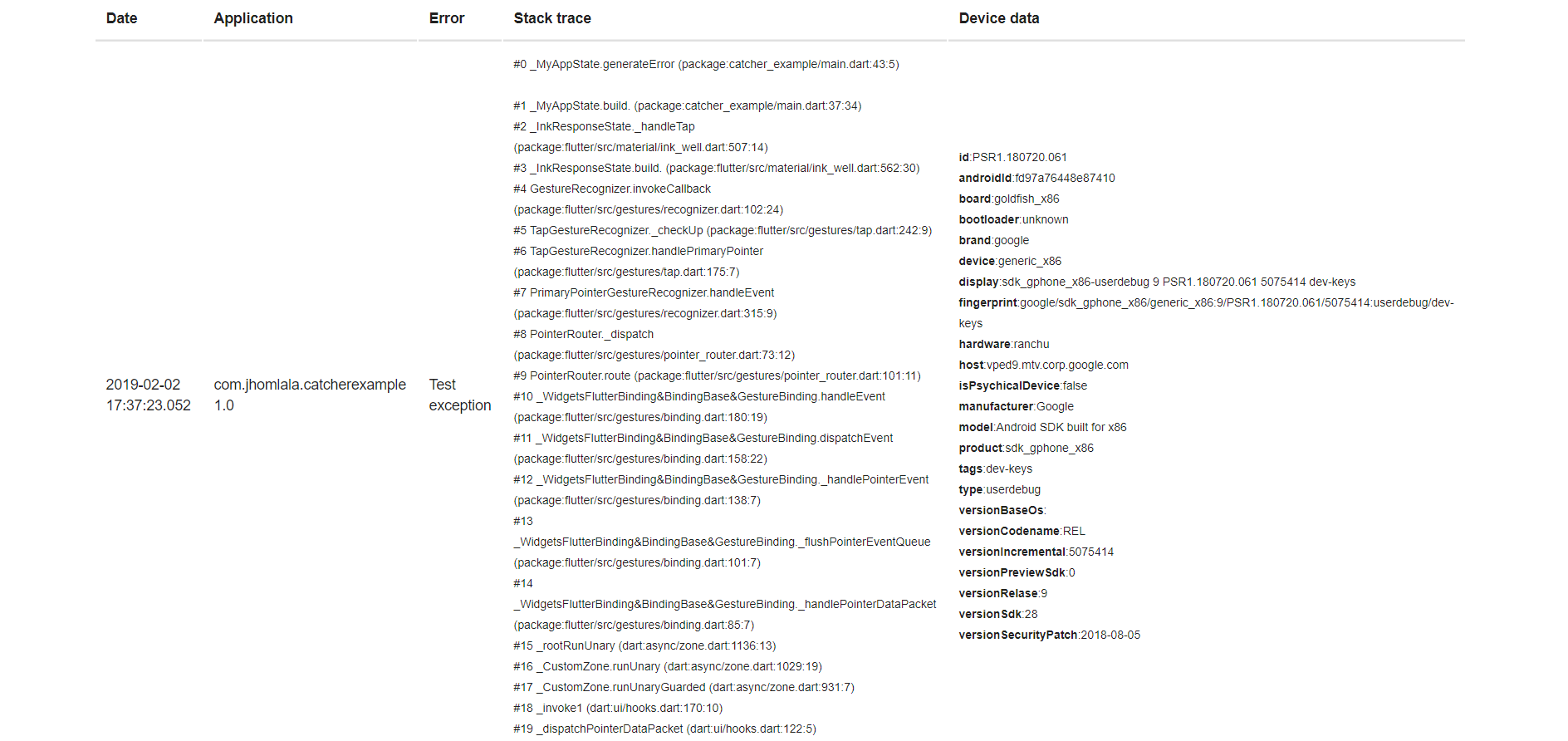
注意:请记住在 Android Manifest 中添加 Internet 权限
<uses-permission android:name="android.permission.INTERNET"/>
文件处理器
文件处理器允许将日志存储到文件中。最小示例
main() {
  String path = "/storage/emulated/0/log.txt";
  CatcherOptions debugOptions = CatcherOptions(
      DialogReportMode(), [FileHandler(File(path), printLogs: true)]);
  CatcherOptions releaseOptions =
      CatcherOptions(DialogReportMode(), [FileHandler(File(path))]);

  Catcher(MyApp(), debugConfig: debugOptions, releaseConfig: releaseOptions);
}
所有参数列表
- file (必需) - 您想存储日志的文件
- enableDeviceParameters (可选) - 请参阅控制台处理器说明
- enableApplicationParameters (可选) - 请参阅控制台处理器说明
- enableStackTrace (可选) - 请参阅控制台处理器说明
- enableCustomParameters (可选) - 请参阅控制台处理器说明
- printLogs (可选) - 启用/禁用调试日志
将日志记录到外部目录文件的示例:https://github.com/jhomlala/catcher/blob/master/example/lib/file_example.dart
Toast 处理器
Toast 处理器允许在 toast 中显示简短消息。最小示例
所有参数列表
- gravity (可选) - toast 在屏幕上的位置:顶部/中部/底部
- length (可选) - toast 的长度:长或短
- backgroundColor (可选) - toast 的背景颜色
- textColor (可选) - toast 的文本颜色
- fontSize (可选) - 文本大小
- customMessage (可选) - toast 的自定义消息,如果未设置,则显示“Error occured: error”。
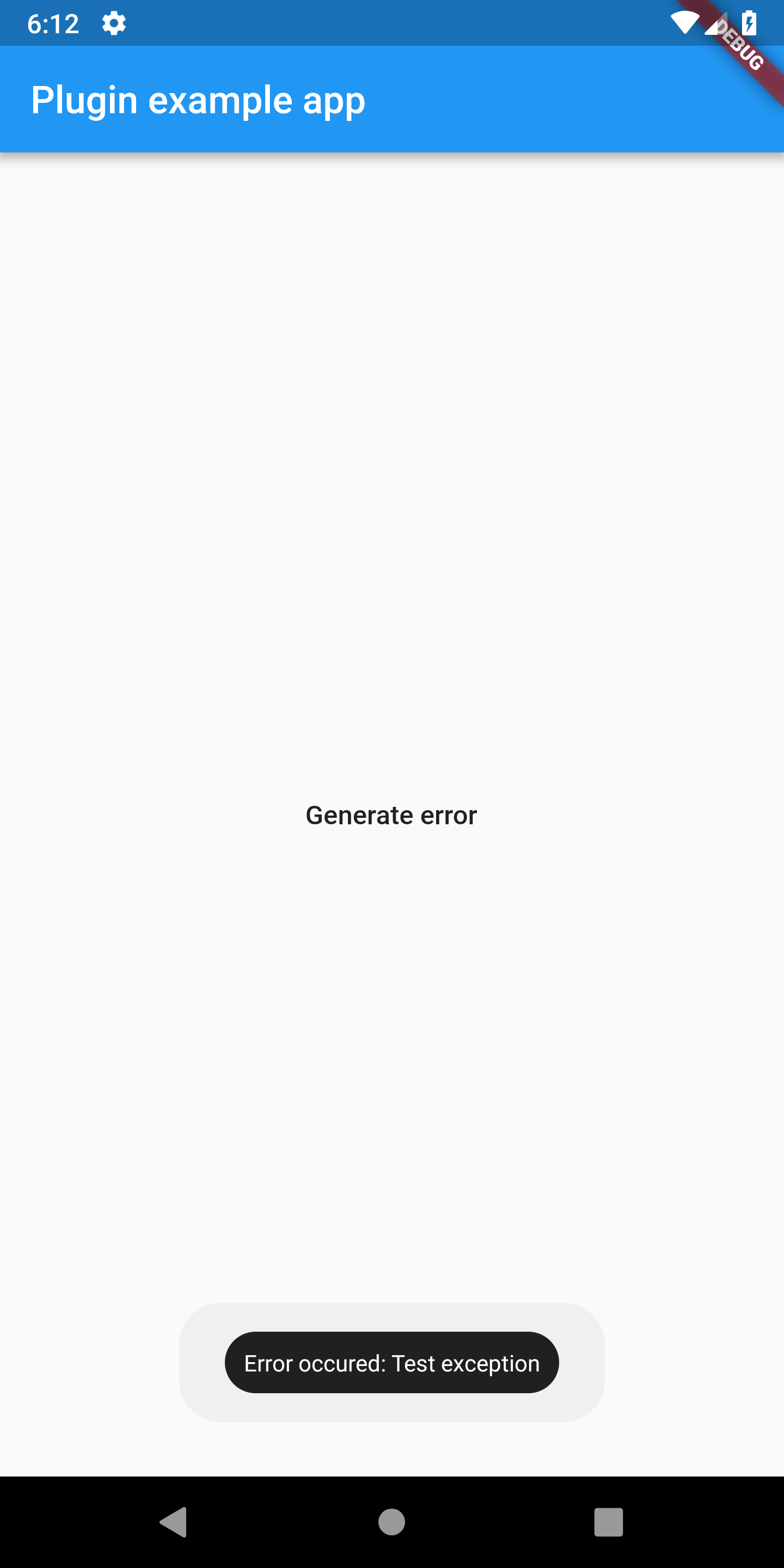
Sentry 处理器
Sentry 处理器允许将已处理的错误发送到 Sentry.io。在使用 sentry 处理器之前,您需要在
Sentry.io 页面上创建您的项目,然后复制 DSN 链接。示例
main() {

  CatcherOptions debugOptions = CatcherOptions(
      DialogReportMode(), [SentryHandler(SentryClient("YOUR_DSN_HERE"))]);
  CatcherOptions releaseOptions = CatcherOptions(NotificationReportMode(), [
    EmailManualHandler(["[email protected]"])
  ]);

  Catcher(MyApp(), debugConfig: debugOptions, releaseConfig: releaseOptions);
}
所有参数列表
- sentryClient - sentry 客户端实例
- enableDeviceParameters (可选) - 请参阅控制台处理器说明
- enableApplicationParameters (可选) - 请参阅控制台处理器说明
- enableCustomParameters (可选) - 请参阅控制台处理器说明
- printLogs (可选) - 启用/禁用调试日志
Slack 处理器
Slack 处理器允许将消息发送到您的 Slack 工作区。您可以指定目标
您的消息和格式。您需要在工作区中注册 webhook 才能使此处理器
正常工作:https://api.slack.com/incoming-webhooks。
main() {

 CatcherOptions debugOptions = CatcherOptions(SilentReportMode(), [
     SlackHandler(
         "<web_hook_url>",
         "#catcher",
         username: "CatcherTest",
         iconEmoji: ":thinking_face:",
         enableDeviceParameters: true,
         enableApplicationParameters: true,
         enableCustomParameters: true,
         enableStackTrace: true,
         printLogs: true),
   ]);
   Catcher(MyApp(), debugConfig: debugOptions);
}
所有参数列表
- webhookUrl (必需) - 您的 webhook 的 URL
- channel (必需) - 您的频道名称(例如 #catcher)
- username (可选) - 集成机器人的名称
- iconEmoji (可选) - 集成机器人的头像
- enableDeviceParameters (可选) - 请参阅控制台处理器说明
- enableApplicationParameters (可选) - 请参阅控制台处理器说明
- enableCustomParameters (可选) - 请参阅控制台处理器说明
- enableStackTrace (可选) - 请参阅控制台处理器说明
- printLogs (可选) - 启用/禁用调试日志
Discord 处理器
Discord 处理器允许将消息发送到您的 Discord 工作区。您需要在服务器中注册 webhook 才能使此处理器
正常工作:https://support.discordapp.com/hc/en-us/articles/228383668-Intro-to-Webhooks。
main() {
 CatcherOptions debugOptions = CatcherOptions(SilentReportMode(), [
     DiscordHandler(
         "<web_hook_url>",
         enableDeviceParameters: true,
         enableApplicationParameters: true,
         enableCustomParameters: true,
         enableStackTrace: true,
         printLogs: true),
   ]);

   Catcher(MyApp(), debugConfig: debugOptions);
}
所有参数列表
- webhookUrl (必需) - 您的 webhook 的 URL
- enableDeviceParameters (可选) - 请参阅控制台处理器说明
- enableApplicationParameters (可选) - 请参阅控制台处理器说明
- enableCustomParameters (可选) - 请参阅控制台处理器说明
- enableStackTrace (可选) - 请参阅控制台处理器说明
- printLogs (可选) - 启用/禁用调试日志
Crashlytics 处理器
Crashlytics 处理器允许将崩溃报告发送到 Firebase 服务。您需要先设置您的项目
与 Firebase 库。请遵循此处提供的说明
https://pub.dev/packages/firebase_crashlytics 和 https://firebase.google.com/docs/crashlytics/get-started
main() {
 CatcherOptions debugOptions = CatcherOptions(SilentReportMode(), [
     CrashlyticsHandler(
         enableDeviceParameters: true,
         enableApplicationParameters: true,
         enableCustomParameters: true,
         printLogs: true),
   ]);

   Catcher(MyApp(), debugConfig: debugOptions);
}
所有参数列表
- enableDeviceParameters (可选) - 请参阅控制台处理器说明
- enableApplicationParameters (可选) - 请参阅控制台处理器说明
- enableCustomParameters (可选) - 请参阅控制台处理器说明
- printLogs (可选) - 启用/禁用调试日志
显式异常报告处理器映射
显式异常报告处理器映射允许您为特定异常设置报告处理器。例如,如果您想为 FormatException 设置控制台处理器,您可以这样写
var explicitMap = {"FormatException": ConsoleHandler()};
CatcherOptions debugOptions = CatcherOptions(
      DialogReportMode(),
      [
        ConsoleHandler(),
        HttpHandler(HttpRequestType.post, Uri.parse("https://httpstat.us/200"),
            printLogs: true)
      ],
      explicitExceptionHandlersMap: explicitMap);
现在,如果捕获到 `FormatException`,则将使用控制台处理器。警告:如果您为特定异常设置了显式异常映射,则该异常将仅使用此处理器!
显式异常报告模式映射
与显式报告处理器映射相同,但这是为报告模式设计的。假设您想为某些异常使用特定的报告模式
 var explicitReportModesMap = {"FormatException": NotificationReportMode()};
  CatcherOptions debugOptions = CatcherOptions(
      DialogReportMode(),
      [
        ConsoleHandler(),
        HttpHandler(HttpRequestType.post, Uri.parse("https://httpstat.us/200"),
            printLogs: true)
      ],
      explicitExceptionReportModesMap: explicitReportModesMap,);
当捕获到 `FormatException` 时,将使用 NotificationReportMode。对于其他异常,Catcher 将使用 DialogReportMode。
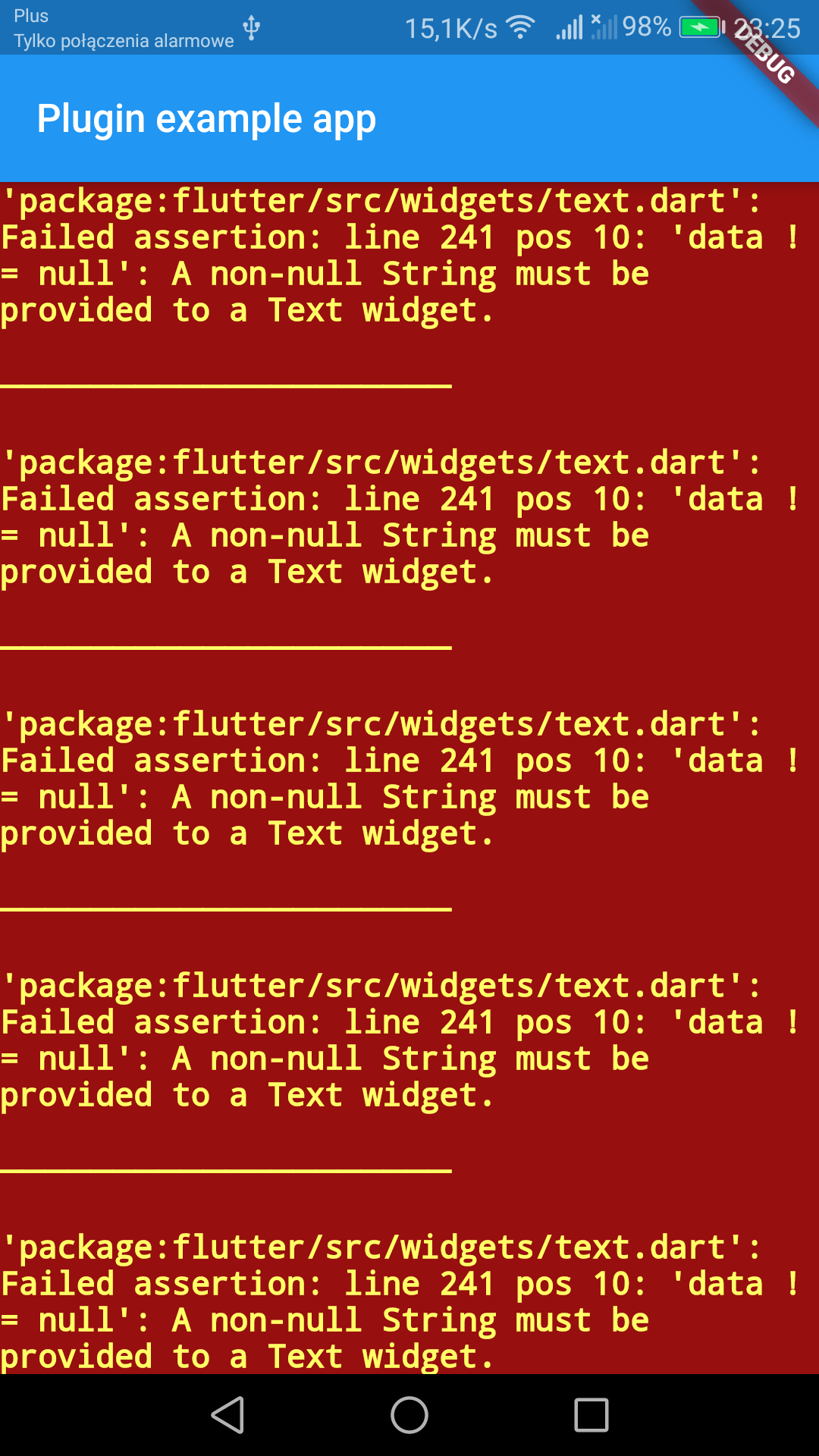
错误小部件
您可以添加错误小部件,它将替换红屏死机。要将其添加到您的应用中,请查看下面的代码
  @override
  Widget build(BuildContext context) {
    return MaterialApp(
      navigatorKey: Catcher.navigatorKey,
      //********************************************
      builder: (BuildContext context, Widget widget) {
        Catcher.addDefaultErrorWidget(
            showStacktrace: true,
            title: "Custom error title",
            description: "Custom error description",
            maxWidthForSmallMode: 150);
        return widget;
      },
      //********************************************
      home: Scaffold(
          appBar: AppBar(
            title: const Text('Plugin example app'),
          ),
          body: ChildWidget()),
    );
  }
您需要在您的 MaterialApp 或 CupertinoApp 的 builder 方法中添加 `Catcher.addDefaultErrorWidget()`。这将为您的应用中的每个 Widget 添加错误处理器。
您可以提供可选参数
- showStacktrace - 显示/隐藏堆栈跟踪
- title - 错误小部件的自定义标题
- description - 错误小部件的自定义描述
- maxWidthForSmallMode - “小”模式的最大宽度,默认为 150
错误小部件将在 Widget 无法渲染时替换您的 Widget。如果 Widget 的宽度小于 maxWidthForSmallMode,则将启用“小”模式,该模式将仅显示错误图标
| 带有错误小部件 | 没有错误小部件 |
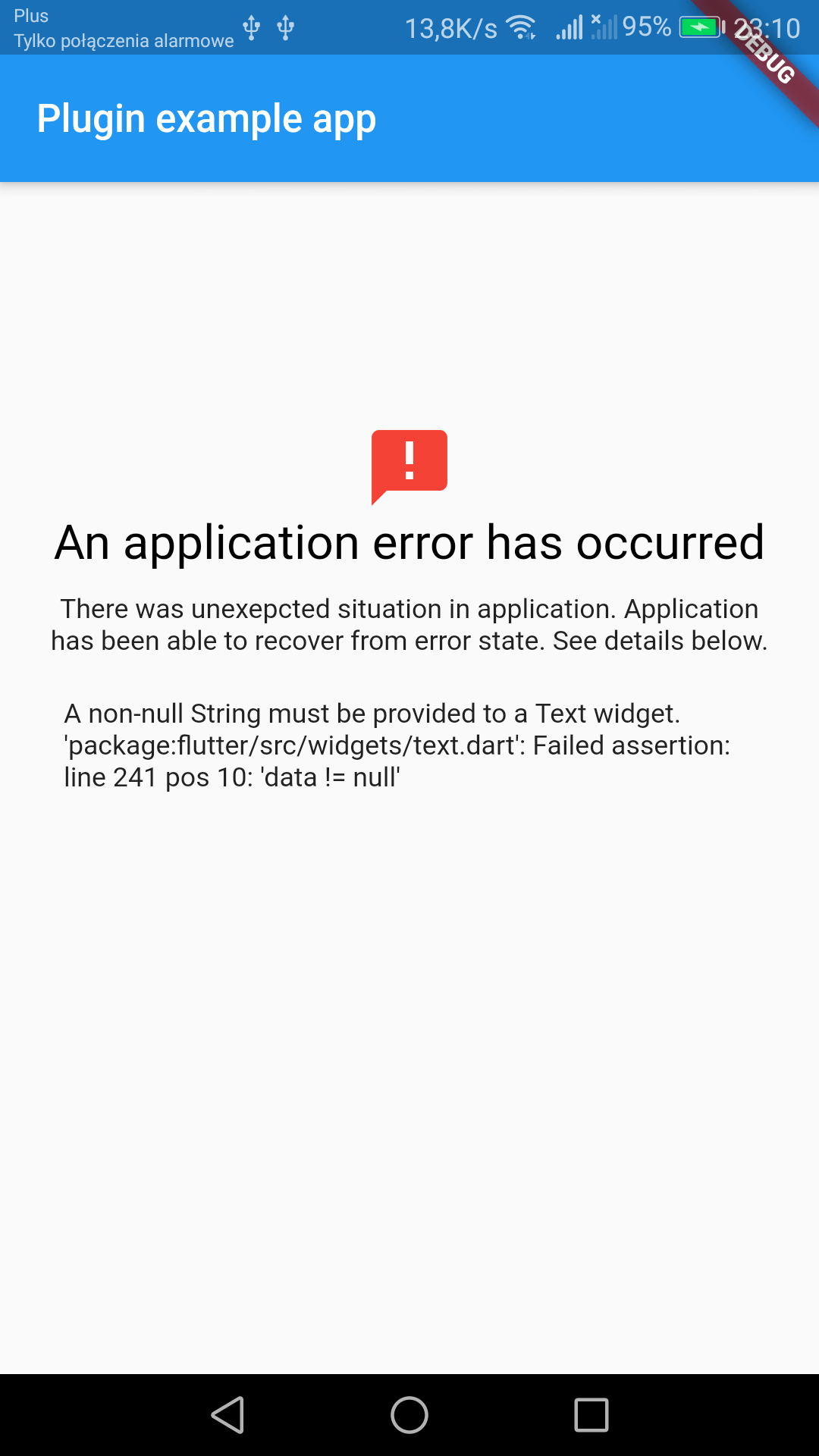 |  |
当前配置
您可以使用以下方法获取当前使用的配置
CatcherOptions options = catcher.getCurrentConfig();
例如,这可用于在运行时更改自定义参数。
测试异常
发送测试异常
Catcher.sendTestException();


