
Flutter ConstraintLayout
一个功能强大的 Stack,使用约束构建灵活的布局。类似于 Android 的 ConstraintLayout 和 iOS 的 AutoLayout。
无论布局多复杂、约束嵌套多深,它的性能几乎与 Flex 和 Stack 相当。面对复杂布局,它比 Flex 和 Stack 提供了更好的性能、灵活性以及非常扁平的代码层级。告别“嵌套地狱”。
Flutter ConstraintLayout 拥有极高的布局性能,无需线性方程求解。建议在顶层使用 ConstraintLayout。对于极度复杂的布局(千个子元素,两千个约束),布局和绘制总耗时在5毫秒内(Windows 10 调试模式,发布模式耗时更短),帧率轻松达到200fps。
如果没有必要,尽量相对于父布局,这样可以少定义id。或者使用相对id。
警告:出于布局性能考虑,约束始终是单向的,不允许两个子元素直接或间接相互约束。每个约束都应该精确地描述子元素的位置。虽然约束只能是单向的,但您仍然可以更好地处理以前(Android ConstraintLayout)的双向约束,例如链。
任何骚扰你的人,你都可以给他发 Flutter 代码,用嵌套地狱来侮辱他。
功能
- 使用约束构建灵活的布局
- 左对齐左
- 左对齐右
- 右对齐左
- 右对齐右
- 顶对齐顶
- 顶对齐底
- 底对齐顶
- 底对齐底
- 基线对齐顶
- 基线对齐底
- 基线对齐基线
- margin 和 goneMargin
- clickPadding(快速扩展子元素的点击区域,而不改变其实际大小。这意味着点击区域可以在子元素之间共享,而无需增加嵌套。有时可能需要结合 e-index 使用)
- 可见性控制
- visible
- 不可见
- 隐藏
- 约束完整性提示
- bias(偏差)
- z-index(绘制顺序,默认为子元素索引)
- translate(移动)
- 百分比布局
- guideline(参考线)
- 约束和 widget 分离
- barrier(障碍)
- dimension ratio(尺寸比例)
- relative id(相对 ID)
- wrapper constraints(包装约束)
- 左上对齐
- 顶部中心对齐
- 右上对齐
- 左侧中心对齐
- 中心对齐
- 右侧中心对齐
- 左下对齐
- 底部中心对齐
- 右下对齐
- 中心水平对齐
- 中心垂直对齐
- 外侧左上
- 外侧顶部中心
- 外侧右上
- 外侧左侧中心
- 外侧右侧中心
- 外侧左下
- 外侧底部中心
- 外侧右下
- 中心左上
- 中心顶部中心
- 中心右上
- 中心左侧中心
- 中心右侧中心
- 中心左下
- 中心底部中心
- 中心右下
- 瀑布流、网格、列表(列表是特殊的瀑布流,网格也是特殊的瀑布流)
- 圆心定位
- e-index(事件分发顺序,默认为 z-index)
即将推出
- chain(链)
- 约束可视化
- 自适应内容大小
- 更多...
支持平台
- Android
- iOS
- Mac
- Windows
- Linux
- Web
导入
Null-safety(空安全)
dependencies:
  flutter_constraintlayout:
    git:
      url: 'https://github.com/hackware1993/Flutter-ConstraintLayout.git'
      ref: 'v0.9.27-stable'
dependencies:
  flutter_constraintlayout: ^0.9.27-stable
import 'package:flutter_constraintlayout/flutter_constraintlayout.dart';
示例 Flutter Web 在线示例
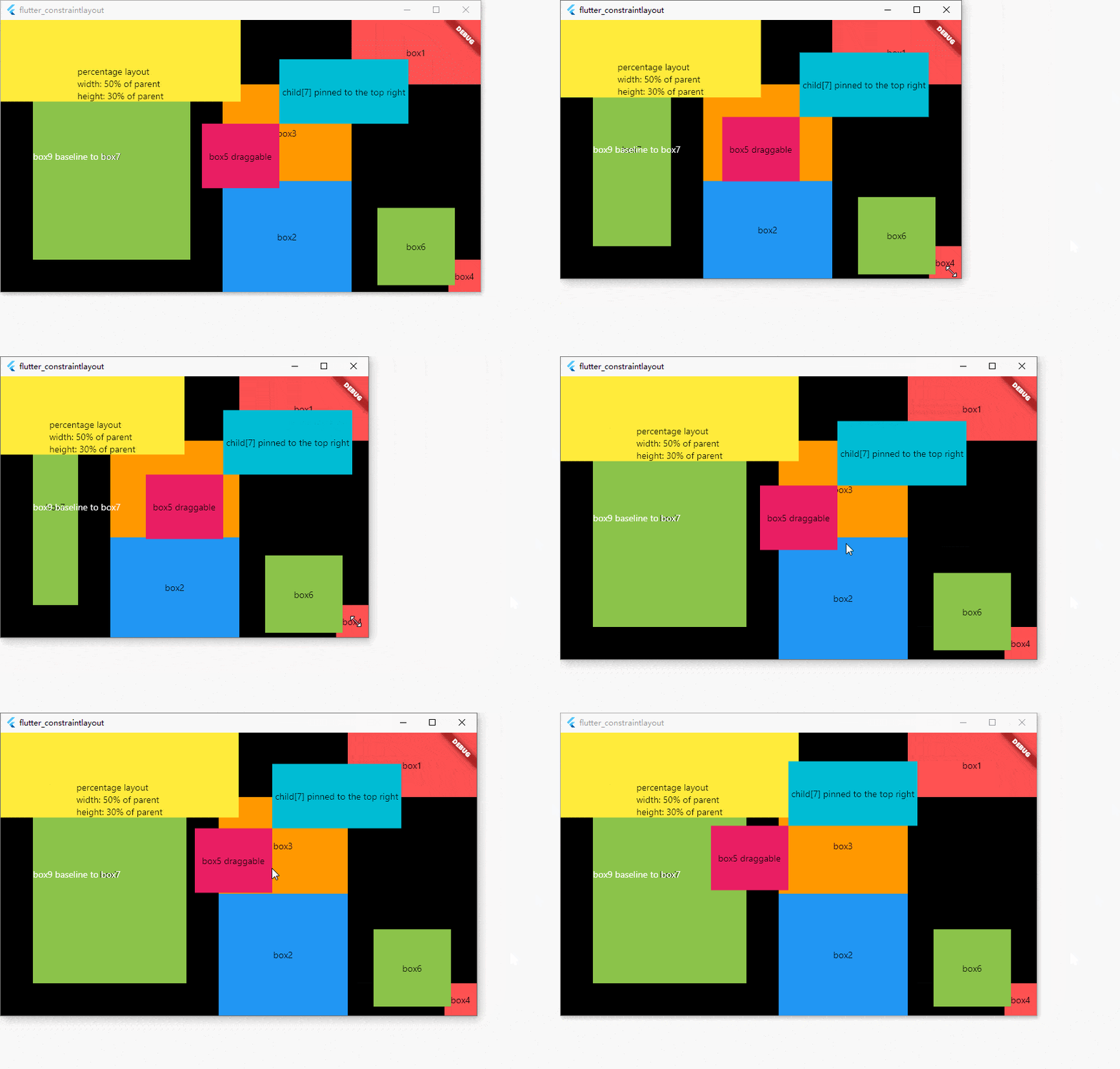
class ExampleState extends State<Example> {
  double x = 0;
  double y = 0;

  ConstraintId box0 = ConstraintId('box0');
  ConstraintId box1 = ConstraintId('box1');
  ConstraintId box2 = ConstraintId('box2');
  ConstraintId box3 = ConstraintId('box3');
  ConstraintId box4 = ConstraintId('box4');
  ConstraintId box5 = ConstraintId('box5');
  ConstraintId box6 = ConstraintId('box6');
  ConstraintId box7 = ConstraintId('box7');
  ConstraintId box8 = ConstraintId('box8');
  ConstraintId box9 = ConstraintId('box9');
  ConstraintId box10 = ConstraintId('box10');
  ConstraintId box11 = ConstraintId('box11');

  @override
  Widget build(BuildContext context) {
    return MaterialApp(
      home: Scaffold(
        backgroundColor: Colors.black,
        body: ConstraintLayout(
          // Constraints can be separated from widgets
          childConstraints: [
            Constraint(
              id: box0,
              width: 200,
              height: 200,
              bottomLeftTo: parent,
              zIndex: 20,
            )
          ],
          children: [
            Container(
              color: Colors.redAccent,
              alignment: Alignment.center,
              child: const Text('box0'),
            ).applyConstraintId(
              id: box0, // Constraints can be separated from widgets
            ),
            Container(
              color: Colors.redAccent,
              alignment: Alignment.center,
              child: const Text('box1'),
            ).apply(
              constraint: Constraint(
                // Constraints set with widgets
                id: box1,
                width: 200,
                height: 100,
                topRightTo: parent,
              ),
            ),
            Container(
              color: Colors.blue,
              alignment: Alignment.center,
              child: const Text('box2'),
            ).applyConstraint(
              // Constraints set with widgets easy way
              id: box2,
              width: matchConstraint,
              height: matchConstraint,
              centerHorizontalTo: box3,
              top: box3.bottom,
              bottom: parent.bottom,
            ),
            Container(
              color: Colors.orange,
              width: 200,
              height: 150,
              alignment: Alignment.center,
              child: const Text('box3'),
            ).applyConstraint(
              id: box3,
              width: wrapContent,
              height: wrapContent,
              right: box1.left,
              top: box1.bottom,
            ),
            Container(
              color: Colors.redAccent,
              alignment: Alignment.center,
              child: const Text('box4'),
            ).applyConstraint(
              id: box4,
              width: 50,
              height: 50,
              bottomRightTo: parent,
            ),
            GestureDetector(
              child: Container(
                color: Colors.pink,
                alignment: Alignment.center,
                child: const Text('box5 draggable'),
              ),
              onPanUpdate: (details) {
                setState(() {
                  x += details.delta.dx;
                  y += details.delta.dy;
                });
              },
            ).applyConstraint(
              id: box5,
              width: 120,
              height: 100,
              centerTo: parent,
              zIndex: 100,
              translate: Offset(x, y),
              translateConstraint: true,
            ),
            Container(
              color: Colors.lightGreen,
              alignment: Alignment.center,
              child: const Text('box6'),
            ).applyConstraint(
              id: box6,
              width: 120,
              height: 120,
              centerVerticalTo: box2,
              verticalBias: 0.8,
              left: box3.right,
              right: parent.right,
            ),
            Container(
              color: Colors.lightGreen,
              alignment: Alignment.center,
              child: const Text('box7'),
            ).applyConstraint(
              id: box7,
              width: matchConstraint,
              height: matchConstraint,
              left: parent.left,
              right: box3.left,
              centerVerticalTo: parent,
              margin: const EdgeInsets.all(50),
            ),
            Container(
              color: Colors.cyan,
              alignment: Alignment.center,
              child: const Text('child[7] pinned to the top right'),
            ).applyConstraint(
              width: 200,
              height: 100,
              left: box5.right,
              bottom: box5.top,
            ),
            const Text(
              'box9 baseline to box7',
              style: TextStyle(
                color: Colors.white,
              ),
            ).applyConstraint(
              id: box9,
              width: wrapContent,
              height: wrapContent,
              baseline: box7.baseline,
              left: box7.left,
            ),
            ...horizontalChain(
              centerHorizontalTo: parent,
              hChainList: [
                Container(
                  color: Colors.redAccent,
                  alignment: Alignment.center,
                  child: const Text('chain item 1'),
                ).applyConstraint(
                  id: box10,
                  width: matchConstraint,
                  height: 200,
                  top: parent.top,
                ),
                Container(
                  color: Colors.redAccent,
                  alignment: Alignment.center,
                  child: const Text('chain item 2'),
                ).applyConstraint(
                  id: box11,
                  width: matchConstraint,
                  height: 200,
                  top: parent.top,
                ),
              ],
            ),
            Container(
              color: Colors.yellow,
              alignment: Alignment.bottomCenter,
              child: const Text(
                  'percentage layout\nwidth: 50% of parent\nheight: 30% of parent'),
            ).applyConstraint(
              width: matchConstraint,
              height: matchConstraint,
              widthPercent: 0.5,
              heightPercent: 0.3,
              horizontalBias: 0,
              verticalBias: 0,
              centerTo: parent,
            ),
          ],
        ),
      ),
    );
  }
}
高级用法
- guideline Flutter Web 在线示例
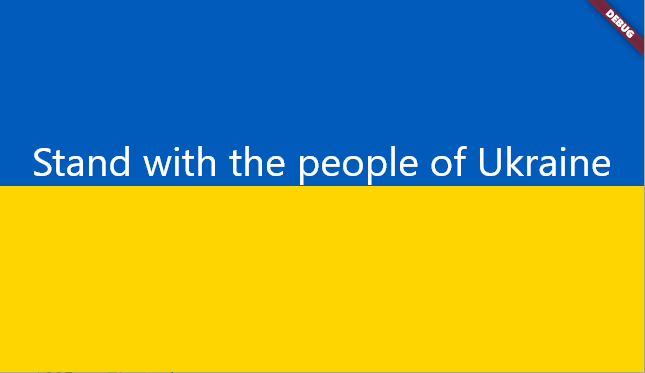
class GuidelineExample extends StatelessWidget {
  const GuidelineExample({Key? key}) : super(key: key);

  @override
  Widget build(BuildContext context) {
    ConstraintId guideline = ConstraintId('guideline');
    return MaterialApp(
      home: Scaffold(
        body: ConstraintLayout(
          children: [
            Container(
              color: const Color(0xFF005BBB),
            ).applyConstraint(
              width: matchParent,
              height: matchConstraint,
              top: parent.top,
              bottom: guideline.top,
            ),
            Guideline(
              id: guideline,
              horizontal: true,
              guidelinePercent: 0.5,
            ),
            Container(
              color: const Color(0xFFFFD500),
            ).applyConstraint(
              width: matchParent,
              height: matchConstraint,
              top: guideline.bottom,
              bottom: parent.bottom,
            ),
            const Text(
              'Stand with the people of Ukraine',
              style: TextStyle(
                fontSize: 40,
                color: Colors.white,
              ),
            ).applyConstraint(
              width: wrapContent,
              height: wrapContent,
              centerHorizontalTo: parent,
              bottom: guideline.bottom,
            )
          ],
        ),
      ),
    );
  }
}
- barrier Flutter Web 在线示例
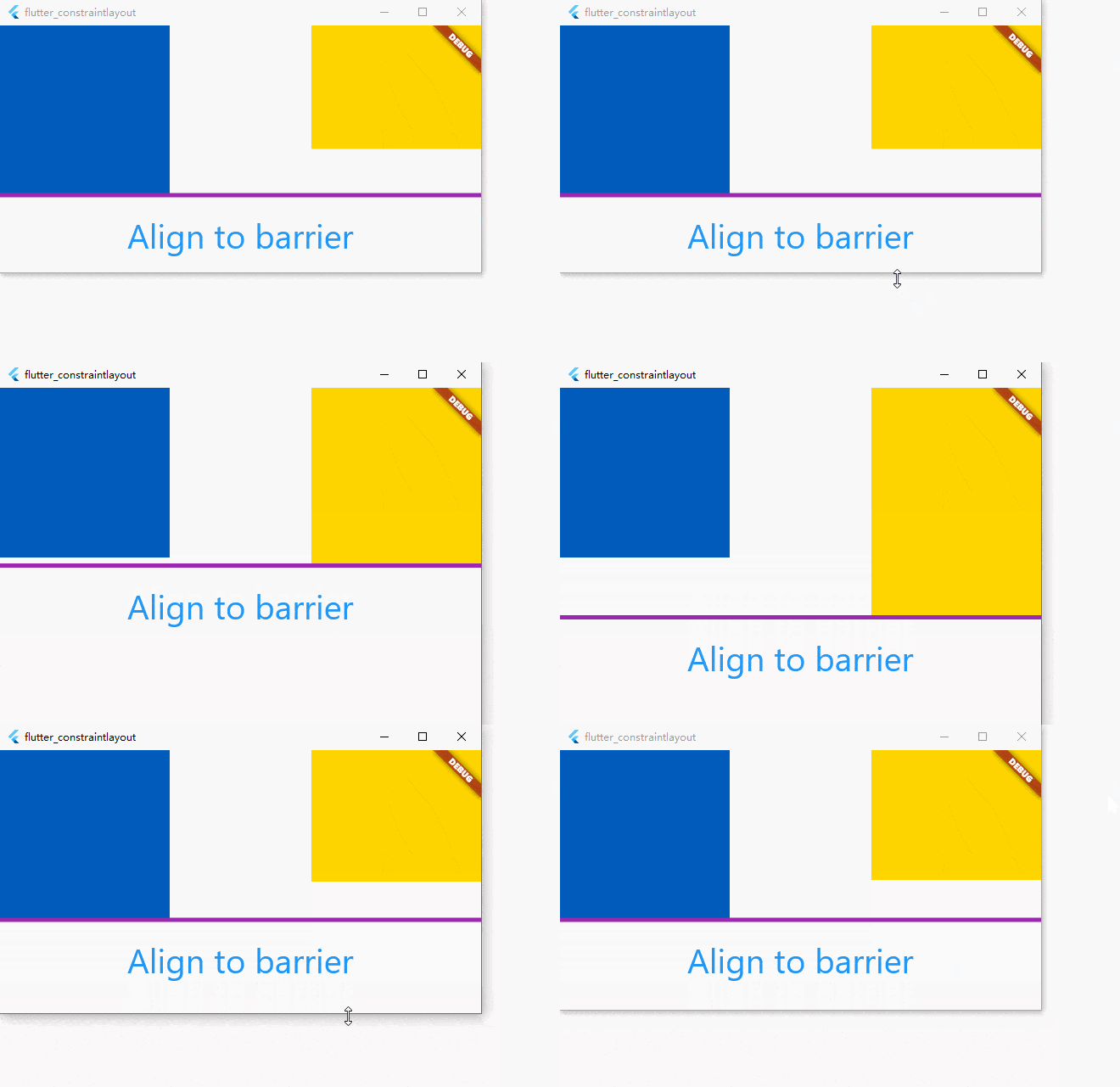
class BarrierExample extends StatelessWidget {
  const BarrierExample({Key? key}) : super(key: key);

  @override
  Widget build(BuildContext context) {
    ConstraintId leftChild = ConstraintId('leftChild');
    ConstraintId rightChild = ConstraintId('rightChild');
    ConstraintId barrier = ConstraintId('barrier');
    return MaterialApp(
      home: Scaffold(
        body: ConstraintLayout(
          debugShowGuideline: true,
          children: [
            Container(
              color: const Color(0xFF005BBB),
            ).applyConstraint(
              id: leftChild,
              width: 200,
              height: 200,
              top: parent.top,
              left: parent.left,
            ),
            Container(
              color: const Color(0xFFFFD500),
            ).applyConstraint(
              id: rightChild,
              width: 200,
              height: matchConstraint,
              right: parent.right,
              top: parent.top,
              bottom: parent.bottom,
              heightPercent: 0.5,
              verticalBias: 0,
            ),
            Barrier(
              id: barrier,
              direction: BarrierDirection.bottom,
              referencedIds: [leftChild, rightChild],
            ),
            const Text(
              'Align to barrier',
              style: TextStyle(
                fontSize: 40,
                color: Colors.blue,
              ),
            ).applyConstraint(
              width: wrapContent,
              height: wrapContent,
              centerHorizontalTo: parent,
              top: barrier.bottom,
              goneMargin: const EdgeInsets.only(top: 20),
            )
          ],
        ),
      ),
    );
  }
}
- badge Flutter Web 在线示例
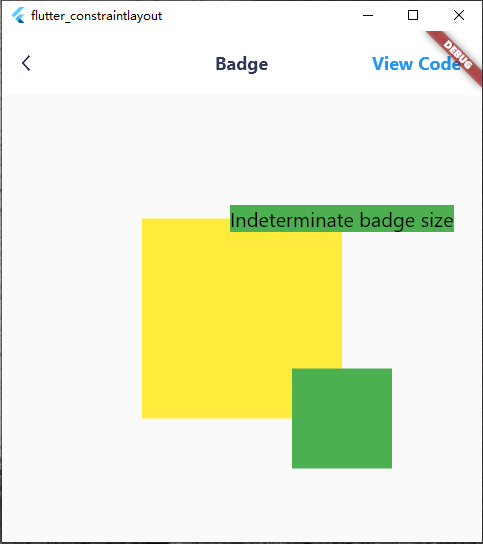
class BadgeExample extends StatelessWidget {
  const BadgeExample({Key? key}) : super(key: key);

  @override
  Widget build(BuildContext context) {
    ConstraintId anchor = ConstraintId('anchor');
    return Scaffold(
      body: ConstraintLayout(
        children: [
          Container(
            color: Colors.yellow,
          ).applyConstraint(
            width: 200,
            height: 200,
            centerTo: parent,
            id: anchor,
          ),
          Container(
            color: Colors.green,
            child: const Text(
              'Indeterminate badge size',
              style: TextStyle(
                color: Colors.black,
                fontSize: 20,
              ),
            ),
          ).applyConstraint(
            left: anchor.right,
            bottom: anchor.top,
            translate: const Offset(-0.5, 0.5),
            percentageTranslate: true,
          ),
          Container(
            color: Colors.green,
          ).applyConstraint(
            width: 100,
            height: 100,
            left: anchor.right,
            right: anchor.right,
            top: anchor.bottom,
            bottom: anchor.bottom,
          )
        ],
      ),
    );
  }
}
- grid Flutter Web 在线示例
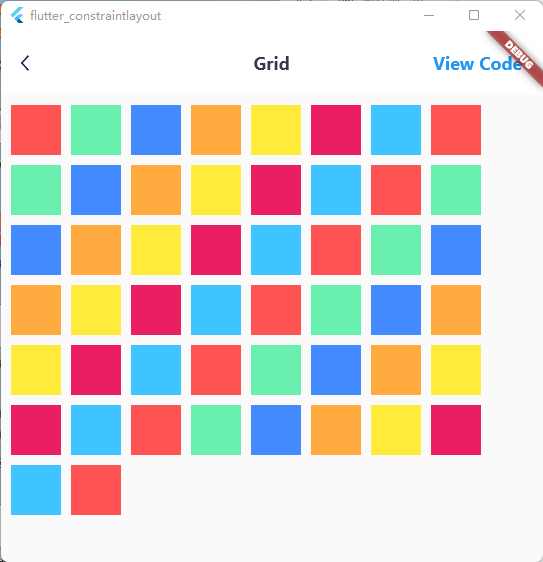
class GridExample extends StatelessWidget {
  const GridExample({Key? key}) : super(key: key);

  @override
  Widget build(BuildContext context) {
    List<Color> colors = [
      Colors.redAccent,
      Colors.greenAccent,
      Colors.blueAccent,
      Colors.orangeAccent,
      Colors.yellow,
      Colors.pink,
      Colors.lightBlueAccent
    ];
    return Scaffold(
      body: ConstraintLayout(
        children: [
          ...constraintGrid(
              id: ConstraintId('grid'),
              left: parent.left,
              top: parent.top,
              itemCount: 50,
              columnCount: 8,
              itemWidth: 50,
              itemHeight: 50,
              itemBuilder: (index) {
                return Container(
                  color: colors[index % colors.length],
                );
              },
              itemMarginBuilder: (index) {
                return const EdgeInsets.only(
                  left: 10,
                  top: 10,
                );
              })
        ],
      ),
    );
  }
}
- staggered grid Flutter Web 在线示例
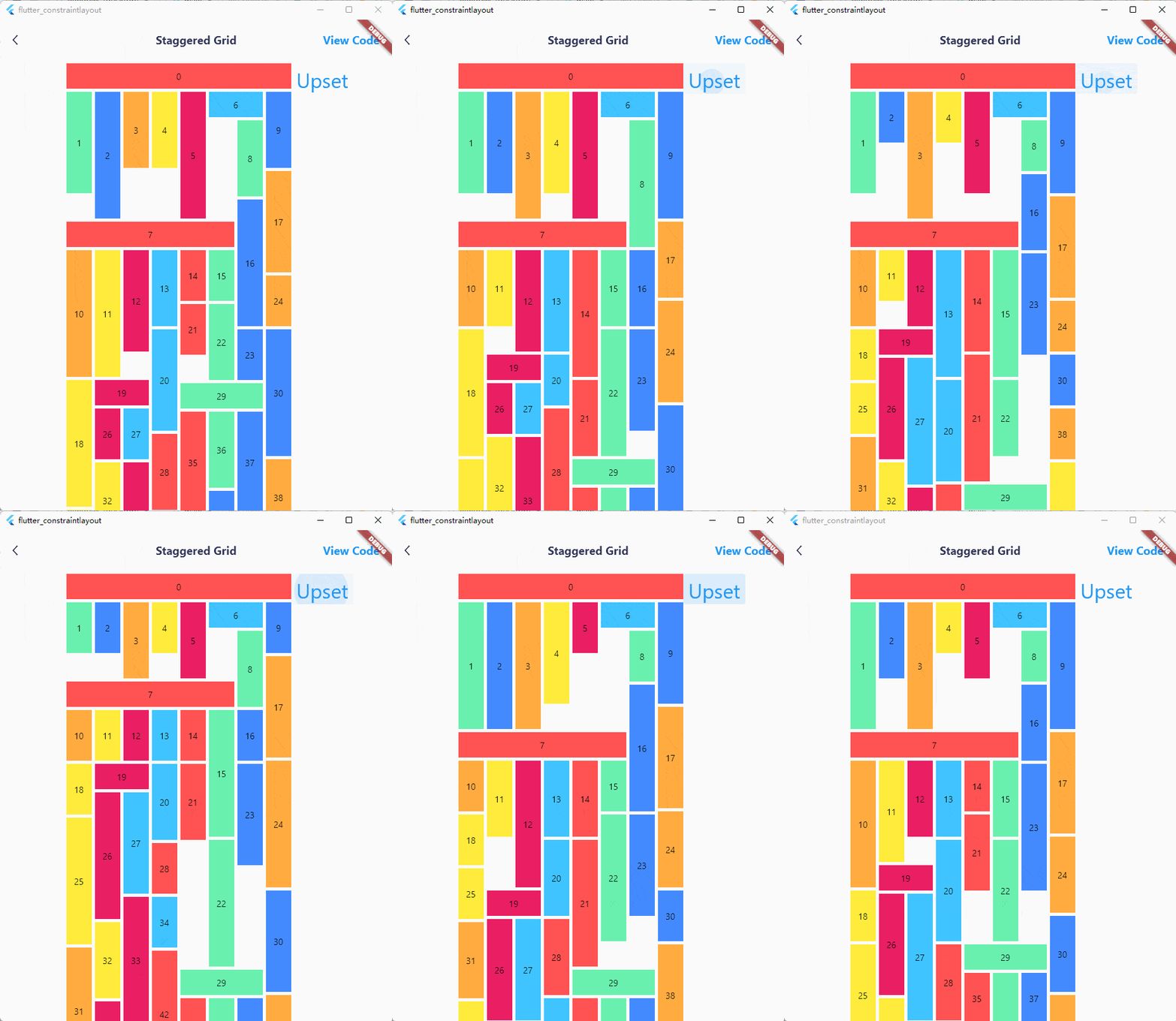
class StaggeredGridExample extends StatelessWidget {
  const StaggeredGridExample({Key? key}) : super(key: key);

  @override
  Widget build(BuildContext context) {
    List<Color> colors = [
      Colors.redAccent,
      Colors.greenAccent,
      Colors.blueAccent,
      Colors.orangeAccent,
      Colors.yellow,
      Colors.pink,
      Colors.lightBlueAccent
    ];
    const double smallestSize = 40;
    const int columnCount = 8;
    Random random = Random();
    return Scaffold(
      body: ConstraintLayout(
        children: [
          TextButton(
            onPressed: () {
              (context as Element).markNeedsBuild();
            },
            child: const Text(
              'Upset',
              style: TextStyle(
                fontSize: 32,
                height: 1.5,
              ),
            ),
          ).applyConstraint(
            left: ConstraintId('horizontalList').right,
            top: ConstraintId('horizontalList').top,
          ),
          ...constraintGrid(
              id: ConstraintId('horizontalList'),
              left: parent.left,
              top: parent.top,
              margin: const EdgeInsets.only(
                left: 100,
              ),
              itemCount: 50,
              columnCount: columnCount,
              itemBuilder: (index) {
                return Container(
                  color: colors[index % colors.length],
                  alignment: Alignment.center,
                  child: Text('$index'),
                );
              },
              itemSizeBuilder: (index) {
                if (index == 0) {
                  return const Size(
                      smallestSize * columnCount + 35, smallestSize);
                }
                if (index == 6) {
                  return const Size(smallestSize * 2 + 5, smallestSize);
                }
                if (index == 7) {
                  return const Size(smallestSize * 6 + 25, smallestSize);
                }
                if (index == 19) {
                  return const Size(smallestSize * 2 + 5, smallestSize);
                }
                if (index == 29) {
                  return const Size(smallestSize * 3 + 10, smallestSize);
                }
                return Size(
                    smallestSize, (2 + random.nextInt(4)) * smallestSize);
              },
              itemSpanBuilder: (index) {
                if (index == 0) {
                  return columnCount;
                }
                if (index == 6) {
                  return 2;
                }
                if (index == 7) {
                  return 6;
                }
                if (index == 19) {
                  return 2;
                }
                if (index == 29) {
                  return 3;
                }
                return 1;
              },
              itemMarginBuilder: (index) {
                return const EdgeInsets.only(
                  left: 5,
                  top: 5,
                );
              })
        ],
      ),
    );
  }
}
- circle position Flutter Web 在线示例
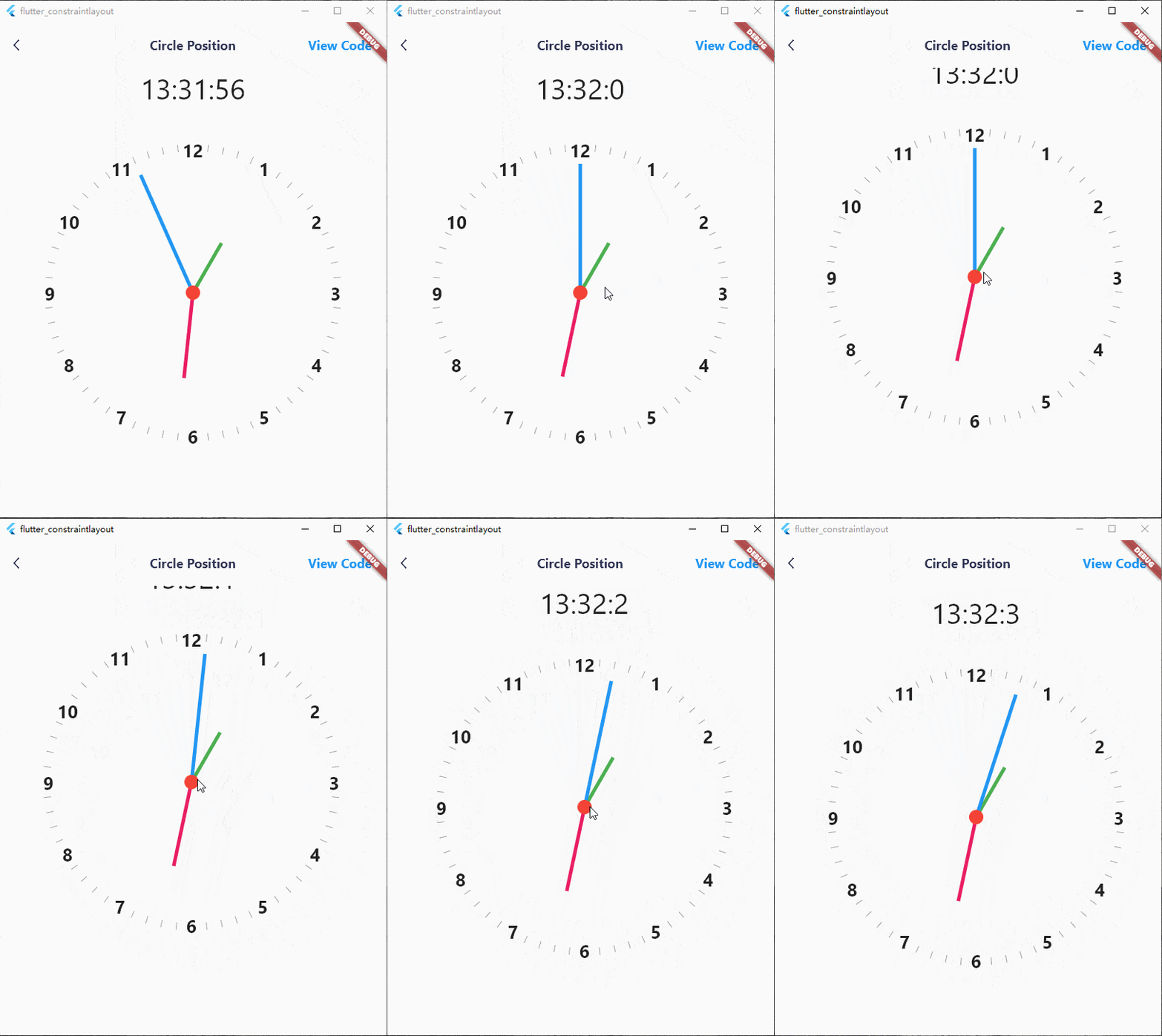
class CirclePositionExampleState extends State<CirclePositionExample> {
  late Timer timer;
  late int hour;
  late int minute;
  late int second;

  double centerTranslateX = 0;
  double centerTranslateY = 0;

  @override
  void initState() {
    super.initState();
    calculateClockAngle();
    timer = Timer.periodic(const Duration(seconds: 1), (_) {
      calculateClockAngle();
    });
  }

  void calculateClockAngle() {
    setState(() {
      DateTime now = DateTime.now();
      hour = now.hour;
      minute = now.minute;
      second = now.second;
    });
  }

  @override
  void dispose() {
    super.dispose();
    timer.cancel();
  }

  @override
  Widget build(BuildContext context) {
    return Scaffold(
      body: ConstraintLayout(
        children: [
          GestureDetector(
            child: Container(
              decoration: const BoxDecoration(
                color: Colors.red,
                borderRadius: BorderRadius.all(
                  Radius.circular(1000),
                ),
              ),
            ),
            onPanUpdate: (details) {
              setState(() {
                centerTranslateX += details.delta.dx;
                centerTranslateY += details.delta.dy;
              });
            },
          ).applyConstraint(
            width: 20,
            height: 20,
            centerTo: parent,
            zIndex: 100,
            translate: Offset(centerTranslateX, centerTranslateY),
            translateConstraint: true,
          ),
          for (int i = 0; i < 12; i++)
            Text(
              '${i + 1}',
              style: const TextStyle(
                fontWeight: FontWeight.bold,
                fontSize: 25,
              ),
            ).applyConstraint(
              centerTo: rId(0),
              translate: circleTranslate(
                radius: 205,
                angle: (i + 1) * 30,
              ),
            ),
          for (int i = 0; i < 60; i++)
            if (i % 5 != 0)
              Transform.rotate(
                angle: pi + pi * (i * 6 / 180),
                child: Container(
                  color: Colors.grey,
                  margin: const EdgeInsets.only(
                    top: 405,
                  ),
                ),
              ).applyConstraint(
                width: 1,
                height: 415,
                centerTo: rId(0),
              ),
          Transform.rotate(
            angle: pi + pi * (hour * 30 / 180),
            alignment: Alignment.topCenter,
            child: Container(
              color: Colors.green,
            ),
          ).applyConstraint(
            width: 5,
            height: 80,
            centerTo: rId(0),
            translate: const Offset(0, 0.5),
            percentageTranslate: true,
          ),
          Transform.rotate(
            angle: pi + pi * (minute * 6 / 180),
            alignment: Alignment.topCenter,
            child: Container(
              color: Colors.pink,
            ),
          ).applyConstraint(
            width: 5,
            height: 120,
            centerTo: rId(0),
            translate: const Offset(0, 0.5),
            percentageTranslate: true,
          ),
          Transform.rotate(
            angle: pi + pi * (second * 6 / 180),
            alignment: Alignment.topCenter,
            child: Container(
              color: Colors.blue,
            ),
          ).applyConstraint(
            width: 5,
            height: 180,
            centerTo: rId(0),
            translate: const Offset(0, 0.5),
            percentageTranslate: true,
          ),
          Text(
            '$hour:$minute:$second',
            style: const TextStyle(
              fontSize: 40,
            ),
          ).applyConstraint(
            outTopCenterTo: rId(0),
            margin: const EdgeInsets.only(
              bottom: 250,
            ),
          )
        ],
      ),
    );
  }
}
性能优化
- 当布局复杂时,如果子元素需要频繁重绘,建议使用 RepaintBoundary 来提升性能。
class OffPaintExample extends StatelessWidget {
  const OffPaintExample({Key? key}) : super(key: key);

  @override
  Widget build(BuildContext context) {
    return MaterialApp(
      home: Scaffold(
        body: ConstraintLayout(
          children: [
            Container(
              color: Colors.orangeAccent,
            ).offPaint().applyConstraint(
              width: 200,
              height: 200,
              topRightTo: parent,
            )
          ],
        ),
      ),
    );
  }
}
- 尝试使用 const Widget。如果无法将子元素声明为 const 且其内容不会发生变化,则可以使用 OffBuildWidget 来避免子元素的重建。
class OffBuildExample extends StatelessWidget {
  const OffBuildExample({Key? key}) : super(key: key);

  @override
  Widget build(BuildContext context) {
    return MaterialApp(
      home: Scaffold(
        body: ConstraintLayout(
          children: [

            /// subtrees that do not change
            Container(
              color: Colors.orangeAccent,
            ).offBuild(id: 'id').applyConstraint(
              width: 200,
              height: 200,
              topRightTo: parent,
            )
          ],
        ),
      ),
    );
  }
}
-
子元素会自动成为 RelayoutBoundary,除非其宽度或高度设置为 wrapContent。可以合理地减少 wrapContent 的使用,因为当 ConstraintLayout 的尺寸发生变化时(通常是窗口尺寸变化),所有宽度或高度为 wrapContent 的子元素都会被重新布局。并且由于传递给其他子元素的约束不会改变,因此不会触发实际的重新布局。
-
如果您在子元素列表中使用了 Guideline 或 Barrier,它们不可避免地会生成 Element 和 RenderObject,这些元素会被布局但不会被绘制。此时可以使用 GuidelineDefine 或 BarrierDefine 来进行优化,它们将不再生成 Element 和 RenderObject。
class BarrierExample extends StatelessWidget {
  const BarrierExample({Key? key}) : super(key: key);

  @override
  Widget build(BuildContext context) {
    ConstraintId leftChild = ConstraintId('leftChild');
    ConstraintId rightChild = ConstraintId('rightChild');
    ConstraintId barrier = ConstraintId('barrier');
    return Scaffold(
      body: ConstraintLayout(
        childConstraints: [
          BarrierDefine(
            id: barrier,
            direction: BarrierDirection.bottom,
            referencedIds: [leftChild, rightChild],
          ),
        ],
        children: [
          Container(
            color: const Color(0xFF005BBB),
          ).applyConstraint(
            id: leftChild,
            width: 200,
            height: 200,
            topLeftTo: parent,
          ),
          Container(
            color: const Color(0xFFFFD500),
          ).applyConstraint(
            id: rightChild,
            width: 200,
            height: matchConstraint,
            centerRightTo: parent,
            heightPercent: 0.5,
            verticalBias: 0,
          ),
          const Text(
            'Align to barrier',
            style: TextStyle(
              fontSize: 40,
              color: Colors.blue,
            ),
          ).applyConstraint(
            centerHorizontalTo: parent,
            top: barrier.bottom,
          )
        ],
      ),
    );
  }
}
支持我
如果对您有很大帮助,请考虑赞助我一杯奶茶。 Paypal 
联系方式
许可证
MIT License

Copyright (c) 2022 hackware1993

Permission is hereby granted, free of charge, to any person obtaining a copy of this software and
associated documentation files (the "Software"), to deal in the Software without restriction,
including without limitation the rights to use, copy, modify, merge, publish, distribute,
sublicense, and/or sell copies of the Software, and to permit persons to whom the Software is
furnished to do so, subject to the following conditions:

The above copyright notice and this permission notice shall be included in all copies or substantial
portions of the Software.

THE SOFTWARE IS PROVIDED "AS IS", WITHOUT WARRANTY OF ANY KIND, EXPRESS OR IMPLIED, INCLUDING BUT
NOT LIMITED TO THE WARRANTIES OF MERCHANTABILITY, FITNESS FOR A PARTICULAR PURPOSE AND
NONINFRINGEMENT. IN NO EVENT SHALL THE AUTHORS OR COPYRIGHT HOLDERS BE LIABLE FOR ANY CLAIM, DAMAGES
OR OTHER LIABILITY, WHETHER IN AN ACTION OF CONTRACT, TORT OR OTHERWISE, ARISING FROM, OUT OF OR IN
CONNECTION WITH THE SOFTWARE OR THE USE OR OTHER DEALINGS IN THE SOFTWARE.


