
custom_lint
用于构建自定义 lint 规则的工具。
教程
您可以阅读最新的 博客文章 或观看 关于 custom_lint 的高级用例视频
关于
Lint 规则是提高项目可维护性的强大方法。越多越好!但是,虽然 Dart 默认提供了各种各样的 lint 规则,但它无法合理地包含所有可能的 lint。例如,Dart 不包含与第三方包相关的 lint。
Custom_lint 通过允许包作者编写自定义 lint 规则来解决这个问题。
Custom_lint 类似于 analyzer_plugin,但更深入,试图提供更好的开发体验。
这包括
- 一个命令行工具,用于在 CI 中获取 lint 列表,而无需自己编写命令行。
- 简化的项目设置。无需处理
analyzer服务器或错误处理。Custom_lint 会为您处理这些,以便您可以专注于编写 lint。 - 支持热重载。更新 linter 插件的源代码将动态重启它,而无需重新启动您的 IDE/analyzer 服务器
- 内置支持
// ignore:和// ignore_for_file:。 - 支持
print(...)和异常。如果您的插件以某种方式抛出或打印调试消息,custom_lint 将生成一个包含消息/错误的日志文件。
用法
使用 custom_lint 分为两部分
- 如何定义一个 custom_lint 包
- 用户如何在他们的应用程序中安装我们的包以查看我们新定义的 lint
创建自定义 lint 包
要创建自定义 lint,您需要两样东西
-
更新您的
pubspec.yaml以将custom_lint_builder添加为依赖项# pubspec.yaml name: my_custom_lint_package environment: sdk: '>=2.16.0 <3.0.0' dependencies: # we will use analyzer for inspecting Dart files analyzer: # custom_lint_builder will give us tools for writing lints custom_lint_builder:
-
在您的项目中创建一个
bin/custom_lint.dart文件,内容如下// This is the entrypoint of our custom linter void main(List<String> args, SendPort sendPort) { startPlugin(sendPort, _ExampleLinter()); } // This class is the one that will analyze Dart files and return lints class _ExampleLinter extends PluginBase { @override Stream<Lint> getLints(ResolvedUnitResult resolvedUnitResult) async* { // A basic lint that shows at the top of the file. yield Lint( code: 'my_custom_lint_code', message: 'This is the description of our custom lint', // Where your lint will appear within the Dart file. // The following code will make appear at the top of the file (offset 0), // and be 10 characters long. location: resolvedUnitResult.lintLocationFromOffset(0, length: 10), ); } }
这就是定义自定义 lint 包的全部内容!
现在让我们在应用程序中使用它。
在应用程序中使用我们的自定义 lint 包
为了让用户运行 custom_lint 包,有几个步骤
-
应用程序必须包含一个
analysis_options.yaml文件,内容如下analyzer: plugins: - custom_lint
-
应用程序还需要将其
custom_lint和我们的包添加为开发依赖项# The pubspec.yaml of an application using our lints name: example_app environment: sdk: '>=2.16.0 <3.0.0' dev_dependencies: custom_lint: my_custom_lint_package:
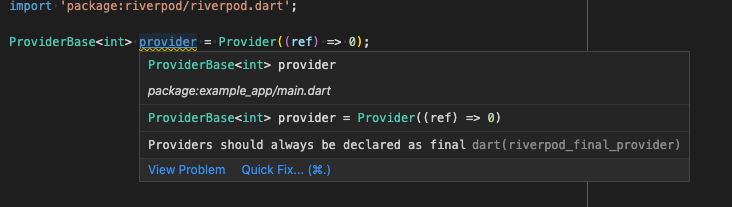
就是这样!运行 pub get(可能还需要重启 IDE)后,用户现在应该可以在他们的 Dart 文件中看到我们的自定义 lint 了
在 CI 中获取 lint 列表
不幸的是,运行 dart analyze 不会拾取我们新定义的 lint。我们需要一个单独的命令。
为此,我们的自定义 lint 包的用户可以在应用程序内运行以下命令
$ dart run custom_lint
  lib/main.dart:0:0 • This is the description of our custom lint • my_custom_lint_code
如果您正在处理 Flutter 项目,请改为运行 flutter pub run custom_lint。
由 Invertase 构建和维护。


