
Flutter Cupertino 日期选择器
Flutter Cupertino 日期选择器。
用法
1. 依赖
将此添加到您的软件包的 pubspec.yaml 文件中
dependencies:
  flutter_cupertino_date_picker: ^1.0.26+2
2. 安装
运行命令
$ flutter packages get
3. 导入
在 Dart 代码中导入
import 'package:flutter_cupertino_date_picker/flutter_cupertino_date_picker.dart';
4. 显示日期选择器
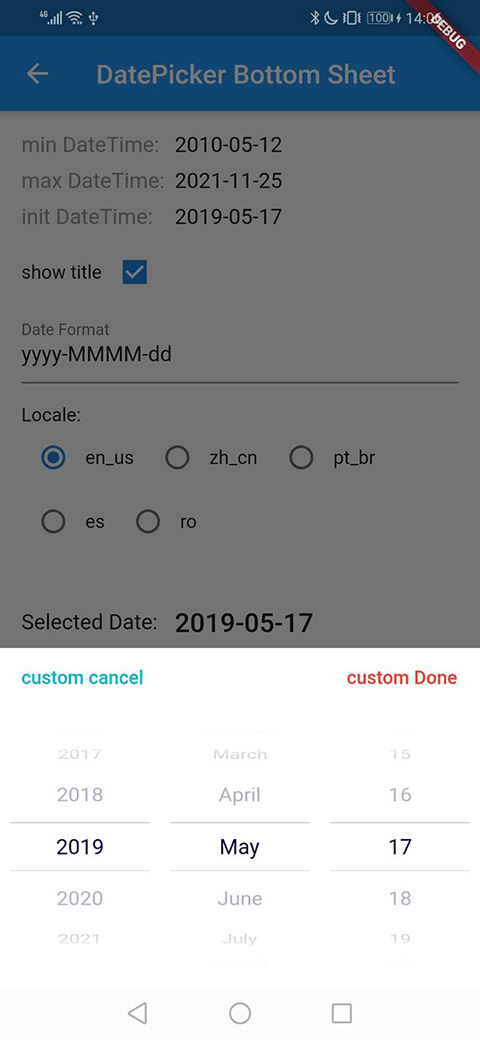
底部表格日期选择器
/// Display date picker in bottom sheet.
///
/// context: [BuildContext]
/// minDateTime: [DateTime] minimum date time
/// maxDateTime: [DateTime] maximum date time
/// initialDateTime: [DateTime] initial date time for selected
/// dateFormat: [String] date format pattern
/// locale: [DateTimePickerLocale] internationalization
/// pickerMode: [DateTimePickerMode] display mode: date(DatePicker)、time(TimePicker)、datetime(DateTimePicker)
/// pickerTheme: [DateTimePickerTheme] the theme of date time picker
/// onCancel: [DateVoidCallback] pressed title cancel widget event
/// onClose: [DateVoidCallback] date picker closed event
/// onChange: [DateValueCallback] selected date time changed event
/// onConfirm: [DateValueCallback] pressed title confirm widget event
DatePicker.showDatePicker(
  BuildContext context,
  DateTime minDateTime,
  DateTime maxDateTime,
  DateTime initialDateTime,
  String dateFormat,
  DateTimePickerLocale locale: DATETIME_PICKER_LOCALE_DEFAULT,
  DateTimePickerMode pickerMode: DateTimePickerMode.date,
  DateTimePickerTheme pickerTheme: DatePickerTheme.Default,
  DateVoidCallback onCancel,
  DateVoidCallback onClose,
  DateValueCallback onChange,
  DateValueCallback onConfirm,
});
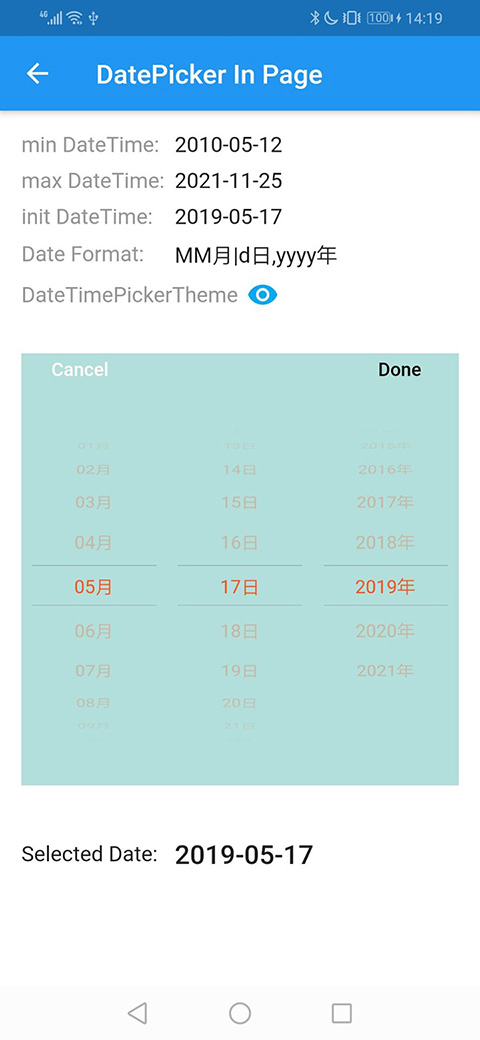
日期选择器控件
/// Display date picker widget.
///
/// minDateTime: [DateTime] minimum date time
/// maxDateTime: [DateTime] maximum date time
/// initialDateTime: [DateTime] initial date time for selected
/// dateFormat: [String] date format pattern
/// locale: [DateTimePickerLocale] internationalization
/// pickerTheme: [DateTimePickerTheme] the theme of date time picker
/// onCancel: [DateVoidCallback] pressed title cancel widget event
/// onChange: [DateValueCallback] selected date time changed event
/// onConfirm: [DateValueCallback] pressed title confirm widget event
DatePickerWidget({
  DateTime minDateTime,
  DateTime maxDateTime,
  DateTime initialDateTime,
  String dateFormat: DATETIME_PICKER_DATE_FORMAT,
  DateTimePickerLocale locale: DATETIME_PICKER_LOCALE_DEFAULT,
  DateTimePickerTheme pickerTheme: DatePickerTheme.Default,
  DateVoidCallback onCancel,
  DateValueCallback onChange,
  DateValueCallback onConfirm,
})
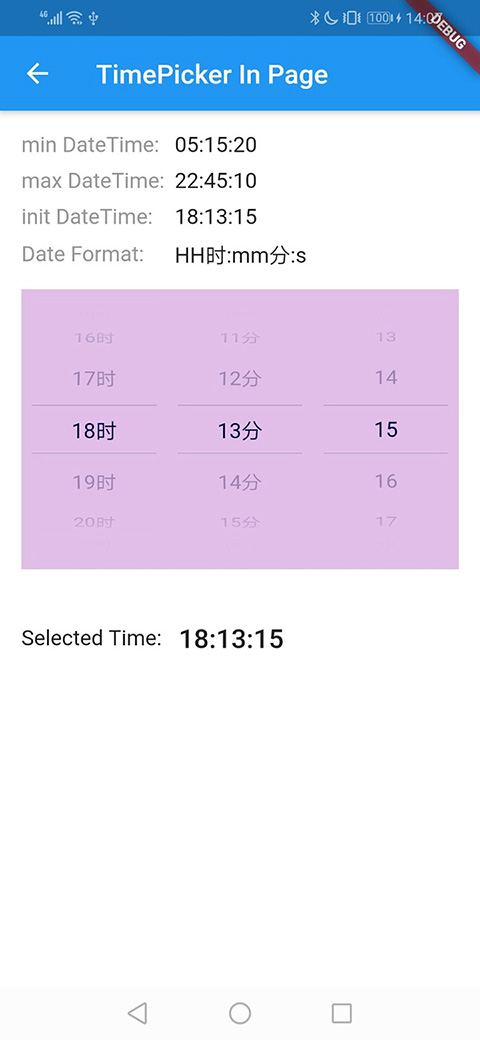
时间选择器控件
/// Display time picker widget.
///
/// minDateTime: [DateTime] minimum date time
/// maxDateTime: [DateTime] maximum date time
/// initialDateTime: [DateTime] initial date time for selected
/// dateFormat: [String] date format pattern
/// locale: [DateTimePickerLocale] internationalization
/// pickerTheme: [DateTimePickerTheme] the theme of date time picker
/// minuteDivider: [int] minute restriction, e.g. 5: every 5th minute will be shown (0, 5, 10, 15 ...)
/// onCancel: [DateVoidCallback] pressed title cancel widget event
/// onChange: [DateValueCallback] selected date time changed event
/// onConfirm: [DateValueCallback] pressed title confirm widget event
TimePickerWidget({
  DateTime minDateTime,
  DateTime maxDateTime,
  DateTime initialDateTime,
  String dateFormat: DATETIME_PICKER_DATE_FORMAT,
  DateTimePickerLocale locale: DATETIME_PICKER_LOCALE_DEFAULT,
  DateTimePickerTheme pickerTheme: DatePickerTheme.Default,
  int minuteDivider: 1,
  DateVoidCallback onCancel,
  DateValueCallback onChange,
  DateValueCallback onConfirm,
})
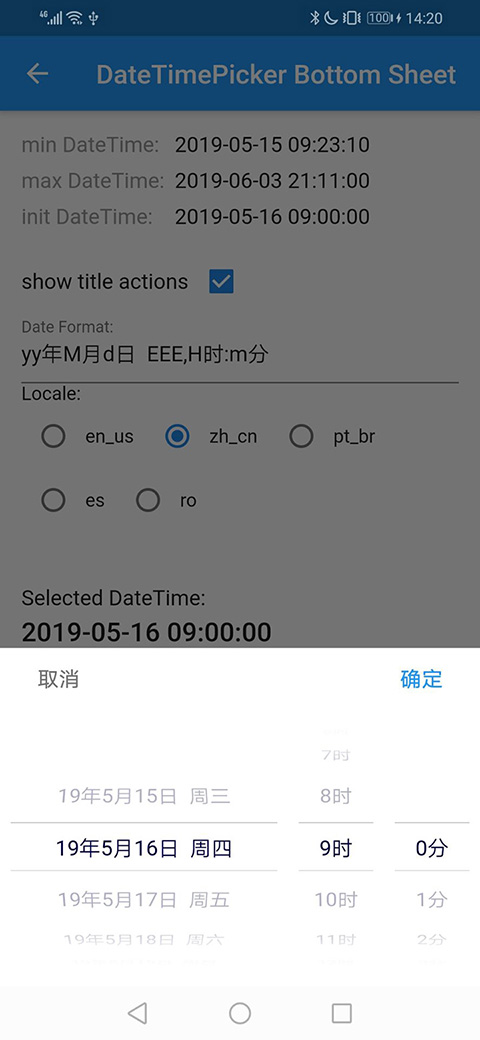
日期时间选择器控件
/// Display date time picker widget.
///
/// minDateTime: [DateTime] minimum date time
/// maxDateTime: [DateTime] maximum date time
/// initialDateTime: [DateTime] initial date time for selected
/// dateFormat: [String] date format pattern
/// locale: [DateTimePickerLocale] internationalization
/// pickerTheme: [DateTimePickerTheme] the theme of date time picker
/// onCancel: [DateVoidCallback] pressed title cancel widget event
/// onChange: [DateValueCallback] selected date time changed event
/// onConfirm: [DateValueCallback] pressed title confirm widget event
DateTimePickerWidget({
  DateTime minDateTime,
  DateTime maxDateTime,
  DateTime initialDateTime,
  String dateFormat: DATETIME_PICKER_DATE_FORMAT,
  DateTimePickerLocale locale: DATETIME_PICKER_LOCALE_DEFAULT,
  DateTimePickerTheme pickerTheme: DatePickerTheme.Default,
  DateVoidCallback onCancel,
  DateValueCallback onChange,
  DateValueCallback onConfirm,
})
5. DateTimePickerLocale
支持
- en_us: 英语 (EN) 美国 [默认区域设置]
- ar: 阿拉伯语 (ar)
- ar_eg: 阿拉伯语 (ar) 埃及
- bn: 孟加拉语 (BN)
- bs: 波斯尼亚语 (BS)
- de: 德语 (DE)
- es: 西班牙语 (ES)
- fr: 法语 (FR)
- hr: 克罗地亚语 (HR)
- hu: 匈牙利语 (HU)
- in_id: 印尼语 (IN) 印度尼西亚
- it: 意大利语 (IT)
- jp: 日语 (JP)
- ko: 韩语 (KO)
- nl: 荷兰语 (NL)
- pt_br: 葡萄牙语 (PT) 巴西
- ro: 罗马尼亚语 (RO)
- ru: 俄语 (RU)
- sr_cyrl: 塞尔维亚语 (sr) 西里尔文
- sr_latn: 塞尔维亚语 (sr) 拉丁文
- tr: 土耳其语 (TR)
- uk: 乌克兰语 (UK)
- vi: 越南语 (VI) 越南
- zh_cn: 汉语 (ZH) 简体
添加更多语言
1. 添加语言 i18n 文件
Fork 这个项目,在 lib/src/i18n/ 目录下添加语言文件,例如 strings_en_us.dart。
/// English (EN) United States
class _StringsEnUs extends _StringsI18n {
  const _StringsEnUs();

  @override
  String getCancelText() {
    // TODO return cancel widget's text
    return null;
  }

  @override
  String getDoneText() {
    // TODO return done widget's text
    return null;
  }

  @override
  List<String> getMonths() {
    // TODO return the array of month's full name [January, February ... December]
    return null;
  }

  @override
  List<String> getMonthsShort() {
    // TODO return the array of month's short name [Jan, Feb ... Dec]. If return null, will substring the full name (max length is 3)
    return null;
  }

  @override
  List<String> getWeeksFull() {
    // TODO return the array of week's full name [Monday, Tuesday ... Sunday]
    return null;
  }

  @override
  List<String> getWeeksShort() {
    // TODO return the array of week's short name [Mon, Tue ... Sun]
    return null;
  }
}
2. 添加区域设置
在 lib/src/i18n/date_picker_i18n.dart 文件中添加语言区域设置。
enum DateTimePickerLocale {
  /// English (EN) United States
  en_us,
}
3. 添加区域设置-语言关系
在 lib/src/i18n/date_picker_i18n.dart 文件中添加语言-区域设置关系。
const Map<DateTimePickerLocale, _StringsI18n> datePickerI18n = {
  DateTimePickerLocale.en_us: const _StringsEnUs(),
};
6. dateFormat
| 模式 | 含义 | 例如 |
|---|---|---|
| yyyy | 年份 | 2019, 2020 |
| yy | 年份,2 位数 | 19, 20 |
| MMMM | 月份 | January(en_us), 01(zh_cn) |
| MMM | 月份,缩写 | Jan(en_us), 01(zh_cn) |
| MM | 月份,2 位数 | 01、11 |
| M | 月份 | 1, 11 |
| dd | 月份中的日期,2 位数 | 05, 25 |
| d | 月份中的日期 | 5, 25 |
| EEEE | 星期几 | Monday(en_us), 星期一(zh_cn) |
| EEE | 星期几,缩写 | Mon(en_us), 周一(zh_cn) |
| HH | 小时 (0~23),2 位数 | 04, 12, 20 |
| H | 小时 (0~23) | 4, 12, 20 |
| mm | 分钟,2 位数 | 05, 40 |
| m | 分钟 | 5, 40 |
| ss | 秒,2 位数 | 06, 55 |
| s | 第二个 | 6, 55 |
| yyyy年 | format | 2019年, 2020年 |
| H时 | format | 5时, 21时 |
日期格式分隔符
支持的分隔符:|,-/\._: 。
7. DateTimePickerTheme
/// DateTimePicker theme.
///
/// [backgroundColor] DatePicker's background color.
/// [cancelTextStyle] Default cancel widget's [TextStyle].
/// [confirmTextStyle] Default confirm widget's [TextStyle].
/// [cancel] Custom cancel widget.
/// [confirm] Custom confirm widget.
/// [title] Custom title widget. If specify a title widget, the cancel and confirm widgets will not display. Must set [titleHeight] value for custom title widget.
/// [showTitle] Whether display title widget or not. If set false, the default cancel and confirm widgets will not display, but the custom title widget will display if had specified one custom title widget.
/// [pickerHeight] The value of DatePicker's height.
/// [titleHeight] The value of DatePicker's title height.
/// [itemHeight] The value of DatePicker's column height.
/// [itemTextStyle] The value of DatePicker's column [TextStyle].
const DateTimePickerTheme({
  this.backgroundColor: DATETIME_PICKER_BACKGROUND_COLOR,
  this.cancelTextStyle,
  this.confirmTextStyle,
  this.cancel,
  this.confirm,
  this.title,
  this.showTitle: DATETIME_PICKER_SHOW_TITLE_DEFAULT,
  this.pickerHeight: DATETIME_PICKER_HEIGHT,
  this.titleHeight: DATETIME_PICKER_TITLE_HEIGHT,
  this.itemHeight: DATETIME_PICKER_ITEM_HEIGHT,
  this.itemTextStyle: DATETIME_PICKER_ITEM_TEXT_STYLE,
});
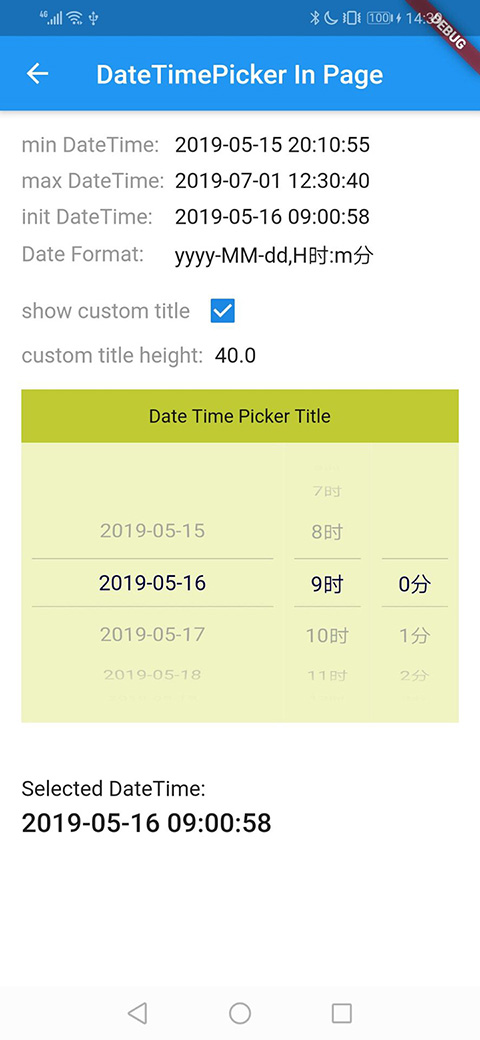
示例

日期选择器
时间选择器

日期时间选择器
许可证
Copyright 2018 wuzhen

Licensed under the Apache License, Version 2.0 (the "License");
you may not use this file except in compliance with the License.
You may obtain a copy of the License at

   https://apache.ac.cn/licenses/LICENSE-2.0

Unless required by applicable law or agreed to in writing, software
distributed under the License is distributed on an "AS IS" BASIS,
WITHOUT WARRANTIES OR CONDITIONS OF ANY KIND, either express or implied.
See the License for the specific language governing permissions and
limitations under the License.


