
Cuberto Bottom Bar
Flutter 插件 - CubertoBottomBar。
Cuberto Bottom bar Gif- 默认样式
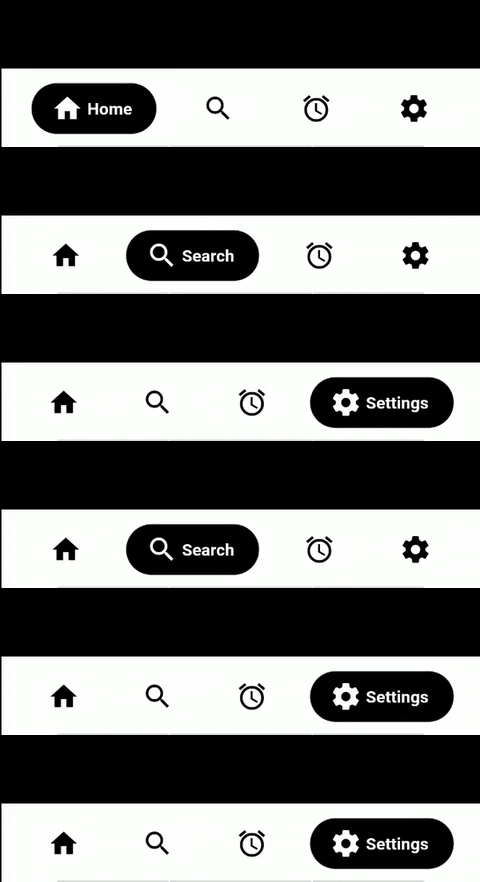
Cuberto Bottom barGif- 渐变样式

入门
dependencies:
  ...
  cuberto_bottom_bar: ^0.0.2
限制
目前仅限于超过1个标签页,少于5个。所以是2-4个标签页。
textColor 仅在 STYLE_NORMAL 情况下生效,
在 STYLE_FADED_BACKGROUND 的情况下,tabColor 将被设置为 textColor(如果未设置 tabColor,则会使用 inactiveColor)
需要手动添加 drawer 或 endDrawer,然后在 CubertoBottomBar 中添加相应的 drawer(
CubertoDrawer.NO_DRAWER 表示没有抽屉,CubertoDrawer.START_DRAWER 表示左抽屉,CubertoDrawer.END_DRAWER 表示右抽屉)
默认情况下,抽屉会覆盖 CubertoBottomBar,为此添加了 margin: EdgeInsets.only(bottom: 60.0)。 (请参考示例)
onTabChangedListener 中的值:(position, title, color) (position、title 和 color 最初为 null),但在点击标签页后会获得值。
基本用法
添加小部件
bottomNavigationBar: CubertoBottomBar(
        inactiveIconColor: inactiveColor,
        tabStyle: CubertoTabStyle.STYLE_FADED_BACKGROUND, // By default its CubertoTabStyle.STYLE_NORMAL
        initialSelection: 0, // By default its 0
        drawer: CubertoDrawer.NO_DRAWER, // By default its NO_DRAWER (Availble START_DRAWER and END_DRAWER as per where you want to how the drawer icon in Cuberto Bottom bar)
        tabs: [
          TabData(
              iconData: Icons.home,
              title: "Home",
              tabColor: Colors.deepPurple),
          TabData(
              iconData: Icons.search,
              title: "Search",
              tabColor: Colors.pink),
          TabData(
              iconData: Icons.access_alarm,
              title: "Alarm",
              tabColor: Colors.amber),
          TabData(
              iconData: Icons.settings,
              title: "Settings",
              tabColor: Colors.teal),
        ],
        onTabChangedListener: (position, title, color) {
          setState(() {
            currentPage = position;
            currentTitle = title;
            currentColor = color;
          });
        },
      ),
TabData
iconData -> 用于标签页的图标
title -> 用于标签页的字符串
tabColor: -> 在选择 STYLE_FADED_BACKGROUND 时用于背景和标签的颜色
onClick -> 当圆形本身被点击时,在活动标签页上使用的可选函数
属性
必需
tabs -> TabData 对象列表
onTabChangedListener -> 用于处理标签页点击的函数,接收 int position、String title 和 Color tabColor(如果未设置,在 STYLE_NORMAL 和 STYLE_FADED_BACKGROUND 中都将返回 inactiveIconColor)
可选
initialSelection -> 默认为 0
inactiveIconColor -> 默认为 null,从 Theme 中获取
textColor -> 默认为 Colors.white
barBackgroundColor -> 默认为 null,从 Theme 中获取
tabStyle -> 默认为 CubertoTabStyle.STYLE_NORMAL
drawer -> 默认为 CubertoDrawer.NO_DRAWER(可根据需要设置为 CubertoDrawer.START_DRAWER 或 CubertoDrawer.END_DRAWER 来放置抽屉图标)
key -> 默认为 null
主题化
该栏将尝试开箱即用地使用您当前的 ThemeData,但是您可能希望对其进行主题化。以下是相关属性
Cuberto Bottom Bar 主题化 - STYLE_FADED_BACKGROUND

Cuberto Bottom Bar 主题化 - STYLE_NORMAL

展示
如果您在实际应用中使用此软件包,请告知我,我将在那里添加您的应用。


