
更好的播放器
适用于 Flutter 的更好的视频播放器,具有多种配置选项。解决典型用例!
简介
此插件基于 Chewie。Chewie 是一个很棒的插件,在许多情况下都运行良好。Better Player 是 Chewie 中引入的理念的延续。Better Player 修复了常见错误,增加了更多配置选项,并解决了典型用例。
特点
✔️ 修复了常见错误
✔️ 添加了高级配置选项
✔️ 重构了播放器控件
✔️ 支持播放列表
✔️ 支持 ListView 中的视频
✔️ 支持字幕:(格式:SRT、带 HTML 标签支持的 WEBTT;HLS 字幕;视频的多个字幕)
✔️ 支持 HTTP 标头
✔️ 支持视频的 BoxFit
✔️ 支持播放速度
✔️ 支持 HLS(轨道、字幕选择)
✔️ 支持替代分辨率
✔️ 支持缓存
✔️ 支持通知
✔️ ... 以及更多!
安装
- 将此添加到您的 pubspec.yaml 文件中
dependencies:
  better_player: ^0.0.44
- 安装它
$ flutter packages get
- 导入它
import 'package:better_player/better_player.dart';
通用用法
查看 示例项目,其中展示了如何在不同场景下使用 Better Player。
基本用法
您可以使用以下 2 种基本方法来设置 Better Player:
BetterPlayer.network(url, configuration)
BetterPlayer.file(url, configuration)
这些方法为您设置了基本配置,并允许您在几秒钟内开始使用播放器。
这是一个示例。
  @override
  Widget build(BuildContext context) {
    return Scaffold(
      appBar: AppBar(
        title: Text("Example player"),
      ),
      body: AspectRatio(
        aspectRatio: 16 / 9,
        child: BetterPlayer.network(
          "https://commondatastorage.googleapis.com/gtv-videos-bucket/sample/ForBiggerBlazes.mp4",
          betterPlayerConfiguration: BetterPlayerConfiguration(
            aspectRatio: 16 / 9,
          ),
        ),
      ),
    );
  }
在此示例中,我们仅显示具有 16/9 宽高比的 URL 视频。
Better Player 还有更多配置选项,如下所示。
正常用法
创建 BetterPlayerDataSource 和 BetterPlayerController。您应该在 initState 中完成此操作
BetterPlayerController _betterPlayerController;

  @override
  void initState() {
    super.initState();
    BetterPlayerDataSource betterPlayerDataSource = BetterPlayerDataSource(
        BetterPlayerDataSourceType.network,
        "https://commondatastorage.googleapis.com/gtv-videos-bucket/sample/BigBuckBunny.mp4");
    _betterPlayerController = BetterPlayerController(
        BetterPlayerConfiguration(),
        betterPlayerDataSource: betterPlayerDataSource);
  }
创建包装在 AspectRatio 小部件中的 BetterPlayer 小部件
  @override
  Widget build(BuildContext context) {
    return AspectRatio(
      aspectRatio: 16 / 9,
      child: BetterPlayer(
        controller: _betterPlayerController,
      ),
    );
  }
播放列表
要使用播放列表,您需要创建包含多个视频的数据集
  List<BetterPlayerDataSource> createDataSet() {
    List dataSourceList = List<BetterPlayerDataSource>();
    dataSourceList.add(
      BetterPlayerDataSource(
        BetterPlayerDataSourceType.network,
        "https://commondatastorage.googleapis.com/gtv-videos-bucket/sample/ForBiggerBlazes.mp4",
      ),
    );
    dataSourceList.add(
      BetterPlayerDataSource(BetterPlayerDataSourceType.network,
          "https://commondatastorage.googleapis.com/gtv-videos-bucket/sample/BigBuckBunny.mp4"),
    );
    dataSourceList.add(
      BetterPlayerDataSource(BetterPlayerDataSourceType.network,
          "http://sample.vodobox.com/skate_phantom_flex_4k/skate_phantom_flex_4k.m3u8"),
    );
    return dataSourceList;
  }
然后创建 BetterPlayerPlaylist
@override
  Widget build(BuildContext context) {
    return AspectRatio(
      aspectRatio: 16 / 9,
      child: BetterPlayerPlaylist(
          betterPlayerConfiguration: BetterPlayerConfiguration(),
          betterPlayerPlaylistConfiguration: const BetterPlayerPlaylistConfiguration(),
          betterPlayerDataSourceList: dataSourceList),
    );
  }
BetterPlayerListViewPlayer
BetterPlayerListViewPlayer 将在视频在屏幕上可见时,根据 playFraction 自动播放/暂停视频。PlayFraction 表示视频在屏幕上可见的百分比,才能播放视频。如果 playFraction 为 0.8,则视频高度的 80% 必须在屏幕上可见才能自动播放视频。
 @override
  Widget build(BuildContext context) {
    return AspectRatio(
      aspectRatio: 16 / 9,
      child: BetterPlayerListVideoPlayer(
        BetterPlayerDataSource(
            BetterPlayerDataSourceType.network, videoListData.videoUrl),
        key: Key(videoListData.hashCode.toString()),
        playFraction: 0.8,
      ),
    );
  }
您可以使用 BetterPlayerListViewPlayerController 来控制 BetterPlayerListViewPlayer。您需要传递
BetterPlayerListViewPlayerController 到 BetterPlayerListVideoPlayer。更多信息请参阅示例应用程序。
字幕
字幕可以从 3 种不同来源配置:文件、网络和内存。字幕来源在 BetterPlayerDataSource 中传递
网络字幕
    var dataSource = BetterPlayerDataSource(
      BetterPlayerDataSourceType.network,
      "https://commondatastorage.googleapis.com/gtv-videos-bucket/sample/ForBiggerBlazes.mp4",
      subtitles: BetterPlayerSubtitlesSource.single(
          type: BetterPlayerSubtitlesSourceType.network,
          url:
              "https://dl.dropboxusercontent.com/s/71nzjo2ux3evxqk/example_subtitles.srt"),
    );
文件字幕
 var dataSource = BetterPlayerDataSource(
      BetterPlayerDataSourceType.file,
      "${directory.path}/testvideo.mp4",
      subtitles: BetterPlayerSubtitlesSource.single(
        type: BetterPlayerSubtitlesSourceType.file,
        url: "${directory.path}/example_subtitles.srt",
      ),
    );
您可以为一个视频传递多个字幕
var dataSource = BetterPlayerDataSource(
      BetterPlayerDataSourceType.network,
      "https://bitdash-a.akamaihd.net/content/sintel/hls/playlist.m3u8",
      liveStream: false,
      useHlsSubtitles: true,
      hlsTrackNames: ["Low quality", "Not so low quality", "Medium quality"],
      subtitles: [
        BetterPlayerSubtitlesSource(
          type: BetterPlayerSubtitlesSourceType.network,
          name: "EN",
          urls: [
            "https://dl.dropboxusercontent.com/s/71nzjo2ux3evxqk/example_subtitles.srt"
          ],
        ),

        BetterPlayerSubtitlesSource(
          type: BetterPlayerSubtitlesSourceType.network,
          name: "DE",
          urls: [
            "https://dl.dropboxusercontent.com/s/71nzjo2ux3evxqk/example_subtitles.srt"
          ],
        ),
      ],
    );
BetterPlayerConfiguration
在创建 BetterPlayerController 时,您可以为播放器提供配置。
    var betterPlayerConfiguration = BetterPlayerConfiguration(
      autoPlay: true,
      looping: true,
      fullScreenByDefault: true,
    );
可能的配置选项
    /// Play the video as soon as it's displayed
    final bool autoPlay;

    /// Start video at a certain position
    final Duration startAt;

    /// Whether or not the video should loop
    final bool looping;

    /// Weather or not to show the controls when initializing the widget.
    final bool showControlsOnInitialize;

    /// When the video playback runs  into an error, you can build a custom
    /// error message.
    final Widget Function(BuildContext context, String errorMessage) errorBuilder;

    /// The Aspect Ratio of the Video. Important to get the correct size of the
    /// video!
    ///
    /// Will fallback to fitting within the space allowed.
    final double aspectRatio;

    /// The placeholder is displayed underneath the Video before it is initialized
    /// or played.
    final Widget placeholder;

    /// Should the placeholder be shown until play is pressed
    final bool showPlaceholderUntilPlay;

    /// Placeholder position of player stack. If false, then placeholder will be
    /// displayed on the bottom, so user need to hide it manually. Default is
    /// true.
    final bool placeholderOnTop;

    /// A widget which is placed between the video and the controls
    final Widget overlay;

    /// Defines if the player will start in fullscreen when play is pressed
    final bool fullScreenByDefault;

    /// Defines if the player will sleep in fullscreen or not
    final bool allowedScreenSleep;

    /// Defines aspect ratio which will be used in fullscreen
    final double fullScreenAspectRatio;

    /// Defines the set of allowed device orientations on entering fullscreen
    final List<DeviceOrientation> deviceOrientationsOnFullScreen;

    /// Defines the system overlays visible after exiting fullscreen
    final List<SystemUiOverlay> systemOverlaysAfterFullScreen;

    /// Defines the set of allowed device orientations after exiting fullscreen
    final List<DeviceOrientation> deviceOrientationsAfterFullScreen;

    /// Defines a custom RoutePageBuilder for the fullscreen
    final BetterPlayerRoutePageBuilder routePageBuilder;

    /// Defines a event listener where video player events will be send
    final Function(BetterPlayerEvent) eventListener;

    ///Defines subtitles configuration
    final BetterPlayerSubtitlesConfiguration subtitlesConfiguration;

    ///Defines controls configuration
    final BetterPlayerControlsConfiguration controlsConfiguration;

    ///Defines fit of the video, allows to fix video stretching, see possible
    ///values here: https://api.flutter.dev/flutter/painting/BoxFit-class.html
    final BoxFit fit;

    ///Defines rotation of the video in degrees. Default value is 0. Can be 0, 90, 180, 270.
    ///Angle will rotate only video box, controls will be in the same place.
    final double rotation;

    ///Defines function which will react on player visibility changed
    final Function(double visibilityFraction) playerVisibilityChangedBehavior;

    ///Defines translations used in player. If null, then default english translations
    ///will be used.
    final List<BetterPlayerTranslations> translations;

    ///Defines if player should auto detect full screen device orientation based
    ///on aspect ratio of the video. If aspect ratio of the video is < 1 then
    ///video will played in full screen in portrait mode. If aspect ratio is >= 1
    ///then video will be played horizontally. If this parameter is true, then
    ///[deviceOrientationsOnFullScreen] and [fullScreenAspectRatio] value will be
    /// ignored.
    final bool autoDetectFullscreenDeviceOrientation;

    ///Defines flag which enables/disables lifecycle handling (pause on app closed,
    ///play on app resumed). Default value is true.
    final bool handleLifecycle;

    ///Defines flag which enabled/disabled auto dispose on BetterPlayer dispose.
    ///Default value is true.
    final bool autoDispose;
BetterPlayerSubtitlesConfiguration
您可以使用此类提供字幕配置。您应该将 BetterPlayerSubtitlesConfiguration 放在 BetterPlayerConfiguration 中。
 var betterPlayerConfiguration = BetterPlayerConfiguration(
      subtitlesConfiguration: BetterPlayerSubtitlesConfiguration(
        fontSize: 20,
        fontColor: Colors.green,
      ),
    );
可能的配置选项
 ///Subtitle font size
  final double fontSize;

  ///Subtitle font color
  final Color fontColor;

  ///Enable outline (border) of the text
  final bool outlineEnabled;

  ///Color of the outline stroke
  final Color outlineColor;

  ///Outline stroke size
  final double outlineSize;

  ///Font family of the subtitle
  final String fontFamily;

  ///Left padding of the subtitle
  final double leftPadding;

  ///Right padding of the subtitle
  final double rightPadding;

  ///Bottom padding of the subtitle
  final double bottomPadding;

  ///Alignment of the subtitle
  final Alignment alignment;

  ///Background color of the subtitle
  final Color backgroundColor;

  ///Subtitles selected by default, without user interaction
  final bool selectedByDefault;
BetterPlayerControlsConfiguration
播放器 GUI 的配置。您应该将此配置传递给 BetterPlayerConfiguration。
var betterPlayerConfiguration = BetterPlayerConfiguration(
      controlsConfiguration: BetterPlayerControlsConfiguration(
        textColor: Colors.black,
        iconsColor: Colors.black,
      ),
    );
   ///Color of the control bars
   final Color controlBarColor;

   ///Color of texts
   final Color textColor;

   ///Color of icons
   final Color iconsColor;

   ///Icon of play
   final IconData playIcon;

   ///Icon of pause
   final IconData pauseIcon;

   ///Icon of mute
   final IconData muteIcon;

   ///Icon of unmute
   final IconData unMuteIcon;

   ///Icon of fullscreen mode enable
   final IconData fullscreenEnableIcon;

   ///Icon of fullscreen mode disable
   final IconData fullscreenDisableIcon;

   ///Cupertino only icon, icon of skip
   final IconData skipBackIcon;

   ///Cupertino only icon, icon of forward
   final IconData skipForwardIcon;

   ///Flag used to enable/disable fullscreen
   final bool enableFullscreen;

   ///Flag used to enable/disable mute
   final bool enableMute;

   ///Flag used to enable/disable progress texts
   final bool enableProgressText;

   ///Flag used to enable/disable progress bar
   final bool enableProgressBar;

   ///Flag used to enable/disable play-pause
   final bool enablePlayPause;

   ///Flag used to enable skip forward and skip back
   final bool enableSkips;

   ///Progress bar played color
   final Color progressBarPlayedColor;

   ///Progress bar circle color
   final Color progressBarHandleColor;

   ///Progress bar buffered video color
   final Color progressBarBufferedColor;

   ///Progress bar background color
   final Color progressBarBackgroundColor;

   ///Time to hide controls
   final Duration controlsHideTime;

   ///Parameter used to build custom controls
   final Widget Function(BetterPlayerController controller)
       customControlsBuilder;

   ///Parameter used to change theme of the player
   final BetterPlayerTheme playerTheme;

   ///Flag used to show/hide controls
   final bool showControls;

   ///Flag used to show controls on init
   final bool showControlsOnInitialize;

   ///Control bar height
   final double controlBarHeight;

   ///Live text color;
   final Color liveTextColor;

   ///Flag used to show/hide overflow menu which contains playback, subtitles,
   ///qualities options.
   final bool enableOverflowMenu;

   ///Flag used to show/hide playback speed
   final bool enablePlaybackSpeed;

   ///Flag used to show/hide subtitles
   final bool enableSubtitles;

   ///Flag used to show/hide qualities
   final bool enableQualities;

   ///Custom items of overflow menu
   final List<BetterPlayerOverflowMenuItem> overflowMenuCustomItems;

   ///Icon of the overflow menu
   final IconData overflowMenuIcon;

   ///Icon of the playback speed menu item from overflow menu
   final IconData playbackSpeedIcon;

   ///Icon of the subtitles menu item from overflow menu
   final IconData subtitlesIcon;

   ///Icon of the qualities menu item from overflow menu
   final IconData qualitiesIcon;

   ///Color of overflow menu icons
   final Color overflowMenuIconsColor;

   ///Time which will be used once user uses rewind and forward
   final int skipsTimeInMilliseconds;
BetterPlayerPlaylistConfiguration
配置您的播放列表。将此对象传递给 BetterPlayerPlaylist
 var betterPlayerPlaylistConfiguration = BetterPlayerPlaylistConfiguration(
      loopVideos: false,
      nextVideoDelay: Duration(milliseconds: 5000),
    );
可能的配置选项
  ///How long user should wait for next video
  final Duration nextVideoDelay;

  ///Should videos be looped
  final bool loopVideos;
BetterPlayerDataSource
为您的应用程序中的一个视频定义来源。有 3 种数据源类型:
- 网络 - 使用 URL 从外部资源播放视频的数据源
- 文件 - 使用 URL 从内部资源播放视频的数据源
- 内存 - 使用字节列表从内存中播放视频的数据源
    var dataSource = BetterPlayerDataSource(
      BetterPlayerDataSourceType.network,
      "https://commondatastorage.googleapis.com/gtv-videos-bucket/sample/ForBiggerBlazes.mp4",
      subtitles: BetterPlayerSubtitlesSource(
        type: BetterPlayerSubtitlesSourceType.file,
        url: "${directory.path}/example_subtitles.srt",
      ),
      headers: {"header":"my_custom_header"}
    );
您可以使用特定类型的工厂来构建数据源。
使用 BetterPlayerDataSource.network 构建网络数据源,BetterPlayerDataSource.file 构建文件数据源,以及 BetterPlayerDataSource.memory
来构建内存数据源。
可能的配置选项
  ///Type of source of video
  final BetterPlayerDataSourceType type;

  ///Url of the video
  final String url;

  ///Subtitles configuration
  ///You can pass here multiple subtitles
  final List<BetterPlayerSubtitlesSource> subtitles;

  ///Flag to determine if current data source is live stream
  final bool liveStream;

  /// Custom headers for player
  final Map<String, String> headers;

  ///Should player use hls subtitles. Default is true.
  final bool useHlsSubtitles;

  ///Should player use hls tracks
  final bool useHlsTracks;

  ///List of strings that represents tracks names.
  ///If empty, then better player will choose name based on track parameters
  final List<String> hlsTrackNames;

  ///Optional, alternative resolutions for non-hls video. Used to setup
  ///different qualities for video.
  ///Data should be in given format:
  ///{"360p": "url", "540p": "url2" }
  final Map<String, String> resolutions;

  ///Optional cache configuration, used only for network data sources
  final BetterPlayerCacheConfiguration cacheConfiguration;
BetterPlayerCacheConfiguration
为给定数据源定义缓存配置。缓存仅适用于网络数据源。
  ///Enable cache for network data source
  final bool useCache;

  /// The maximum cache size to keep on disk in bytes.
  /// Android only option.
  final int maxCacheSize;

  /// The maximum size of each individual file in bytes.
  /// Android only option.
  final int maxCacheFileSize;
BetterPlayerSubtitlesSource
定义视频中字幕的来源
 var subtitles = BetterPlayerSubtitlesSource(
        type: BetterPlayerSubtitlesSourceType.file,
        url: "${directory.path}/example_subtitles.srt",
      );
可能的配置选项
  ///Source type
  final BetterPlayerSubtitlesSourceType type;

  ///Url of the subtitles, used with file or network subtitles
  final String url;

  ///Content of subtitles, used when type is memory
  final String content;
BetterPlayerTranslations
您可以提供不同语言的翻译。您需要将 BetterPlayerTranslations 列表传递给
BetterPlayerConfiguration。以下是一个示例:
 translations: [
              BetterPlayerTranslations(
                languageCode: "language_code for example pl",
                generalDefaultError: "translated text",
                generalNone: "translated text",
                generalDefault: "translated text",
                playlistLoadingNextVideo: "translated text",
                controlsLive: "translated text",
                controlsNextVideoIn: "translated text",
                overflowMenuPlaybackSpeed: "translated text",
                overflowMenuSubtitles: "translated text",
                overflowMenuQuality: "translated text",
              ),
              BetterPlayerTranslations(
                languageCode: "other language for example cz",
                generalDefaultError: "translated text",
                generalNone: "translated text",
                generalDefault: "translated text",
                playlistLoadingNextVideo: "translated text",
                controlsLive: "translated text",
                controlsNextVideoIn: "translated text",
                overflowMenuPlaybackSpeed: "translated text",
                overflowMenuSubtitles: "translated text",
                overflowMenuQuality: "translated text",
              ),
            ],
有 4 种预构建语言:EN、PL、ZH(简体中文)、HI(印地语)。如果您未提供
任何翻译,则将使用 EN 翻译,或者使用预构建的翻译之一,前提是它与
当前用户语言区域匹配。
您需要先在应用程序中设置本地化才能使其正常工作。您可以这样做:
https://flutterdart.cn/docs/development/accessibility-and-localization/internationalization
收听视频事件
您可以收听视频播放器事件,例如:
  initialized,
  play,
  pause,
  seekTo,
  openFullscreen,
  hideFullscreen,
  setVolume,
  progress,
  finished,
  exception,
  controlsVisible,
  controlsHidden,
  setSpeed,
  changedSubtitles,
  changedTrack,
  changedPlayerVisibility,
  changedResolution
创建 BetterPlayerController 后,您可以这样添加事件监听器:
 _betterPlayerController.addEventsListener((event){
      print("Better player event: ${event.betterPlayerEventType}");
    });
您的事件监听器将在 dispose 时自动销毁 :)
更改播放器在不可见时的行为
您可以使用 BetterPlayerConfiguration 中的 playerVisibilityChangedBehavior 选项来更改播放器在不可见时的行为。
以下是在列表中使用播放器的示例:
 void onVisibilityChanged(double visibleFraction) async {
    bool isPlaying = await _betterPlayerController.isPlaying();
    bool initialized = _betterPlayerController.isVideoInitialized();
    if (visibleFraction >= widget.playFraction) {
      if (widget.autoPlay && initialized && !isPlaying && !_isDisposing) {
        _betterPlayerController.play();
      }
    } else {
      if (widget.autoPause && initialized && isPlaying && !_isDisposing) {
        _betterPlayerController.pause();
      }
    }
  }
播放器行为基于 VisibilityDetector(它使用 visibilityFraction,这是一个从 0.0 到 1.0 的值,描述了给定小部件在视口中的可见程度)。因此,如果 visibilityFraction 为 0.0,则播放器不可见,我们需要暂停视频。如果 visibilityFraction 为 1.0,则我们需要再次播放它。
传递视频的多个分辨率
您可以使用 resolutions 参数在数据源中设置不同分辨率的视频。这应该仅用于
普通视频(非 HLS),用于设置原始视频的不同质量。
    var dataSource = BetterPlayerDataSource(BetterPlayerDataSourceType.network,
        "https://file-examples-com.github.io/uploads/2017/04/file_example_MP4_480_1_5MG.mp4",
        resolutions: {
          "LOW":
              "https://file-examples-com.github.io/uploads/2017/04/file_example_MP4_480_1_5MG.mp4",
          "MEDIUM":
              "https://file-examples-com.github.io/uploads/2017/04/file_example_MP4_640_3MG.mp4",
          "LARGE":
              "https://file-examples-com.github.io/uploads/2017/04/file_example_MP4_1280_10MG.mp4",
          "EXTRA_LARGE":
              "https://file-examples-com.github.io/uploads/2017/04/file_example_MP4_1920_18MG.mp4"
        });
设置播放器通知
|
|
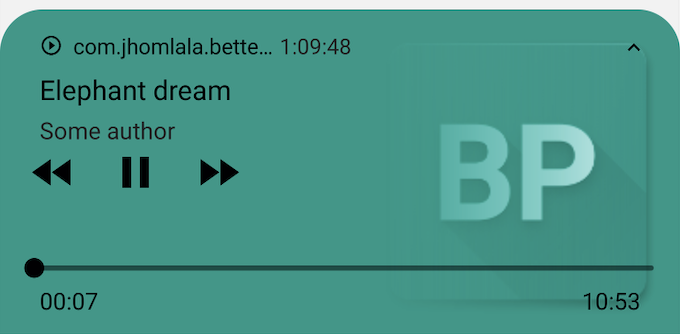
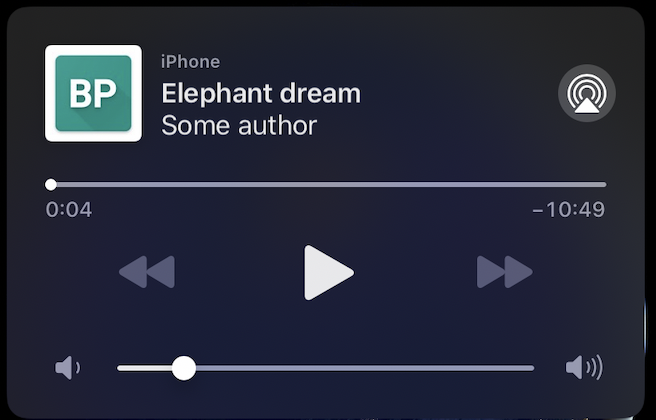
要设置播放器通知,请使用 BetterPlayerDataSource 中的 notificationConfiguration。
BetterPlayerDataSource dataSource = BetterPlayerDataSource(
      BetterPlayerDataSourceType.network,
      Constants.elephantDreamVideoUrl,
      notificationConfiguration: BetterPlayerNotificationConfiguration(
        showNotification: true,
        title: "Elephant dream",
        author: "Some author",
        imageUrl:"https://upload.wikimedia.org/wikipedia/commons/thumb/3/37/African_Bush_Elephant.jpg/1200px-African_Bush_Elephant.jpg",
      ),
    );
这里有 3 个主要参数:
title - 资源的名称,显示在第一行
author - 资源的作者,显示在第二行
imageUrl - 资源的图片(可选)。可以是外部图片或内部文件的链接。
如果 showNotification 设置为 true 并且未提供标题和作者,则会显示一个空的通知。
将显示一个空的通知。
用户可以通过通知按钮(例如播放/暂停、跳转)控制播放器。当通知功能
与多个播放器同时使用时,将使用最后一个播放器。通知将在
第一次播放后显示。
要在离开应用程序后继续播放资源,请在 BetterPlayerConfiguration 中将 handleLifecycle 设置为 false。
Android 的重要注意事项
您需要在 Android 原生代码中添加特殊服务。该服务将简单地销毁所有剩余的通知。
此服务需要用于处理应用程序在未正确销毁播放器的情况下被终止的情况。
请查看示例项目中的 BetterPlayerService,了解如何将此服务添加到您的应用程序中。
https://github.com/jhomlala/betterplayer/blob/feature/player_notifications/example/android/app/src/main/kotlin/com/jhomlala/better_player_example/BetterPlayerService.kt
这是一个带通知的播放器示例:https://github.com/jhomlala/betterplayer/blob/feature/player_notifications/example/lib/pages/notification_player_page.dart
向溢出菜单添加自定义元素
您可以使用 BetterPlayerControlsConfiguration 向溢出菜单添加自定义元素。
  controlsConfiguration: BetterPlayerControlsConfiguration(
              overflowMenuCustomItems: [
                BetterPlayerOverflowMenuItem(
                  Icons.account_circle_rounded,
                  "Custom element",
                  () => print("Click!"),
                )
              ],
            ),
启用/禁用控件(如果为 false,则始终隐藏)
betterPlayerController.setControlsEnabled(false);
设置覆盖的宽高比。如果设置了 overriddenAspectRatio,它将代替 aspectRatio 使用。
如果为 null,则将使用 BetterPlayerConfiguration 中的 aspectRatio。
betterPlayerController.setOverriddenAspectRatio(1.0);
覆盖时长
如果设置了 overridden duration,则视频播放器将播放视频直到达到此时长。
BetterPlayerDataSource dataSource = BetterPlayerDataSource(
      BetterPlayerDataSourceType.network,
      Constants.elephantDreamVideoUrl,
      ///Play only 10 seconds of this video.
      overriddenDuration: Duration(seconds: 10),
    );
(仅限 iOS) 添加到 info.plist(以支持全屏旋转)
<key>UISupportedInterfaceOrientations</key>
<array>
   <string>UIInterfaceOrientationPortrait</string>
   <string>UIInterfaceOrientationLandscapeLeft</string>
   <string>UIInterfaceOrientationLandscapeRight</string>
</array>


