
GeoFlutterFire
GeoFlutterFire 是一个开源库,它允许您根据地理位置存储和查询一组键。GeoFlutterFire 的核心是将位置与字符串键一起存储。然而,它的主要优点是能够仅检索给定地理区域内的键——所有这些都实时进行。
GeoFlutterFire 使用 Firebase Firestore 数据库进行数据存储,允许查询结果随着其变化而实时更新。GeoFlutterFire 选择性地仅加载特定位置附近的数据,即使在处理海量数据集时,也能使您的应用程序保持轻便和响应迅速。
GeoFlutterFire 被设计为 cloud_firestore 插件的一个轻量级附加组件。为了保持简单,GeoFlutterFire 在您的 Firestore 数据库中以自己的格式存储数据。这使得您现有的数据格式和安全规则保持不变,同时仍然为您提供了一个简便的地理查询解决方案。
入门
您应该确保将 GeoFlutterFire 作为依赖项添加到您的 flutter 项目中。
dependencies:
  geoflutterfire: <latest-version>
如果您愿意,也可以直接引用 git 仓库
dependencies:
  geoflutterfire:
    git: git://github.com/DarshanGowda0/GeoFlutterFire.git
然后,您应该运行 flutter packages get 或在 IntelliJ 中更新您的包。
示例
example 文件夹中有一个详细的示例项目。可以看看它,或者继续阅读!
初始化
您需要一个已设置好 Firestore 的 Firebase 项目。
import 'package:geoflutterfire/geoflutterfire.dart';
import 'package:cloud_firestore/cloud_firestore.dart';

// Init firestore and geoFlutterFire
final geo = Geoflutterfire();
final _firestore = FirebaseFirestore.instance;
写入地理数据
使用 GeoFirePoint 将地理数据添加到您的 firestore 文档中
GeoFirePoint myLocation = geo.point(latitude: 12.960632, longitude: 77.641603);
接下来,使用 Firestore 的 add 方法将 GeoFirePoint 添加到您的文档中
 _firestore
        .collection('locations')
        .add({'name': 'random name', 'position': myLocation.data});
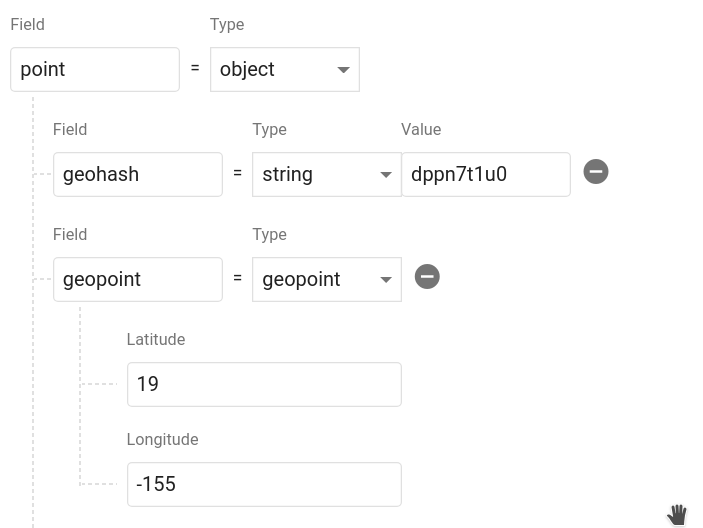
调用 geoFirePoint.data 会返回一个包含 geohash 字符串 和一个 Firestore GeoPoint 的对象。它在您的数据库中应该看起来像这样。您可以随意命名该对象,甚至可以在单个文档中保存多个点。
查询地理数据
查询距离某个点 50 公里内的文档集合
// Create a geoFirePoint
GeoFirePoint center = geo.point(latitude: 12.960632, longitude: 77.641603);

// get the collection reference or query
var collectionReference = _firestore.collection('locations');

double radius = 50;
String field = 'position';

Stream<List<DocumentSnapshot>> stream = geo.collection(collectionRef: collectionReference)
                                        .within(center: center, radius: radius, field: field);
within 函数返回一个 DocumentSnapshot 数据列表的 Stream,以及一些有用的元数据,例如与中心点的距离。
stream.listen((List<DocumentSnapshot> documentList) {
        // doSomething()
      });
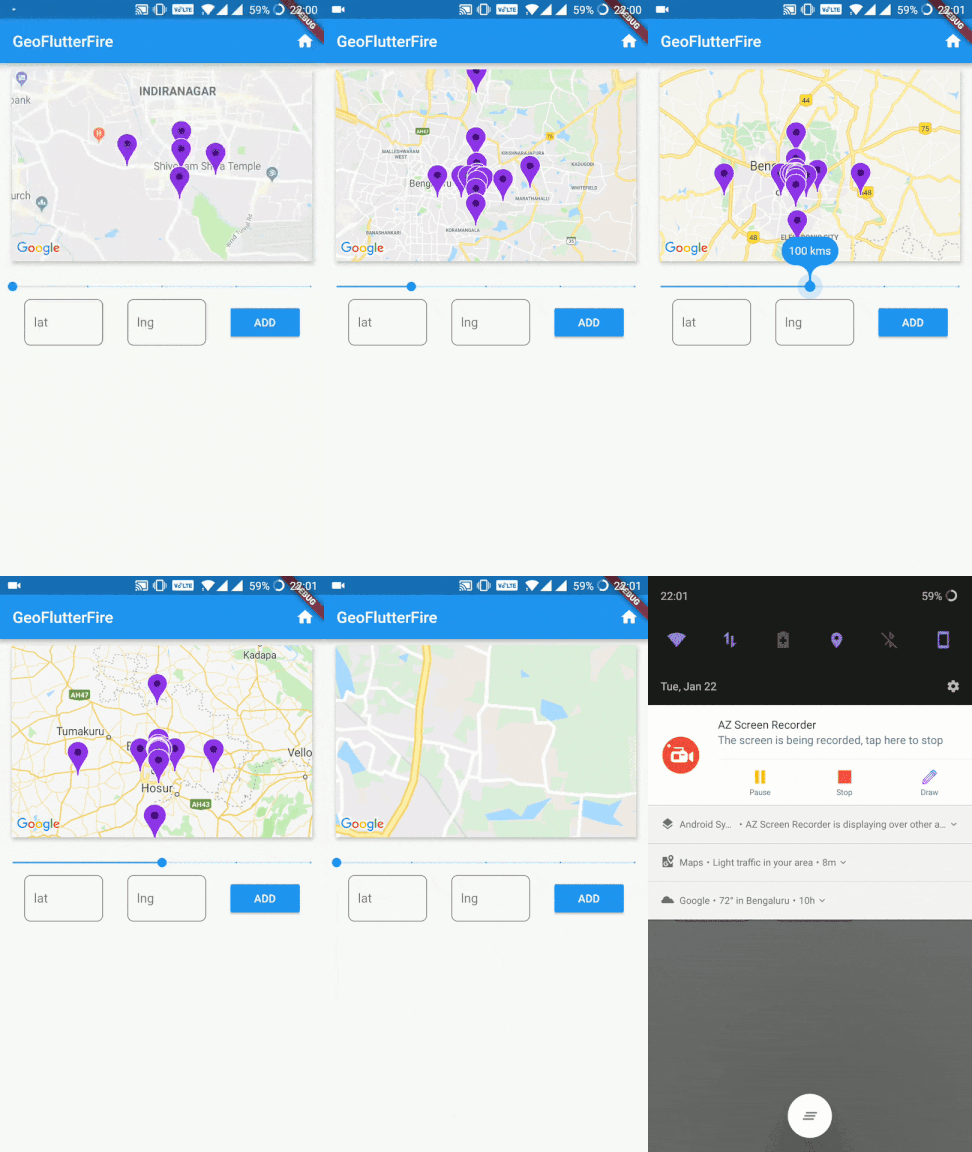
现在您有了一个实时数据流可以在地图上可视化。
:notebook: API
collection(collectionRef: CollectionReference)
创建一个 GeoCollectionRef,可用于进行地理查询,或者也可以像 firestore 的 add / set 功能一样用于写入数据。
示例
// Collection ref
// var collectionReference = _firestore.collection('locations').where('city', isEqualTo: 'bangalore');
var collectionReference = _firestore.collection('locations');
var geoRef = geo.collection(collectionRef: collectionReference);
注意:collectionReference 可以是 CollectionReference 或 Query 类型
执行地理查询
geoRef.within(center: GeoFirePoint, radius: double, field: String, {strictMode: bool})
按地理距离查询父 Firestore 集合。它将返回位于中心点 X 公里范围内的文档。
field 支持 Firestore 文档中的嵌套对象。
注意: 使用可选参数 strictMode = true 将文档严格限制在给定半径范围内。
示例
// For GeoFirePoint stored at the root of the firestore document
geoRef.within(center: centerGeoPoint, radius: 50, field: 'position', strictMode: true);

// For GeoFirePoint nested in other objects of the firestore document
geoRef.within(center: centerGeoPoint, radius: 50, field: 'address.location.position', strictMode: true);
每个 documentSnapshot.data() 还包含查询计算出的 distance。
返回: Stream<List<DocumentSnapshot>>
写入数据
像在 Firestore 中一样写入数据
geoRef.add(data)
或者使用客户端的便捷方法之一
geoRef.setDoc(String id, var data, {bool merge})- 使用 ID 设置集合中的文档。geoRef.setPoint(String id, String field, double latitude, double longitude)- 向现有文档添加 geohash
读取数据
除了地理查询,您还可以像在 Firestore 中一样正常读取集合,但它是一个 Observable
geoRef.data()- documentSnapshot 的 StreamgeoRef.snapshot()- Firestore QuerySnapshot 的 Stream
point(latitude: double, longitude: double)
返回一个 GeoFirePoint,允许您创建 geohash、格式化数据和计算相对距离。
示例:var point = geo.point(38, -119)
获取器
point.hash返回精度为 9 的 geohash 字符串point.geoPoint返回一个 Firestore GeoPointpoint.data返回适合保存到 Firestore 数据库的数据对象
地理计算
point.distance(latitude, longitude)到某点的 Haversine 距离
:zap: 提示
扩展到海量集合
可以构建包含数十亿文档的 Firestore 集合。此项目的主要动机之一是使地理查询成为可能,只需查询一部分数据即可。您可以将 Query 而不是 CollectionReference 传递给 collection(),然后所有地理查询都将通过该查询的约束进行范围限定。
注意:此查询需要复合索引,首次请求时 Firestore 会提示您创建该索引。
示例
var queryRef = _firestore.collection('locations').where('city', isEqualTo: 'bangalore');
var stream = geo
              .collection(collectionRef: queryRef)
              .within(center: center, radius: rad, field: 'position');
strictMode 的用法
对于较小的半径,建议使用 strictMode = false,以便也包含相邻哈希中的文档。
随着半径增大到较大的数值,相邻哈希的精度会获取到离半径边界相当远的文档,因此建议对较大的半径使用 strictMode = true。
注意: strictMode 的过滤发生在客户端,因此在较大半径处进行过滤会以读取不必要的文档为代价。
以 RxDart 的方式进行动态查询
var radius = BehaviorSubject<double>.seeded(1.0);
var collectionReference = _firestore.collection('locations');

stream = radius.switchMap((rad) {
      return geo
          .collection(collectionRef: collectionReference)
          .within(center: center, radius: rad, field: 'position');
    });

// Now update your query
radius.add(25);


