
带有搜索切换的AppBar
一个可以切换为搜索字段的AppBar。
AppBarWithSearchSwitch 是 AppBar 的替代类,它根据搜索是否激活返回两个不同的 AppBar。
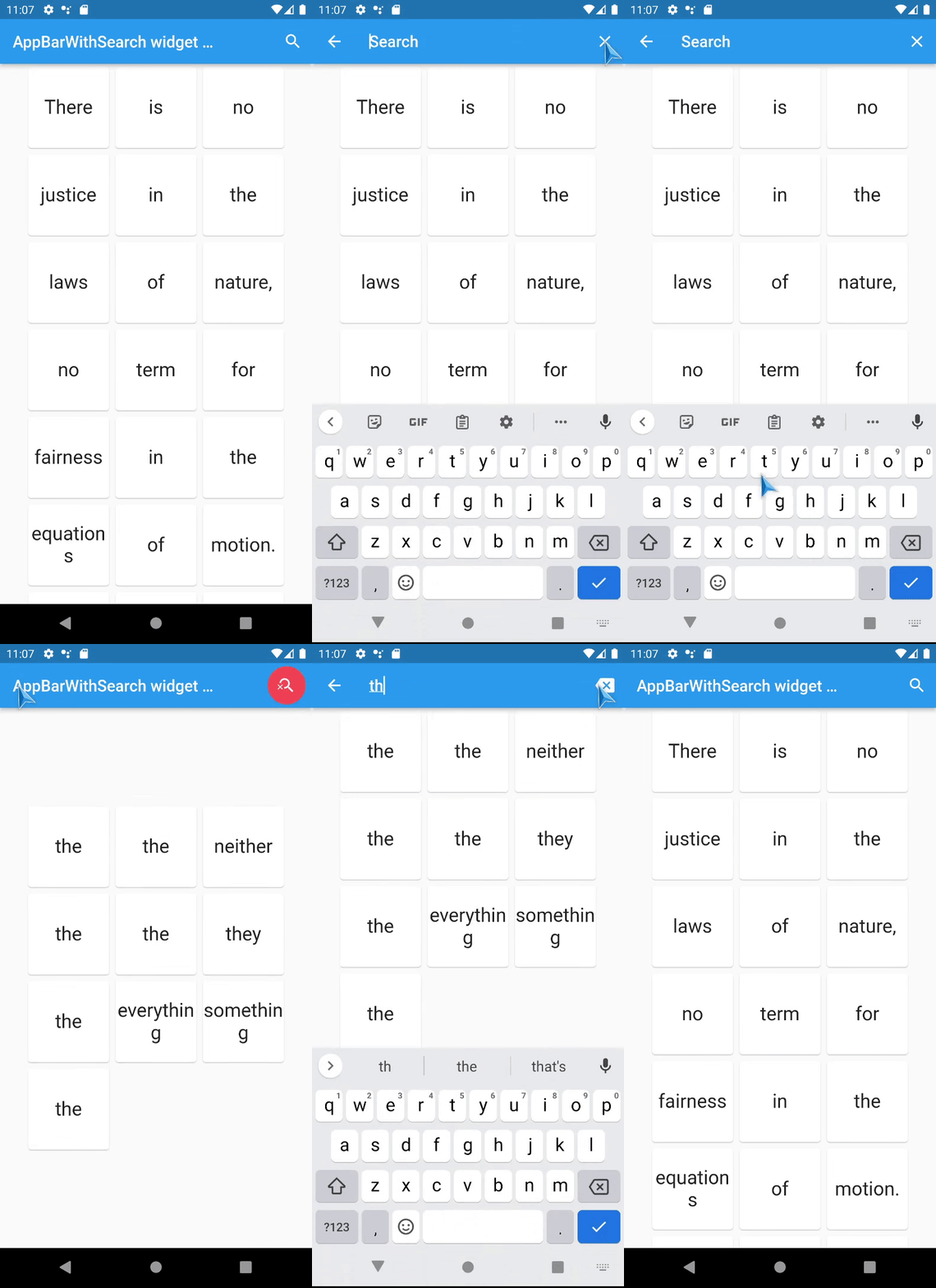
这是 flutter_search_bar 的完全重写,支持
- 支持 Stateless 小部件!,
- 内部使用 ValueNotifier 工作,可以直接使用,也可以轻松与任何 provider 一起使用,
- 完全自定义,
- 它在原地工作(没有导航技巧),
- 不需要在别处添加额外的变量。
快速概览
使用 appBarBuilder 属性来构建默认的 AppBar,其中包含
- 一个搜索按钮,它将调用 startSearch
- 或者使用标准的搜索按钮 AppBarSearchButton。
使用以下回调之一从 TextField 获取文本
此外,还有回调用于
此小部件支持 AppBar 的几乎 *所有* 属性,但
-
leading 和 title 属性现在期望的是
Widget Function(context)?- 这样做的目的是在它们中访问
AppBarWithSearchSwitch.of(context)方法, - 除非必要,否则不要更改它们,如果需要更改这些属性,请使用模板。
- 这样做的目的是在它们中访问
-
preferredSize 在这里是一个方法,您应该通过 toolbarWidth 和 toolbarHeight 设置它。
以下是所有其他新属性(不包括上面提到的)及其默认值列表
- this.tooltipForClearButton = ‘清除’,
- this.tooltipForCloseButton = ‘关闭搜索’,
- this.closeSearchIcon = Icons.close,
- this.clearSearchIcon = Icons.backspace,
- this.fieldHintText = ‘搜索’,
- this.keepAppBarColors = true,
- this.closeOnSubmit = true,
- this.clearOnSubmit = false,
- this.clearOnClose = false,
- this.showClearButton = true,
- this.closeOnClearTwice = true,
- this.keyboardType = TextInputType.text,
- this.toolbarWidth = double.infinity,
- this.searchInputDecoration,
- // 以及 Notifiers
- this.customIsActiveNotifier, // 具有默认的静态值
- this.customTextEditingController, // 具有默认的静态值
- this.customHasText, // 具有默认的静态值
示例
Statefull 小部件的完整示例在此: https://pub.dev/packages/app_bar_with_search_switch/example。
Stateless 小部件的完整示例在此: GitHub。
在线示例在此: https://alexqwesa.github.io/app_bar_with_search_switch/。
以及示例代码片段在此
final searchText = ValueNotifier<String>(''); // somewhere up in a widget tree
//...
  @override
  Widget build(BuildContext context) {
    return Scaffold(
      //
      // *** The Widget AppBarWithSearchSwitch
      //
      appBar: AppBarWithSearchSwitch(
        onChanged: (text) {
          searchText.value = text;
        }, // onSubmitted: (text) => searchText.value = text,
        appBarBuilder: (context) {
          return AppBar(
            title: Text('Example '),
            actions: [
              AppBarSearchButton(),
              // or
              // IconButton(onPressed: AppBarWithSearchSwitch.of(context)?startSearch, icon: Icon(Icons.search)),
            ],
          );
        },
      ),
      body: Container(),
    );
  }
屏幕截图
待办事项
- 添加语音转文本支持,
- 添加有效的 riverpod 示例,
常见问题
如何从其他地方激活 AppBarWithSearchSwitch 的搜索字段 (isActive=true)?
- 使用 customIsActiveNotifier,
- 在小部件树的某处初始化一个 ValueNotifier 类型的变量,
- 将 AppBarWithSearchSwitch 的 customIsActiveNotifier 属性设置为此变量,
- 将此 ValueNotifier 的值设置为 true 以显示搜索 AppBar。(注意:目前,如果您通过此变量停止搜索(将其设置为 false),
clearOnClose将不起作用,onClose回调也不会被调用)。
已知问题
keepAppBarColors = true不会更改“文本选择句柄”(选择气泡)的颜色,这是因为 upstream 问题 flutter/flutter#74890 和 textSelectionTheme:selectionHandleColor


