
概述
这个包包含一组可重用的组件。提供可以帮助您构建屏幕的常用组件。
入门
将依赖项添加到您的 pubspec.yaml 文件中
dependencies:
  collection_picker : "^version"
用法
我们使用模型数据和列表作为真实数据来提供示例数据,以便您更容易理解
提供的示例模型数据是
class CityModel {
  String province;
  String city;

  CityModel(this.province, this.city);
}
而虚拟数据列表是
List<CityModel> dataCity = [
  CityModel('Jakarta', 'SCBD'),
  CityModel('Jakarta', 'Tebet'),
  CityModel('Jakarta', 'Gambir'),
  CityModel('Lampung', 'Bandar Lampung'),
  CityModel('Lampung', 'Pringsewu'),
  CityModel('Bandung', 'Setrasari'),
  CityModel('Bandung', 'Gedebage'),
  CityModel('Bandung', 'Cihanjuang'),
  CityModel('Yogyakarta', 'Bantul'),
  CityModel('Yogyakarta', 'Sleman'),
];
PickerListView

PickerListView<CityModel>(
  type: PickerType.single,
  shrinkWrap: true,
  physics: const NeverScrollableScrollPhysics(),
  separator: const Divider(thickness: 1, height: 16),
  initialValue: dataCity.first,
  data: dataCity,
  itemBuilder: (PickerData<CityModel> item) {
    return SizedBox(
      height: 20,
      child: Row(
        mainAxisAlignment: MainAxisAlignment.spaceBetween,
        children: [
          Text('${item.data?.name}'),
          (item.isSelected)
              ? const Icon(Icons.check)
              : const SizedBox.shrink()
        ],
      ),
    );
  },
  onChanged: (context, index, selectedItem, selectedListItem) {
    // when the type is single/radio, you should use this
    debugPrint('Selected item = $selectedItem');

    /// when the type is multiple, you should use this
    debugPrint('All selected item = $selectedListItem');
  },
)
PickerGridView
实际上与 Picker ListView 相同,但它作为 GridView 提供。
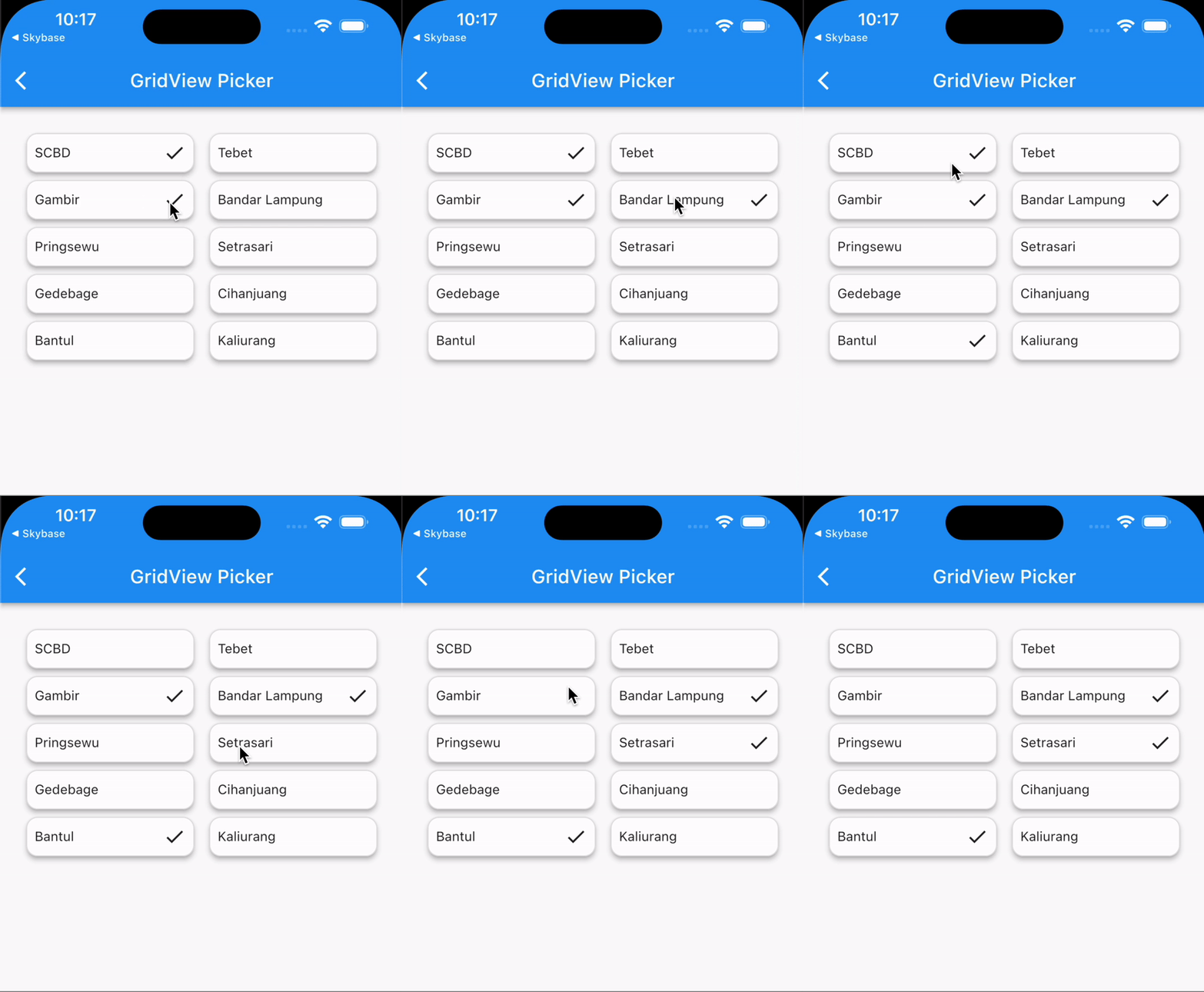
PickerGridView(
  type: PickerType.multiple,
  shrinkWrap: true,
  initialValue: dataCity.first,
  data: dataCity,
  itemBuilder: (PickerData<CityModel> item) {
    return Container(
      padding: const EdgeInsets.all(8),
      decoration: BoxDecoration(
        borderRadius: BorderRadius.circular(12),
        border: Border.all(color: Colors.grey.shade300),
      ),
      child: Row(
        mainAxisAlignment: MainAxisAlignment.spaceBetween,
        children: [
          Text('${item.data?.name}'),
          (item.isSelected)
              ? const Icon(Icons.check)
              : const SizedBox.shrink()
        ],
      ),
    );
  },
  onChanged: (context, index, selectedItem, selectedListItem) {
    // when the type is single/radio, you should use this
    debugPrint('selected item = ${selectedItem?.name}');

    /// when the type is multiple, you should use this
    debugPrint('All selected item = ${selectedListItem.map((e) => e?.name)}');
  },
)
附加信息
感谢您。希望这个包能帮助到您。祝您编码愉快!


