
Flutter 下载器
用于创建和管理下载任务的插件。支持 iOS 和 Android。
该插件基于Android的[WorkManager][1]和iOS的[NSURLSessionDownloadTask][2]在后台模式下运行下载任务。
iOS集成
必需的配置
注意:以下步骤需要您在Xcode中打开ios项目。
- 启用后台模式。

- 添加
sqlite库。

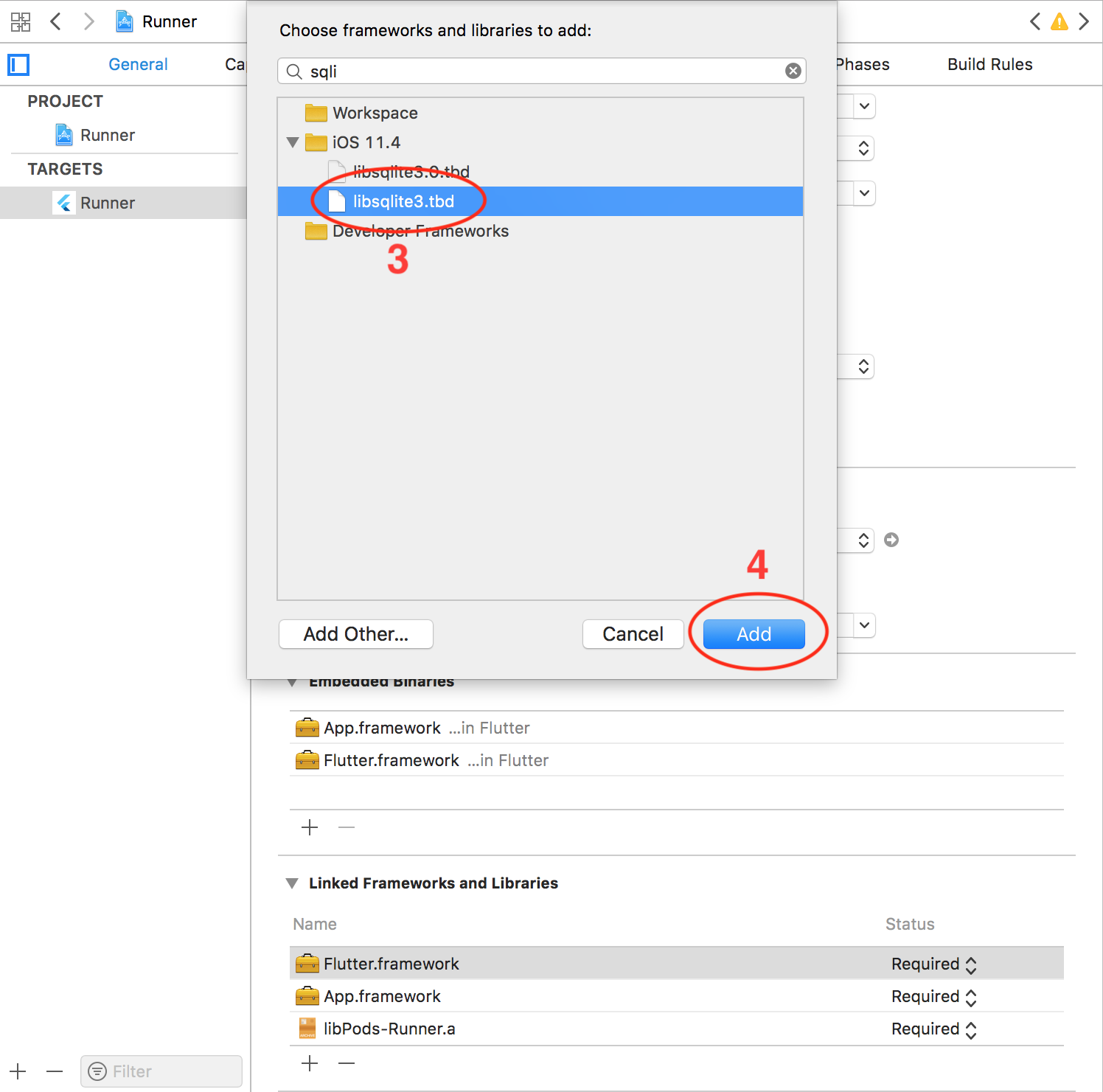
- 配置
AppDelegate
Objective-C
/// AppDelegate.h
#import <Flutter/Flutter.h>
#import <UIKit/UIKit.h>

@interface AppDelegate : FlutterAppDelegate

@end
// AppDelegate.m
#include "AppDelegate.h"
#include "GeneratedPluginRegistrant.h"
#include "FlutterDownloaderPlugin.h"

@implementation AppDelegate

void registerPlugins(NSObject<FlutterPluginRegistry>* registry) {
  if (![registry hasPlugin:@"FlutterDownloaderPlugin"]) {
     [FlutterDownloaderPlugin registerWithRegistrar:[registry registrarForPlugin:@"FlutterDownloaderPlugin"]];
  }
}

- (BOOL)application:(UIApplication *)application
    didFinishLaunchingWithOptions:(NSDictionary *)launchOptions {
  [GeneratedPluginRegistrant registerWithRegistry:self];
  [FlutterDownloaderPlugin setPluginRegistrantCallback:registerPlugins];
  // Override point for customization after application launch.
  return [super application:application didFinishLaunchingWithOptions:launchOptions];
}

@end
或者Swift
import UIKit
import Flutter
import flutter_downloader

@UIApplicationMain
@objc class AppDelegate: FlutterAppDelegate {
  override func application(
    _ application: UIApplication,
    didFinishLaunchingWithOptions launchOptions: [UIApplication.LaunchOptionsKey: Any]?
  ) -> Bool {
    GeneratedPluginRegistrant.register(with: self)
    FlutterDownloaderPlugin.setPluginRegistrantCallback(registerPlugins)
    return super.application(application, didFinishLaunchingWithOptions: launchOptions)
  }
}

private func registerPlugins(registry: FlutterPluginRegistry) {
    if (!registry.hasPlugin("FlutterDownloaderPlugin")) {
       FlutterDownloaderPlugin.register(with: registry.registrar(forPlugin: "FlutterDownloaderPlugin")!)
    }
}
可选配置
- 支持HTTP请求:如果您想通过HTTP请求下载文件,您需要禁用Apple传输安全(ATS)功能。有两种选择:
- 仅为特定域禁用ATS:(将以下代码添加到您的
Info.plist文件中)
<key>NSAppTransportSecurity</key>
<dict>
  <key>NSExceptionDomains</key>
  <dict>
    <key>www.yourserver.com</key>
    <dict>
      <!-- add this key to enable subdomains such as sub.yourserver.com -->
      <key>NSIncludesSubdomains</key>
      <true/>
      <!-- add this key to allow standard HTTP requests, thus negating the ATS -->
      <key>NSTemporaryExceptionAllowsInsecureHTTPLoads</key>
      <true/>
      <!-- add this key to specify the minimum TLS version to accept -->
      <key>NSTemporaryExceptionMinimumTLSVersion</key>
      <string>TLSv1.1</string>
    </dict>
  </dict>
</dict>
- 完全禁用ATS:(将以下代码添加到您的
Info.plist文件中)
<key>NSAppTransportSecurity</key>
<dict>
    <key>NSAllowsArbitraryLoads</key><true/>
</dict>
- 配置并发任务的最大数量:该插件默认允许同时运行3个下载任务(如果您加入的任务超过3个,只有3个任务会运行,其他任务会处于待定状态)。您可以通过将以下代码添加到您的
Info.plist文件中来更改此数量。
<!-- changes this number to configure the maximum number of concurrent tasks -->
<key>FDMaximumConcurrentTasks</key>
<integer>5</integer>
- 本地化通知消息:当您的应用程序不在前台运行时,该插件会发送通知消息以通知用户所有文件已下载。此消息默认为英语。您可以通过在
Info.plist文件中添加和本地化以下消息来本地化此消息。(您可以在此[链接][3]中找到Info.plist本地化的详细信息)
<key>FDAllFilesDownloadedMessage</key>
<string>All files have been downloaded</string>
笔记
- 该插件仅支持将文件保存在
NSDocumentDirectory中
Android集成
必需的配置
-
如果您的项目运行在Flutter v1.12之前的版本,请参考本文档来配置您的Android项目。
-
从Flutter v1.12开始,使用Android v2嵌入,在Android中与后台隔离工作无需额外配置(但您需要正确设置项目。请参阅升级pre-1.12的Android项目)
-
为了处理通知上的点击事件以在Android上打开已下载的文件,您需要添加一些额外的配置。将以下代码添加到您的
AndroidManifest.xml
<provider
    android:name="vn.hunghd.flutterdownloader.DownloadedFileProvider"
    android:authorities="${applicationId}.flutter_downloader.provider"
    android:exported="false"
    android:grantUriPermissions="true">
    <meta-data
        android:name="android.support.FILE_PROVIDER_PATHS"
        android:resource="@xml/provider_paths"/>
</provider>
笔记
- 您必须将下载的文件保存在外部存储中(其他应用程序可以读取您的文件的位置)
- 只有当您的设备至少有一个可以读取这些文件类型(mp3、pdf等)的应用程序时,才能打开下载的文件。
可选配置
- 配置并发任务的最大数量:该插件依赖于
WorkManager库,而WorkManager取决于可用处理器的数量来配置同时运行的最大任务数。您可以通过将以下代码添加到您的AndroidManifest.xml来为此配置设置一个固定数量。
 <provider
     android:name="androidx.work.impl.WorkManagerInitializer"
     android:authorities="${applicationId}.workmanager-init"
     tools:node="remove" />

 <provider
     android:name="vn.hunghd.flutterdownloader.FlutterDownloaderInitializer"
     android:authorities="${applicationId}.flutter-downloader-init"
     android:exported="false">
     <!-- changes this number to configure the maximum number of concurrent tasks -->
     <meta-data
         android:name="vn.hunghd.flutterdownloader.MAX_CONCURRENT_TASKS"
         android:value="5" />
 </provider>
- 本地化通知消息:您可以通过本地化以下消息来本地化下载进度的通知消息。(您可以在此[链接][4]中找到Android中字符串本地化的详细信息)
<string name="flutter_downloader_notification_started">Download started</string>
<string name="flutter_downloader_notification_in_progress">Download in progress</string>
<string name="flutter_downloader_notification_canceled">Download canceled</string>
<string name="flutter_downloader_notification_failed">Download failed</string>
<string name="flutter_downloader_notification_complete">Download complete</string>
<string name="flutter_downloader_notification_paused">Download paused</string>
- PackageInstaller:为了打开APK文件,您的应用程序需要
REQUEST_INSTALL_PACKAGES权限。请将以下代码添加到您的AndroidManifest.xml
<uses-permission android:name="android.permission.REQUEST_INSTALL_PACKAGES" />
用法
导入包
import 'package:flutter_downloader/flutter_downloader.dart';
初始化
WidgetsFlutterBinding.ensureInitialized();
await FlutterDownloader.initialize(
  debug: true // optional: set false to disable printing logs to console
);
- 注意:在使用该插件之前必须对其进行初始化。
创建新的下载任务
final taskId = await FlutterDownloader.enqueue(
  url: 'your download link',
  savedDir: 'the path of directory where you want to save downloaded files',
  showNotification: true, // show download progress in status bar (for Android)
  openFileFromNotification: true, // click on notification to open downloaded file (for Android)
);
更新下载进度
FlutterDownloader.registerCallback(callback); // callback is a top-level or static function
重要提示:您的UI在主Isolate中渲染,而下载事件来自后台Isolate(换句话说,callback中的代码在后台Isolate中运行),因此您必须处理两个Isolate之间的通信。例如:
ReceivePort _port = ReceivePort();

@override
void initState() {
	super.initState();

	IsolateNameServer.registerPortWithName(_port.sendPort, 'downloader_send_port');
	_port.listen((dynamic data) {
		String id = data[0];
		DownloadTaskStatus status = data[1];
		int progress = data[2];
		setState((){ });
	});

	FlutterDownloader.registerCallback(downloadCallback);
}

@override
void dispose() {
	IsolateNameServer.removePortNameMapping('downloader_send_port');
	super.dispose();
}

static void downloadCallback(String id, DownloadTaskStatus status, int progress) {
	final SendPort send = IsolateNameServer.lookupPortByName('downloader_send_port');
	send.send([id, status, progress]);
}
加载所有任务
final tasks = await FlutterDownloader.loadTasks();
带条件加载任务
final tasks = await FlutterDownloader.loadTasksWithRawQuery(query: query);
- 注意:为了成功将数据解析为
DownloadTask对象,您应该从数据库加载所有字段的数据(换句话说,使用:SELECT *)。例如:
SELECT * FROM task WHERE status=3
- 注意:以下是此插件存储任务信息的
task表的架构
CREATE TABLE `task` (
	`id`	INTEGER PRIMARY KEY AUTOINCREMENT,
	`task_id`	VARCHAR ( 256 ),
	`url`	TEXT,
	`status`	INTEGER DEFAULT 0,
	`progress`	INTEGER DEFAULT 0,
	`file_name`	TEXT,
	`saved_dir`	TEXT,
	`resumable`	TINYINT DEFAULT 0,
	`headers`	TEXT,
	`show_notification`	TINYINT DEFAULT 0,
	`open_file_from_notification`	TINYINT DEFAULT 0,
	`time_created`	INTEGER DEFAULT 0
);
取消任务
FlutterDownloader.cancel(taskId: taskId);
取消所有任务
FlutterDownloader.cancelAll();
暂停任务
FlutterDownloader.pause(taskId: taskId);
恢复任务
FlutterDownloader.resume(taskId: taskId);
- 注意:
resume()将返回一个新的taskId,对应于为继续下载过程而创建的新后台任务。您应该用这个新的taskId替换原始的taskId(其状态标记为paused),以继续跟踪下载进度。
重试失败的任务
FlutterDownloader.retry(taskId: taskId);
- 注意:
retry()将返回一个新的taskId(类似resume())
删除任务
FlutterDownloader.remove(taskId: taskId, shouldDeleteContent:false);
打开和预览下载的文件
FlutterDownloader.open(taskId: taskId);
- 注意:在Android上,只有当下载文件存储在外部存储中,并且您的设备上至少有一个可以读取该文件类型的应用程序时,您才能打开下载的文件。


