渐变文本框
一个可定制的渐变文本框,适用于希望为 Flutter 应用的文本框设置样式的开发者。
安装
- 将当前版本的包添加到您的 pubspec.yaml 文件中
dependencies:
 gradient_textfield: ^0.0.1
- 运行以下命令
flutter pub get
- 导入 custom_field 包并在您的 Flutter 应用中使用它
import 'package:gradient_textfield/gradient_textfield.dart';
示例
您可以修改的属性如下所示
- 高度
- width
- 颜色(渐变)
- text
- radius
- 字体样式
示例代码
 class Login extends StatelessWidget {
  const Login({ Key? key }) : super(key: key);

  @override
  Widget build(BuildContext context) {
    TextEditingController email = TextEditingController();
    return Scaffold(
      body:  Gradienttextfield(
              controller: email,
              radius: 40,
              height: 60,
              width: 400,
              colors: const [Colors.grey, Colors.white],
              text: "Email",
              fontColor: Colors.black,
              fontSize: 15,
              fontWeight: FontWeight.normal,
            ),

    );
  }
}
截图
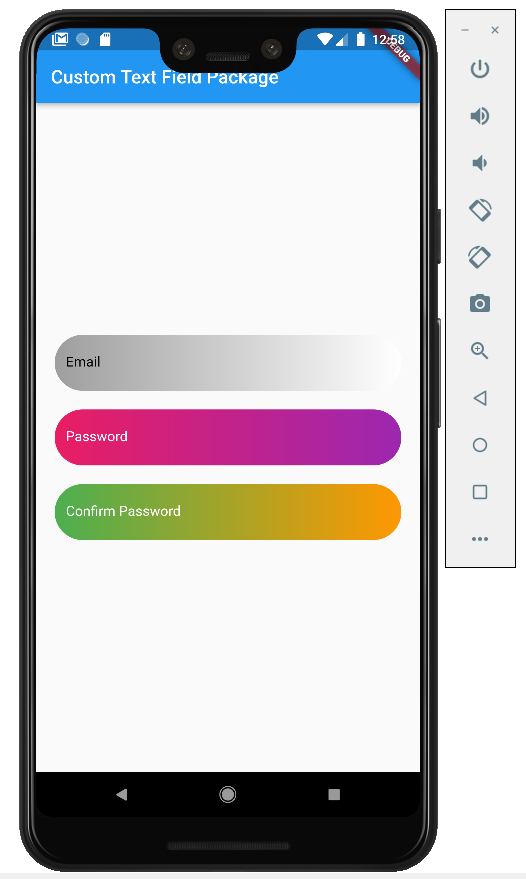
即将发布
- 设置前缀图标
- 设置标签文本和标签样式
- 为容器实现阴影


