
flutter_shine.dart
Flutter Shine 是一个用于创建漂亮阴影、动态灯光位置、高度可定制的阴影的库,没有库依赖项,可根据内容创建文本或框阴影。
受 Shine 启发的 Flutter 小部件
安装
添加包
dependencies:
  flutter_shine: ^0.0.5
❔ 用法
导入此类
import 'package:flutter_shine/flutter_shine.dart';
Flutter Shine
看看如何轻松地为文本和容器创建阴影。
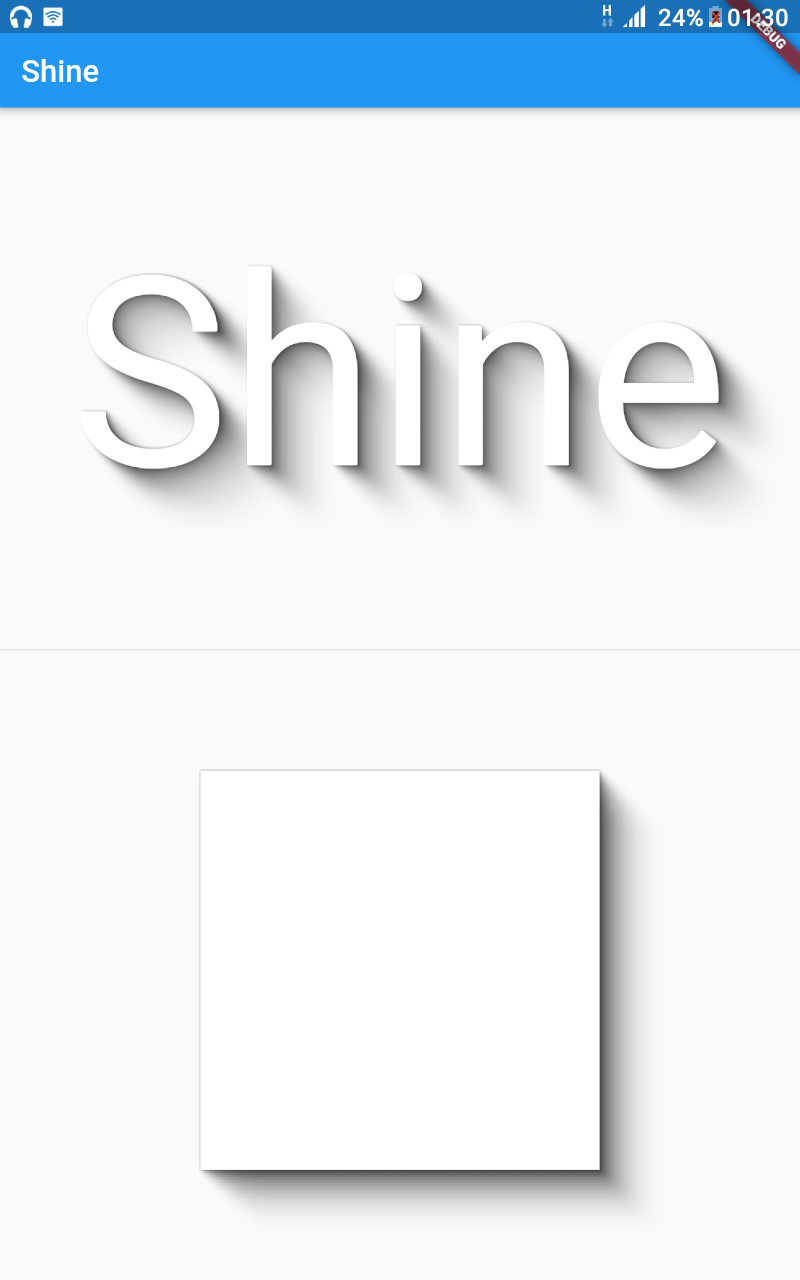
FlutterShine(
    builder: (BuildContext context, ShineShadow shineShadow) {
        return Column(
            crossAxisAlignment: CrossAxisAlignment.center,
            mainAxisAlignment: MainAxisAlignment.spaceEvenly,
            mainAxisSize: MainAxisSize.max,
            children: <Widget>[
                Text(
                    "Shine",
                    style: TextStyle(
                        fontSize: 100,
                        color: Colors.white,
                        shadows: shineShadow.shadows),
                ),
                Divider(),
                Container(
                    width: 300,
                    height: 300,
                    decoration: BoxDecoration(
                        color: Colors.white, boxShadow: shineShadow.boxShadows),
                )
            ],
        );
    },
),
具有动态光源位置的极度可定制的阴影。
您可以自定义以下值
- 步数:阴影的密度
- 不透明度:阴影的不透明度
- 不透明度幂:不透明度幂
- 偏移:阴影的偏移
- 偏移幂:偏移幂
- 模糊:阴影的模糊
- 模糊幂:模糊幂
- 阴影颜色:阴影的颜色

FlutterShine(
    [config: Config(shadowColor: Colors.red[300]),]
    [light: Light(intensity: 1, position: Point(x, y)),]
    builder: (BuildContext context, ShineShadow shineShadow) {
        return Column(
            crossAxisAlignment: CrossAxisAlignment.center,
            mainAxisAlignment: MainAxisAlignment.spaceEvenly,
            mainAxisSize: MainAxisSize.max,
            children: <Widget>[
                Text(
                    "Shine",
                    style: TextStyle(
                        fontSize: 100,
                        color: Colors.white,
                        shadows: shineShadow.shadows),
                ),
                Divider(),
                Container(
                    width: 300,
                    height: 300,
                    decoration: BoxDecoration(
                        color: Colors.white, boxShadow: shineShadow.boxShadows),
                )
            ],
        );
    },
),
示例
Web 和命令行示例可在 example 文件夹中找到。
Web 示例
为了运行 Web 示例,请按照以下步骤操作
- 克隆此仓库并进入目录
- 运行
pub get - 运行
pub run build_runner serve example - 在您的浏览器中导航至 https://:8080/web/
命令行示例
为了运行命令行示例,请按照以下步骤操作
- 克隆此仓库并进入目录
- 运行
pub get - 运行
dart example/lib/main.dart
Flutter 示例
安装 Flutter
为了运行 Flutter 示例,您必须安装 Flutter。有关安装说明,请查看在线
文档.
运行应用
- 打开一个 Android 模拟器、iOS 模拟器或连接一个合适的移动设备进行调试。
- 打开一个终端
- 将目录
cd到example/lib/目录 - 运行
flutter doctor以确保您拥有所有 Flutter 依赖项。 - 运行
flutter packages get - 运行
flutter run


