
scrollable_list_tabview



一个Flutter小部件,用于同步ScrollView和自定义标签视图。
主要思想是创建一个自定义标签视图,并与内部ScrollView同步。滚动活动将触发顶部的自定义标签视图,以跟随内部滚动视图小部件的索引。
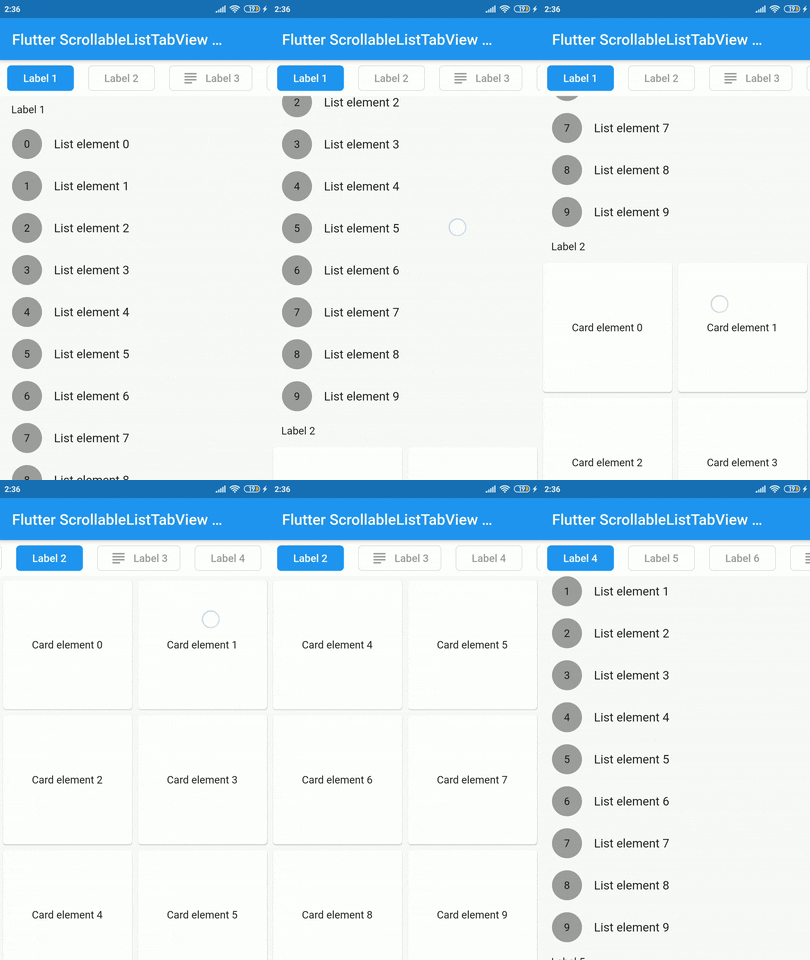
安装
在pubspec.yaml文件中为包添加依赖项
dependencies:
    scrollable_list_tabview: <latest>
用法
要使用此小部件,我们必须首先定义我们的标签将是什么样子。
ListTab
| 参数 | 定义 |
|---|---|
小部件图标 |
标签的尾部小部件,通常是一个图标。 |
小部件标签 |
要在标签中显示的标签,必须非空。 |
BorderRadiusGeometry borderRadius |
单个标签的BorderRadius值。 |
Color activeBackgroundColor |
选项卡被选中时使用的颜色。 |
Color inactiveBackgroundColor |
未选中选项卡时使用的颜色。 |
bool showIconInList |
决定是否在可滚动视图中显示图标小部件。 |
Color borderColor |
未选中时选项卡边框的颜色 |
然后我们可以在ScrollableListTab中使用LisTab。
ScrollableListTab
| 参数 | 定义 |
|---|---|
ListTab tab |
用于渲染标签小部件的数据模型。 |
ScrollView body |
单个内部可滚动小部件。 |
然后ScrollableListTabView将接收ScrollableListTab列表作为参数。
ScrollableListTabView
| 参数 | 定义 |
|---|---|
List<ScrollableListTab> tabs |
要构建的标签列表。 |
double height |
视图顶部标签的高度。 |
Duration tabAnimationDuration |
标签更改动画的持续时间。 |
Duration bodyAnimationDuration |
内部滚动视图动画的持续时间。 |
Curve tabAnimationCurve |
在为标签更改动画时使用的动画曲线。 |
Curve bodyAnimationCurve |
在更改内部ScrollView的索引时使用的动画曲线。 |
示例
import 'package:flutter/material.dart';
import 'package:scrollable_list_tabview/scrollable_list_tabview.dart';

void main() {
  runApp(MyApp());
}

class MyApp extends StatelessWidget {
  // This widget is the root of your application.
  @override
  Widget build(BuildContext context) {
    return MaterialApp(
      title: 'Flutter Demo',
      debugShowCheckedModeBanner: false,
      theme: ThemeData(
        primarySwatch: Colors.blue,
        visualDensity: VisualDensity.adaptivePlatformDensity,
      ),
      home: MyHomePage(title: 'Flutter ScrollableListTabView Example'),
    );
  }
}

class MyHomePage extends StatefulWidget {
  MyHomePage({Key key, this.title}) : super(key: key);

  final String title;

  @override
  _MyHomePageState createState() => _MyHomePageState();
}

class _MyHomePageState extends State<MyHomePage> {
  @override
  Widget build(BuildContext context) {
    return Scaffold(
      appBar: AppBar(
        title: Text(widget.title),
      ),
      body: ScrollableListTabView(
        tabHeight: 48,
        tabs: [
          ScrollableListTab(
              tab: ListTab(label: Text('Label 1'), icon: Icon(Icons.group)),
              body: ListView.builder(
                shrinkWrap: true,
                physics: NeverScrollableScrollPhysics(),
                itemCount: 10,
                itemBuilder: (_, index) => ListTile(
                  leading: Container(
                    height: 40,
                    width: 40,
                    decoration: BoxDecoration(
                        shape: BoxShape.circle, color: Colors.grey),
                    alignment: Alignment.center,
                    child: Text(index.toString()),
                  ),
                  title: Text('List element $index'),
                ),
              )),
        ],
      ),
    );
  }
}
限制和注意事项
此包存在一些限制。例如,我们只支持ScrollView作为主体。此外,我们也可以使用builder模式来构建小部件。
我想感谢Google开发者创建了名为ScrollablePositionedList的出色包。
贡献
欢迎通过拉取请求进行贡献。有关如何为该包贡献的更多信息,请查看贡献指南。
许可证
本项目采用MIT许可证,有关该许可证的更多信息可在此处找到。


