
EasyDateTimeline
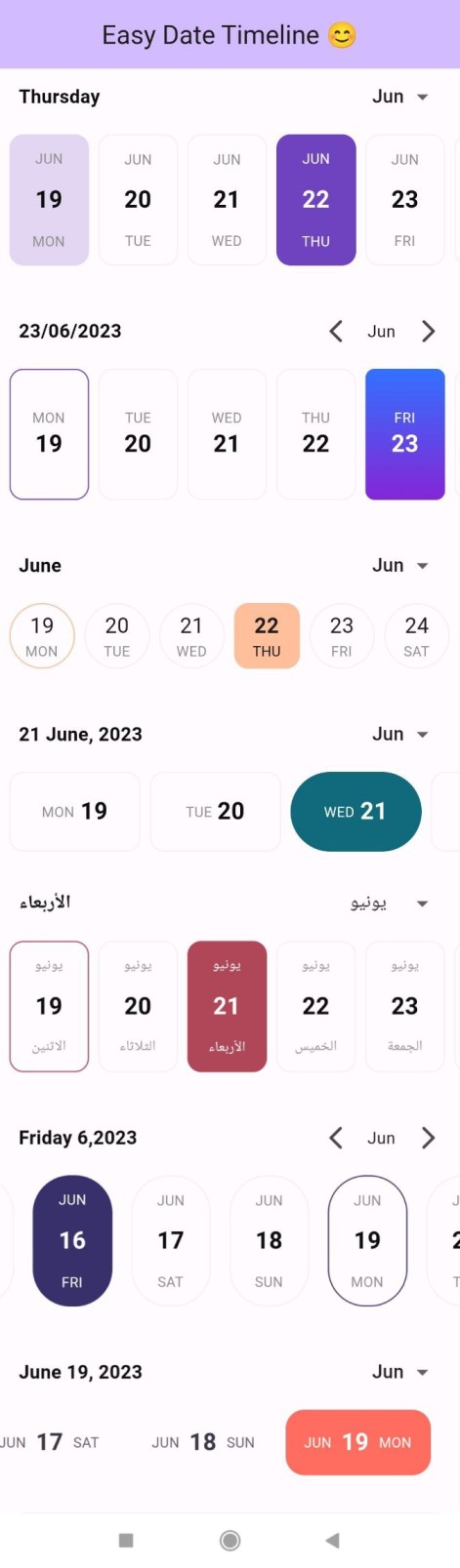
“easy_date_timeline” 包是一个可定制的 Flutter 库,可在水平视图中显示日期时间轴。
使用方法
在您的 dart 文件中导入以下包
import 'package:easy_date_timeline/easy_date_timeline.dart';
用法
使用 EasyDateTimeLine Widget
   Column(
        mainAxisAlignment: MainAxisAlignment.center,
        children: [
          EasyDateTimeLine(
            initialDate: DateTime.now(),
            onDateChange: (selectedDate) {
              //[selectedDate] the new date selected.
            },
          ),
        ],
      ),
功能
动态文本颜色: “easy_date_timeline” 包会根据激活颜色自动调整活动日期的文本颜色。如果激活颜色为深色,则文本颜色将为浅色;如果激活颜色为浅色,则文本颜色将为深色。这可确保文本始终易于阅读,并与背景色形成良好对比。可定制项目构建器: “easy_date_timeline” 包提供了一个项目构建器,可实现时间轴项目的完全自定义。通过项目构建器,开发人员可以自定义时间轴中每个日期项目的外观和行为,包括文本、背景颜色等。本地化支持: “easy_date_timeline” 包支持本地化,允许开发人员根据用户设备设置以不同语言和格式显示时间轴。此功能可确保该包可在各种国际环境中使用,并为全球用户提供无缝的用户体验。
自定义背景
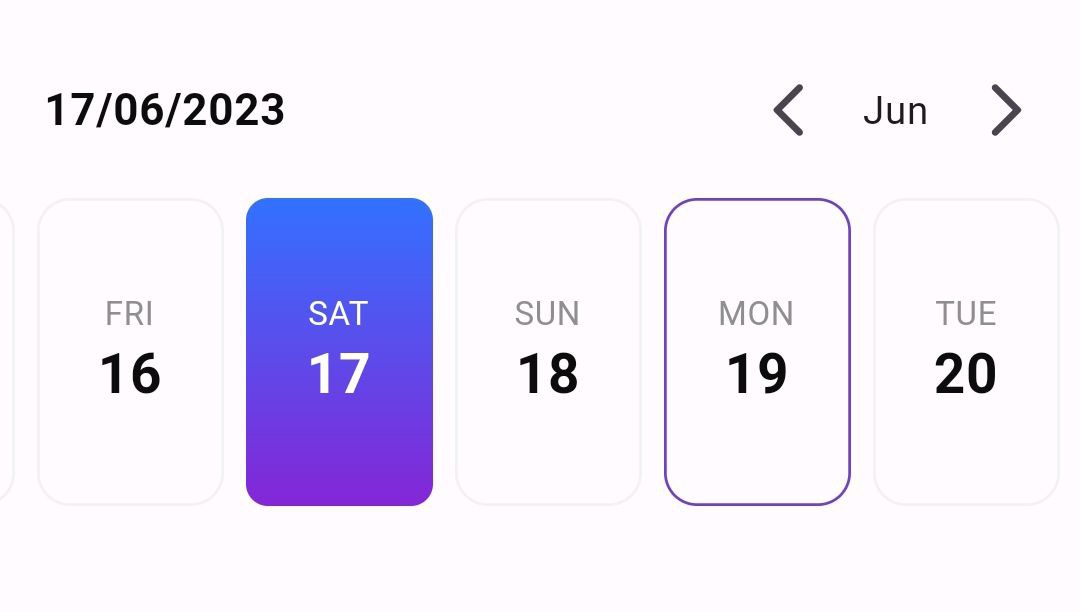
使用 dayProps,其中包含活动和非活动日期的装饰。
 Column(
        mainAxisAlignment: MainAxisAlignment.center,
        children: [
          EasyDateTimeLine(
            initialDate: DateTime.now(),
            onDateChange: (selectedDate) {
              //[selectedDate] the new date selected.
            },
            dayProps: const EasyDayProps(
              activeDayDecoration: BoxDecoration(
                borderRadius: BorderRadius.all(Radius.circular(8)),
                gradient: LinearGradient(
                  begin: Alignment.topCenter,
                  end: Alignment.bottomCenter,
                  colors: [
                    Color(0xff3371FF),
                    Color(0xff8426D6),
                  ],
                ),
              ),
            ),
          ),
        ],
      ),
更改当前日期高亮颜色和样式
在 dayProps 中,您可以将 todayHighlightStyle 设置为
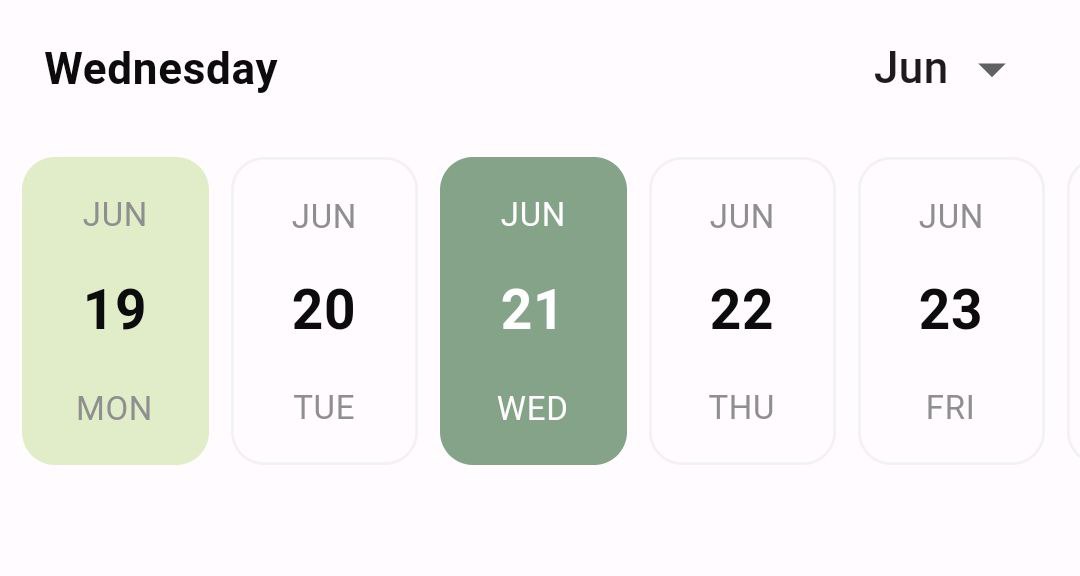
TodayHighlightStyle.withBackground:为当前日期设置背景色。TodayHighlightStyle.withBorder:仅为当前日期设置彩色边框。TodayHighlightStyle.none:从当前日期移除高亮。默认情况下,高亮颜色等于主要颜色的 20% 不透明度。要更改高亮颜色,您可以使用todayHighlightColor并设置您自己的颜色。
 Column(
        mainAxisAlignment: MainAxisAlignment.center,
        children: [
          EasyDateTimeLine(
            initialDate: DateTime.now(),
            onDateChange: (selectedDate) {
              //[selectedDate] the new date selected.
            },
            activeColor: const Color(0xff85A389),
            dayProps: const EasyDayProps(
              todayHighlightStyle: TodayHighlightStyle.withBackground,
              todayHighlightColor: Color(0xffE1ECC8),
            ),
          ),
        ],
      ),
注意
如果您为 EasyDateTimeline 小部件提供了
inactiveDecoration,则当前日期高亮功能将被禁用。这是因为 inactiveDecoration 用于设置不在活动日期范围内的日期的样式,并且将当前日期高亮应用于这些日期可能不理想。如果您想使用当前日期高亮功能,请不要为小部件提供 inactiveDecoration。
更改日期结构
在 dayProps 中,将 dayStructure 更改为
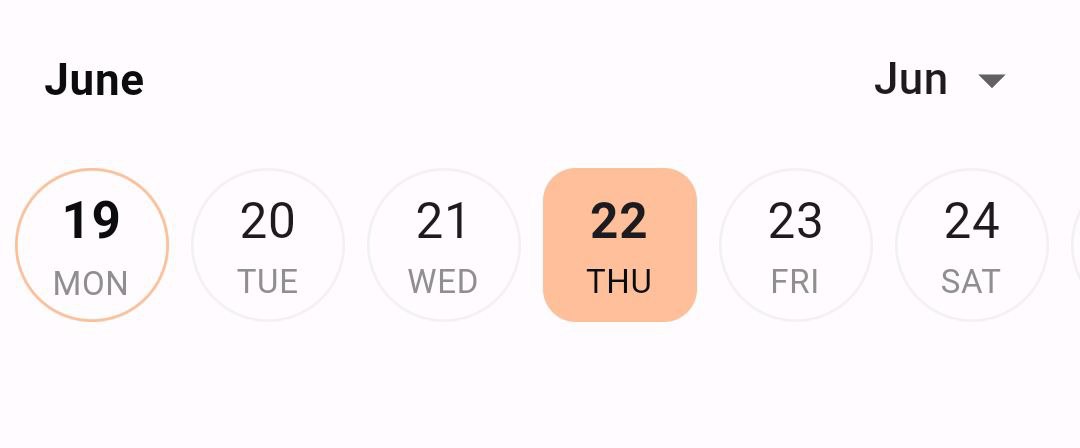
DayStructure.dayNumDayStr:显示当前日期号,然后显示当前日期名称。DayStructure.dayStrDayNum:显示当前日期名称,然后显示当前日期号。DayStructure.monthDayNumDayStr:显示当前月份名称,然后显示当前日期号,最后显示当前日期名称。DayStructure.dayNumberOnly:仅显示当前日期号。DayStructure.dayNameOnly:仅显示当前日期名称。DayStructure.dayStrDayNumMonth:显示当前日期名称,然后显示当前日期号,最后显示当前月份名称。
       Column(
        mainAxisAlignment: MainAxisAlignment.center,
        children: [
          EasyDateTimeLine(
            initialDate: DateTime.now(),
            onDateChange: (selectedDate) {
              //[selectedDate] the new date selected.
            },
            activeColor: const Color(0xffFFBF9B),
            dayProps: const EasyDayProps(
              dayStructure: DayStructure.dayNumDayStr,
              inactiveBorderRadius: 48.0,
              height: 56.0,
              width: 56.0,
              activeDayNumStyle: TextStyle(
                fontSize: 18.0,
                fontWeight: FontWeight.bold,
              ),
              inactiveDayNumStyle: TextStyle(
                fontSize: 18.0,
              ),
            ),
          )
        ],
      ),
本地化支持
使用 easy_date_timeline,您可以显示您偏好的语言和格式的日期和时间轴。只需将 locale 参数传递给适当的语言代码和区域作为值即可。例如,如果您想以阿拉伯语显示日期,可以将 locale 参数设置为“ar”。该包的本地化支持允许您通过以用户偏好的语言和格式显示文本和信息,为全球用户提供更好的用户体验。
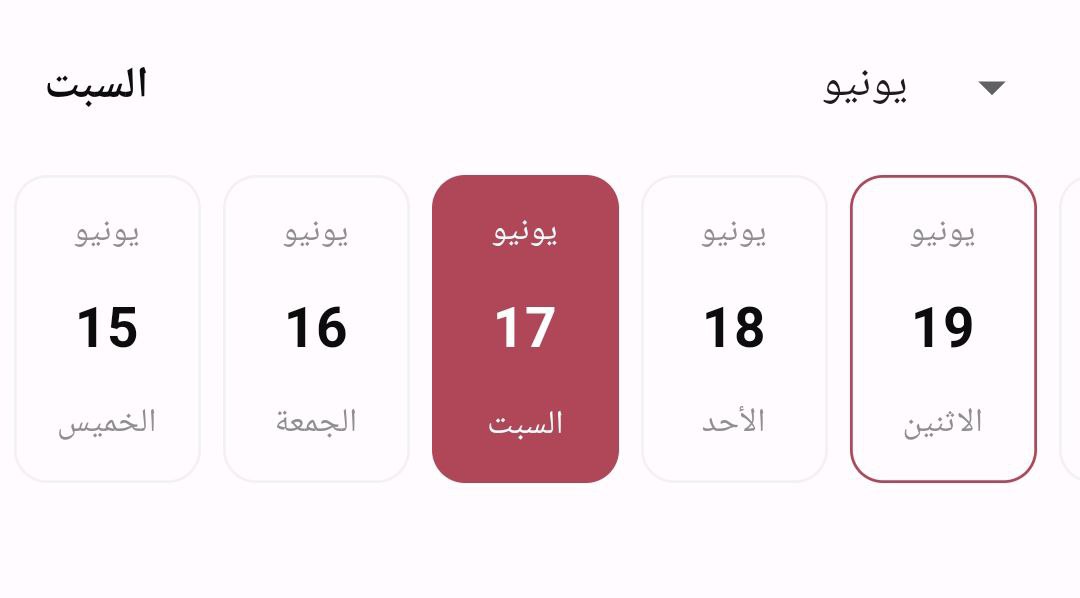
       Column(
        mainAxisAlignment: MainAxisAlignment.center,
        children: [
          EasyDateTimeLine(
            initialDate: DateTime.now(),
            onDateChange: (selectedDate) {
              //[selectedDate] the new date selected.
            },
            activeColor: const Color(0xffB04759),
            locale:"ar",
          ),
        ],
      ),
横屏模式
使用 easy_date_timeline,您可以在横屏模式下显示日期和时间轴,只需在 dayProps 中将 landScapeMode 设置为 true。
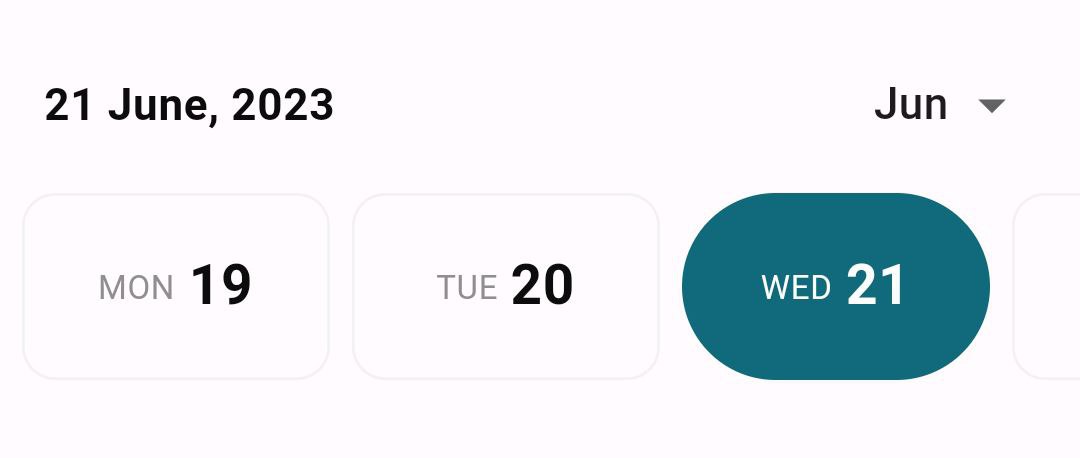
       Column(
        mainAxisAlignment: MainAxisAlignment.center,
        children: [
                EasyDateTimeLine(
            initialDate: DateTime.now(),
            onDateChange: (selectedDate) {
              //[selectedDate] the new date selected.
            },
            activeColor: const Color(0xff116A7B),
            dayProps: const EasyDayProps(
              //set landScapeMode = true
              landScapeMode: true,
              activeBorderRadius: 48.0,
              dayStructure: DayStructure.dayStrDayNum,
            ),
            headerProps: const EasyHeaderProps(
              selectedDateFormat: SelectedDateFormat.fullDateDMonthAsStrY,
            ),
          ),
        ],
      ),
更改标题外观
在 headerProps 中,将 monthPickerType 更改为
MonthPickerType.switcher:显示月份,您可以通过单击箭头按钮更改月份。MonthPickerType.dropDown:显示月份,您可以通过下拉菜单更改月份。同样在headerProps中,将selectedDateFormat更改为SelectedDateFormat.fullDateDMY:将日期显示为:“11/06/2023”SelectedDateFormat.fullDateMDY:将日期显示为:“06/11/2023”SelectedDateFormat.fullDateDayAsStrMY:将日期显示为:“星期日 6,2023”SelectedDateFormat.fullDateDMonthAsStrY:将日期显示为:“11 6月,2023”SelectedDateFormat.fullDateMonthAsStrDY:将日期显示为:“6月 11,2023”SelectedDateFormat.dayOnly:仅显示选定的日期,如:“星期日”SelectedDateFormat.monthOnly:仅显示选定的月份,如:“6月”
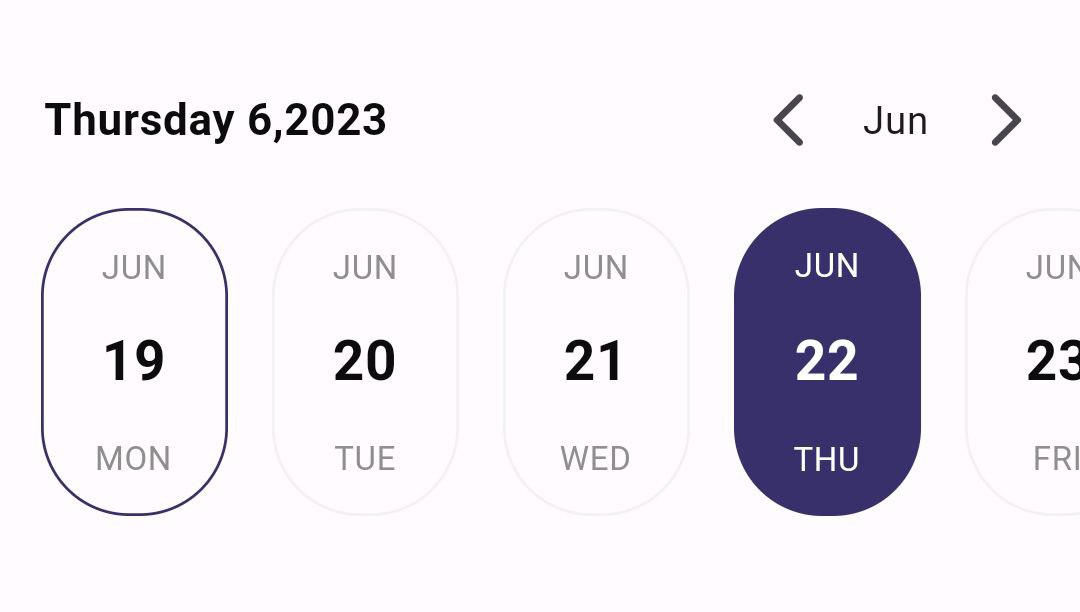
      Column(
        mainAxisAlignment: MainAxisAlignment.center,
        children: [
          EasyDateTimeLine(
            initialDate: DateTime.now(),
            onDateChange: (selectedDate) {
              //[selectedDate] the new date selected.
            },
            activeColor: const Color(0xff37306B),
            headerProps: const EasyHeaderProps(
              monthPickerType: MonthPickerType.switcher,
              selectedDateFormat: SelectedDateFormat.fullDateDMY,
            ),
            dayProps: const EasyDayProps(
              activeBorderRadius: 32.0,
              inactiveBorderRadius: 32.0,
            ),
            timeLineProps: const TimeLineProps(
              hPadding: 16.0, // padding from left and right
              separatorPadding: 16.0, // padding between days
            ),
          ),
        ],
      ),
自定义日期外观
您可以使用 itemBuilder 来自定义日期小部件的外观。itemBuilder 提供以下内容:
BuildContext context.String dayNumber:日期号,例如:“11”。String dayName:日期名称,例如:“星期日”。String monthName:月份名称,例如:“6月”。DateTime fullDate:日期的完整日期,用于完全自定义。bool isSelected:日期是否被选中。
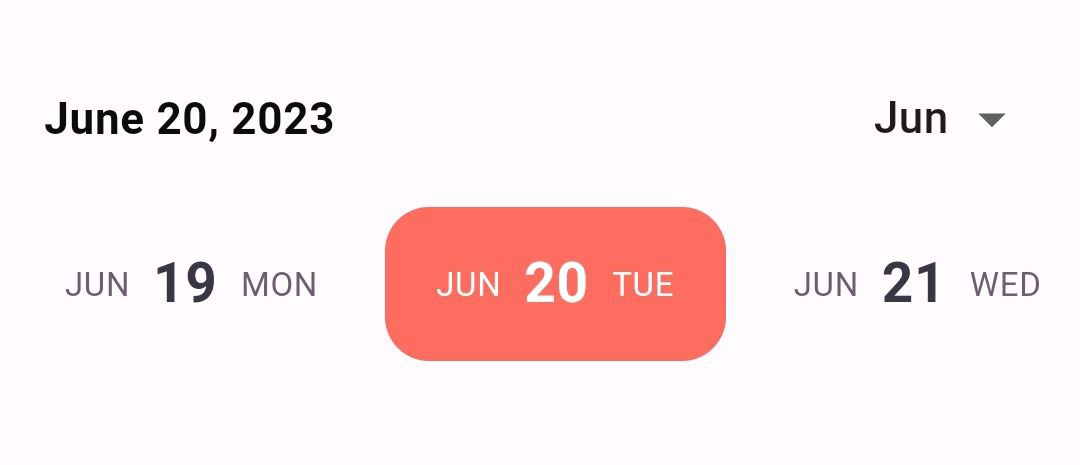
Column(
        mainAxisAlignment: MainAxisAlignment.center,
        children: [
          EasyDateTimeLine(
            initialDate: DateTime.now(),
            onDateChange: (selectedDate) {
              //[selectedDate] the new date selected.
            },
            dayProps: const EasyDayProps(
              height: 56.0,
              //you must provide the width in this case
              width: 124.0,
              activeBorderRadius: 16.0,
            ),
            itemBuilder:
                (context, dayNumber, dayName, monthName, fullDate, isSelected) {
              return Container(
                //the same width that provided previously.
                width: 124.0,
                padding: const EdgeInsets.symmetric(horizontal: 8.0),
                decoration: BoxDecoration(
                  color: isSelected ? const Color(0xffFF6D60) : null,
                  borderRadius: BorderRadius.circular(16.0),
                ),
                child: Row(
                  mainAxisAlignment: MainAxisAlignment.center,
                  children: [
                    Text(
                      monthName,
                      style: TextStyle(
                        fontSize: 12,
                        color:
                            isSelected ? Colors.white : const Color(0xff6D5D6E),
                      ),
                    ),
                    const SizedBox(
                      width: 8.0,
                    ),
                    Text(
                      dayNumber,
                      style: TextStyle(
                        fontSize: 20,
                        fontWeight: FontWeight.bold,
                        color:
                            isSelected ? Colors.white : const Color(0xff393646),
                      ),
                    ),
                    const SizedBox(
                      width: 8.0,
                    ),
                    Text(
                      dayName,
                      style: TextStyle(
                        fontSize: 12,
                        color:
                            isSelected ? Colors.white : const Color(0xff6D5D6E),
                      ),
                    ),
                  ],
                ),
              );
            },
          )
        ],
      ),
构造函数
  EasyDateTimeLine({
    super.key,
    required this.initialDate,
    this.activeColor,
    this.headerProps,
    this.timeLineProps,
    this.dayProps,
    this.onDateChange,
    this.itemBuilder,
    this.locale = "en_US",
  });


