SEO 渲染器

一个 Flutter 插件(*开发中*),用于将文本、链接、图片小部件渲染为 HTML 元素,以实现 SEO 目的。
专门为 issue flutter/flutter#46789 创建。它将使用正则表达式和导航器用户代理自动检测爬虫,并将您选择的 HtmlElement 添加到 DOM 中。
欢迎所有 PR?
入门
-
将此添加到您的pubspec.yaml
dependencies:
  seo_renderer: ^0.6.0
-
从 Pub 获取包
flutter packages get
-
在您的文件中导入它
import 'package:seo_renderer/seo_renderer.dart';
用法
这是必需的,需要添加一个 RobotDetector 来检测页面是否被机器人访问,并添加 seoRouteObserver 来观察小部件何时改变可见性。要做到这一点,只需将 MaterialApp 包装在 RobotDetector 中,并将 seoRouteObserver 添加到 navigatorObservers 中。
runApp(
  RobotDetector(
    debug: true, // you can set true to enable robot mode
    child: MaterialApp(
      home: MyApp(),
      navigatorObservers: [seoRouteObserver],
    ),
  ),
);
对于更复杂的项目,建议在 index.html 中添加这些行,在检测到机器人时强制使用 html Web 渲染器。这是因为 canvaskit 有一些更严格的限制,并且可能会中断。
<body>
  ...
  <script>
    const regExp = new RegExp("bot|google|baidu|bing|msn|teoma|slurp|yandex", "i");
    if (regExp.test(navigator.userAgent)) {
      window.flutterWebRenderer = "html";
    }
  </script>
  ...
</body>
TextRenderer
要将 HTML 文本元素渲染在子元素之上,请将 Text、RichText 作为子元素传递,或直接设置 text。
TextRenderer(
  child: Text(
    'Lorem Ipsum is simply dummy text of the printing and typesetting industry.',
  ),
)

TextRenderer(
  text: 'Lorem Ipsum is simply dummy text of the printing and typesetting industry.',
  child: CustomWidget(),
)
您可以选择通过设置 style 将 HTML 元素从 <h1> 更改为 <h6> 和 <p>。默认值为 TextRendererStyle.paragraph。
TextRenderer(
  style: TextRendererStyle.paragraph,
  child: Text(
    'Lorem Ipsum is simply dummy text of the printing and typesetting industry.',
  ),
)

TextRenderer(
  style: TextRendererStyle.header1,
  child: Text(
    'Lorem Ipsum is simply dummy text of the printing and typesetting industry.',
  ),
)
LinkRenderer
要将 HTML 链接元素渲染在子元素之上,请设置 text 和 href。
LinkRenderer(
  text: 'Try Flutter',
  href: 'https://www.flutter.dev',
  child: ...,
)
ImageRenderer
要将 HTML 图片元素渲染在子元素之上,请设置 alt 并将 Image.network(...)、Image.asset(...)、Image.memory(...) 作为子元素传递,或直接设置 src。
ImageRenderer(
  alt: 'Network Image',
  child: Image.network('https://fakeimg.pl/300x300/?text=Network'),
)

ImageRenderer(
  alt: 'Network Image',
  src: 'https://fakeimg.pl/300x300/?text=Network',
  child: CustomWidget(),
)
截图 & 示例
实时示例 https://seo-renderer.netlify.app/
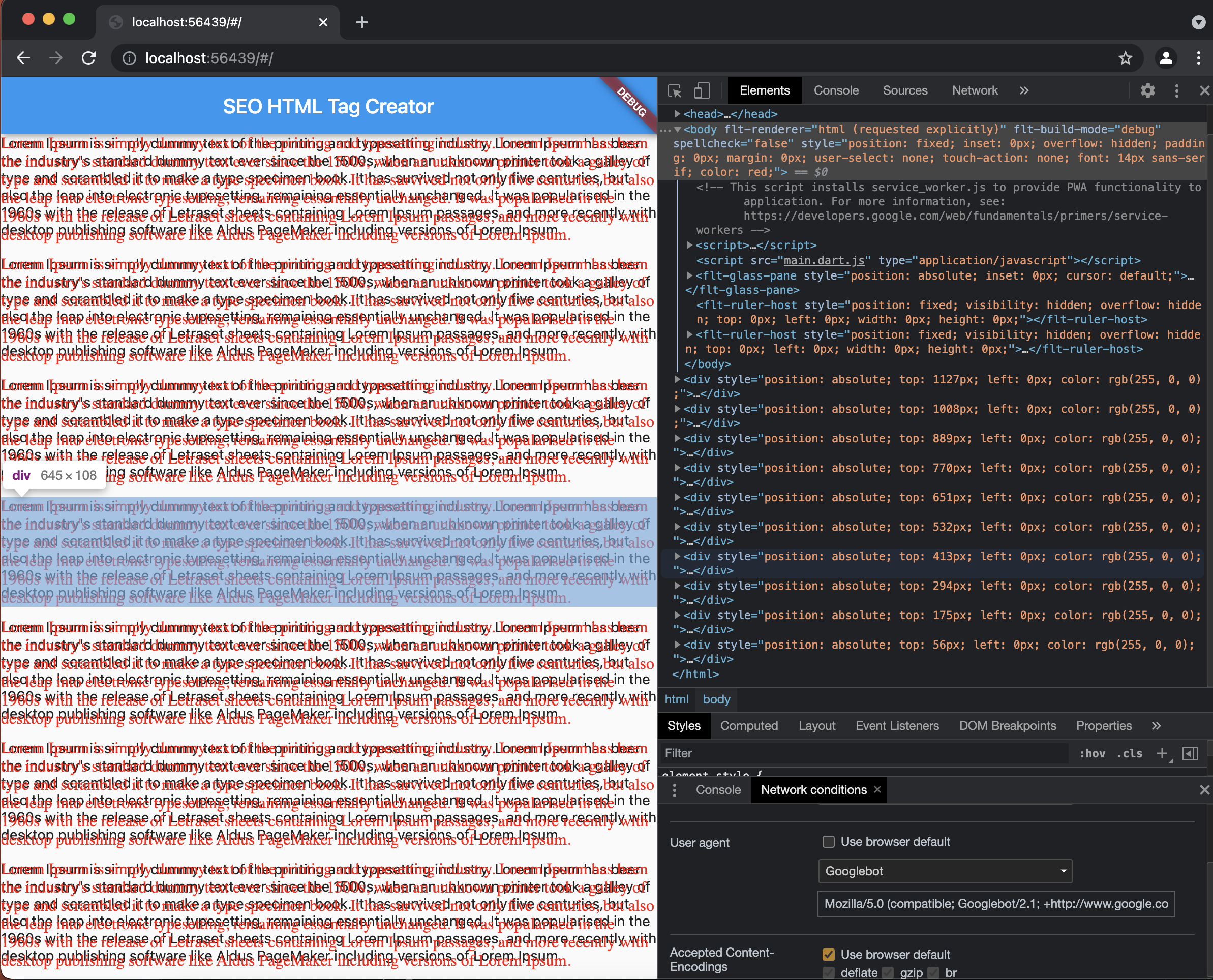
在 Network Condition 中选择 GoogleBot 如此处作为用户代理并刷新页面以查看创建的 Div 元素。
许可证
MIT License

Copyright (c) 2021 Sahdeep Singh

Permission is hereby granted, free of charge, to any person obtaining a copy
of this software and associated documentation files (the "Software"), to deal
in the Software without restriction, including without limitation the rights
to use, copy, modify, merge, publish, distribute, sublicense, and/or sell
copies of the Software, and to permit persons to whom the Software is
furnished to do so, subject to the following conditions:

The above copyright notice and this permission notice shall be included in all
copies or substantial portions of the Software.

THE SOFTWARE IS PROVIDED "AS IS", WITHOUT WARRANTY OF ANY KIND, EXPRESS OR
IMPLIED, INCLUDING BUT NOT LIMITED TO THE WARRANTIES OF MERCHANTABILITY,
FITNESS FOR A PARTICULAR PURPOSE AND NONINFRINGEMENT. IN NO EVENT SHALL THE
AUTHORS OR COPYRIGHT HOLDERS BE LIABLE FOR ANY CLAIM, DAMAGES OR OTHER
LIABILITY, WHETHER IN AN ACTION OF CONTRACT, TORT OR OTHERWISE, ARISING FROM,
OUT OF OR IN CONNECTION WITH THE SOFTWARE OR THE USE OR OTHER DEALINGS IN THE
SOFTWARE.
作者 & 支持
该项目由 Sahdeep Singh 创建
如果您欣赏我的工作,可以 在 LinkedIn 上联系我并认可我,以激励我?
别忘了看看这些 超赞的贡献者