
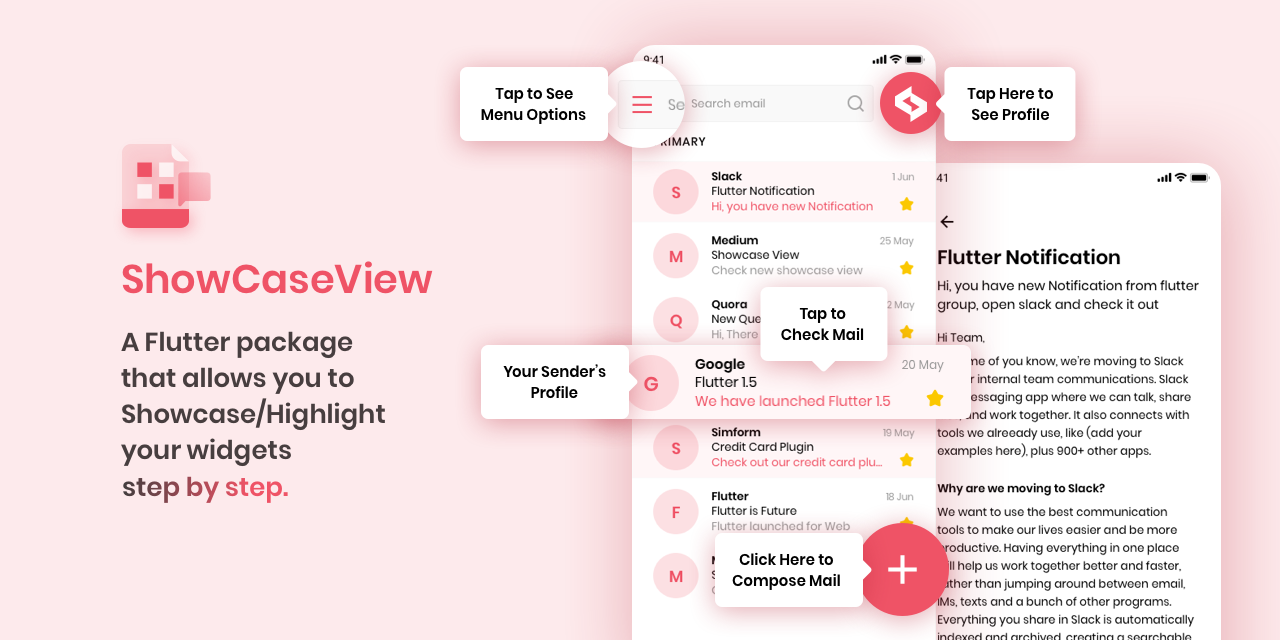
ShowCaseView


一个Flutter包,可让您逐步展示/突出显示您的Widget。
预览

安装
-
将依赖项添加到
pubspec.yaml在 pub.dev 的“安装”选项卡中获取最新版本。
dependencies:
    showcaseview: <latest-version>
- 导入包
import 'package:showcaseview/showcaseview.dart';
- 添加一个
ShowCaseWidget小部件。
ShowCaseWidget(
  builder: Builder(
    builder : (context)=> Somewidget()
  ),
),
- 添加一个
Showcase小部件。
GlobalKey _one = GlobalKey();
GlobalKey _two = GlobalKey();
GlobalKey _three = GlobalKey();

...

Showcase(
  key: _one,
  title: 'Menu',
  description: 'Click here to see menu options',
  child: Icon(
    Icons.menu,
    color: Colors.black45,
  ),
),
更多可选参数
Showcase(
  key: _two,
  title: 'Profile',
  description: 'Click here to go to your Profile',
  disableAnimation: true,
  shapeBorder: CircleBorder(),
  radius: BorderRadius.all(Radius.circular(40)),
  showArrow: false,
  tipBorderRadius: BorderRadius.all(Radius.circular(8)),
  overlayPadding: EdgeInsets.all(5),
  slideDuration: Duration(milliseconds: 1500),
  tooltipColor: Colors.blueGrey,
  blurValue: 2,
  disableDefaultTargetGestures: true,
  initialAnimationCurve: Curves.easeIn,
  initialAnimationDuration: const Duration(milliseconds: 300),
  initialAnimationAlignment: Alignment.center,
  child: ...,
),
- 使用
Showcase.withWidget小部件。
Showcase.withWidget(
  key: _three,
  cHeight: 80,
  cWidth: 140,
  shapeBorder: CircleBorder(),
  container: Column(
    crossAxisAlignment: CrossAxisAlignment.start,
    children: <Widget>[
      ...
    ],
  ),
  child: ...,
),
- 开始
ShowCase
someEvent(){
    ShowCaseWidget.of(context).startShowCase([_one, _two, _three]);
}
ShowCase的 onFinish 方法
ShowCaseWidget(
  onFinish: () {
    // Your code goes here
  },
  builder: Builder(
    builder : (context) ()=> Somewidget()
  ),
),
- 转到下一个
ShowCase
someEvent(){
  ShowCaseWidget.of(context).next();
}
- 转到上一个
ShowCase
someEvent(){
  ShowCaseWidget.of(context).previous();
}
如果您想在UI构建完成后立即启动 ShowCaseView,请使用以下代码。
WidgetsBinding.instance.addPostFrameCallback((_) =>
  ShowCaseWidget.of(context).startShowCase([_one, _two, _three])
);
如果您想禁用障碍物交互,请将 disableBarrierInteraction 参数设置为 true。
ShowCaseWidget(
  disableBarrierInteraction: true,
),
如果您想禁用目标小部件的默认手势,请在 Showcase 中将 disableDefaultTargetGestures 参数设置为 true。注意:如果您要导航到其他屏幕,请确保使用 ShowCaseWidget.of(context).dismiss() 来关闭当前 Showcase。如果 disableDefaultTargetGestures 设置为 false,则默认情况下会处理此问题。
ShowCase(
  disableDefaultTargetGestures: true,
),
如何使用
请查看 pub.dartlang.org 上的“示例”选项卡中的 示例 应用,或者查看 example 目录以获取更完整的示例。
滚动到活动 Showcase
滚动到活动 Showcase 功能在按需渲染 Widget 的滚动视图(例如,ListView,GridView)中将无法正常工作。
为了滚动到 Widget,它需要附加到 Widget 树。因此,如果您使用的滚动视图是按需渲染 Widget 的,那么 Showcase 所应用的 Widget 可能未附加到 Widget 树。因此,Flutter 将无法滚动到该 Widget。
因此,如果您想制作一个包含较少子 Widget 的滚动视图,请优先使用 SingleChildScrollView。
如果无法使用 SingleChildScrollView,那么您可以为该滚动视图分配一个 ScrollController,并在 ShowCaseWidget 的 onStart 方法中手动滚动到 Showcase Widget 渲染的位置。您可以将该代码添加到 onStart 方法中。
例如,
// This controller will be assigned to respected sctollview.
final _controller = ScrollController();

ShowCaseWidget(
  onStart: (index, key) {
    if(index == 0) {
      WidgetsBinding.instance.addPostFrameCallback((_) {
       // If showcase widget is at offset 1000 in the listview.
       // If you don't know the exact position of the showcase widget,
       // You can provide nearest possible location.
       //
       // In this case providing 990 instead of 1000 will work as well.
        _controller.jumpTo(1000);
      });
    }
  },
);
启用自动滚动
默认情况下,自动滚动行为是关闭的,您可以通过在 showCaseWidget 中将 enableAutoScroll 标志设置为 true 来启用它。
ShowCaseWidget(
  enableAutoScroll: true,
);
主要贡献者
 Birju Vachhani Birju Vachhani |
 Devarsh Ranpara Devarsh Ranpara |
 Ankit Panchal Ankit Panchal |
 Kashifa Laliwala Kashifa Laliwala |
 Vatsal Tanna Vatsal Tanna |
 Sanket Kachhela Sanket Kachhela |
 Parth Baraiya Parth Baraiya |
 Shweta Chauhan Shweta Chauhan |
 Mehul Kabaria Mehul Kabaria |
 Dhaval Kansara Dhaval Kansara |
笔记
我们已将 flutter_showcaseview 的许可证从 BSD 2 条款“简化”更新为 MIT。
许可证
MIT License

Copyright (c) 2021 Simform Solutions

Permission is hereby granted, free of charge, to any person obtaining a copy
of this software and associated documentation files (the "Software"), to deal
in the Software without restriction, including without limitation the rights
to use, copy, modify, merge, publish, distribute, sublicense, and/or sell
copies of the Software, and to permit persons to whom the Software is
furnished to do so, subject to the following conditions:

The above copyright notice and this permission notice shall be included in all
copies or substantial portions of the Software.

THE SOFTWARE IS PROVIDED "AS IS", WITHOUT WARRANTY OF ANY KIND, EXPRESS OR
IMPLIED, INCLUDING BUT NOT LIMITED TO THE WARRANTIES OF MERCHANTABILITY,
FITNESS FOR A PARTICULAR PURPOSE AND NONINFRINGEMENT. IN NO EVENT SHALL THE
AUTHORS OR COPYRIGHT HOLDERS BE LIABLE FOR ANY CLAIM, DAMAGES OR OTHER
LIABILITY, WHETHER IN AN ACTION OF CONTRACT, TORT OR OTHERWISE, ARISING FROM,
OUT OF OR IN CONNECTION WITH THE SOFTWARE OR THE USE OR OTHER DEALINGS IN THE
SOFTWARE.


