
食物食谱应用
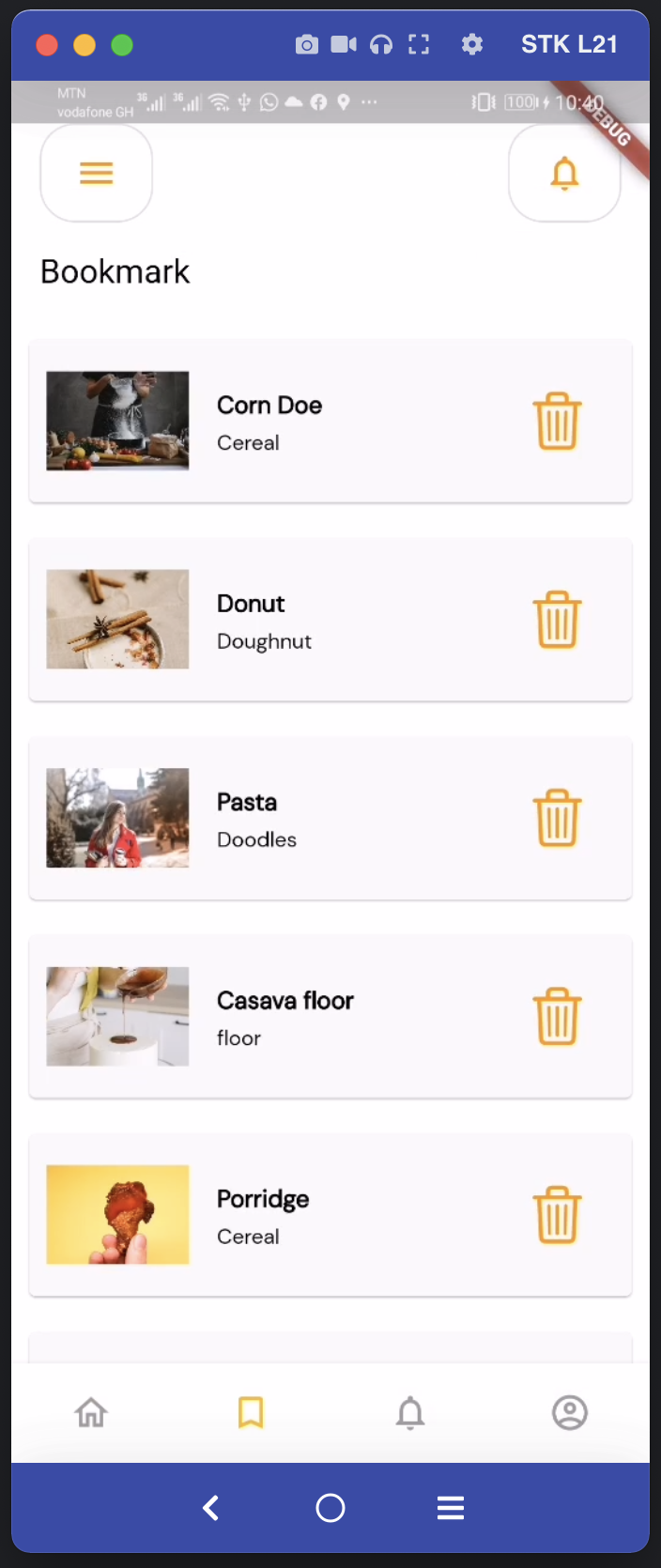
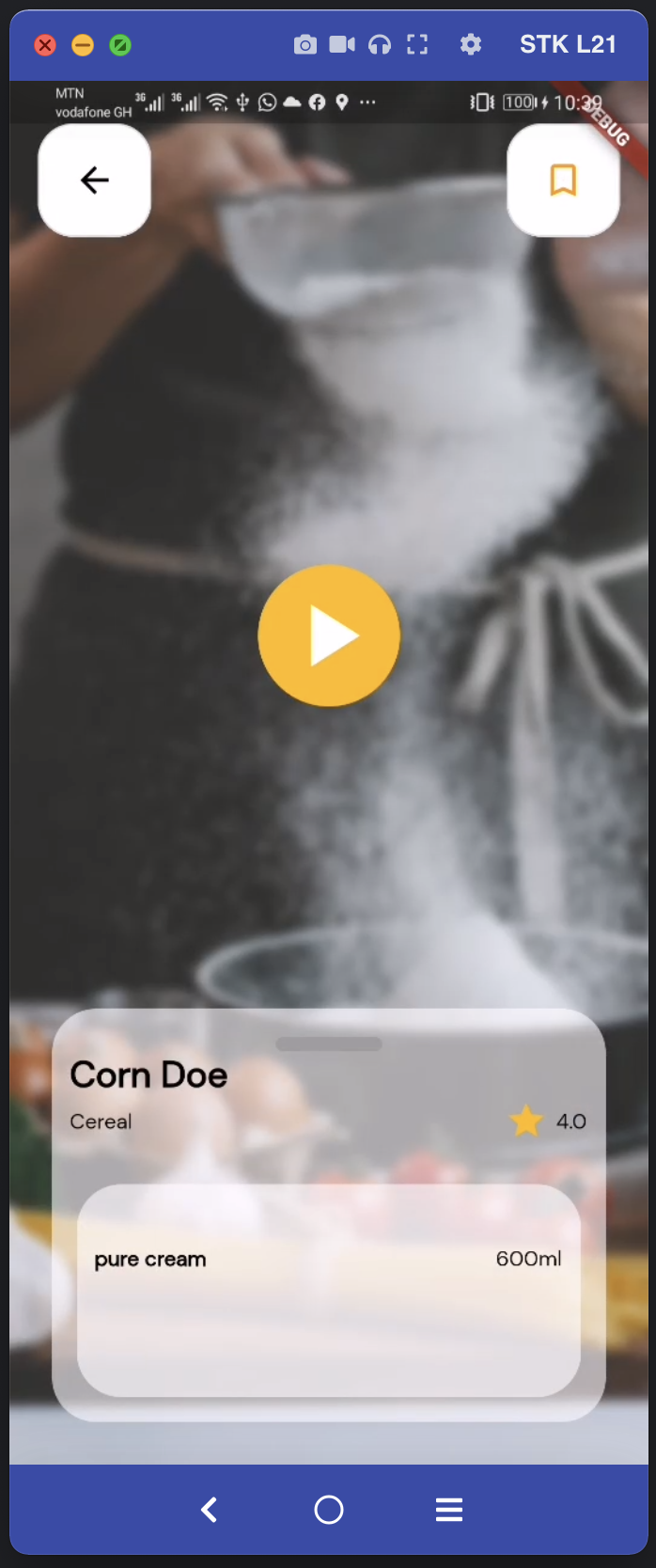
一个Flutter应用程序,允许用户查看各种食谱,并将喜欢的食谱添加到本地存储(使用sqlite)。用户可以观看食谱视频,以及添加和删除食谱。





这个项目是我们主持人布置的一项作业,旨在测试每个人对Flutter基础知识的理解程度。
艺术


## 入门
本项目是 Flutter 应用程序的起点。
要克隆此项目,
打开您的终端或 cmd
cd folder/to/clone-into/
git clone https://github.com/bayorwor/familiciousapp
Then
locate the project on your system and open with android studio or Vscode or intellij IDE.

To Run:
C:\path\to\project> flutter pub get
then run:
C:\path\to\project> flutter run
## Build release version
运行:flutter build e.g flutter build ios –release
## Switch Theme

**Automatically switch theme based on system settings**

## Resources

A few resources to get you started if this is your first Flutter project:

- [Lab: Write your first Flutter app](https://flutter.io/docs/get-started/codelab)
- [Cookbook: Useful Flutter samples](https://flutter.io/docs/cookbook)

For help getting started with Flutter, view our
[online documentation](https://flutter.io/docs), which offers tutorials,
samples, guidance on mobile development, and a full API reference.

## Prerequisites

What things you need to run the app
- Android Studio/Vscode/Intellij IDE
- Flutter SDK
- Android SDK
- MacBook / Windows / Linux
## How to contribute

- **Fork the repository and clone it locally**. Connect your local to the original “upstream” repository by adding it as a remote. Pull in changes from “upstream” often so that you stay up to date so that when you submit your pull request, merge conflicts will be less likely. (See more detailed instructions here.)
- **Create a branch** for your edits.
- **Reference any relevant issues** or supporting documentation in your PR (for example, “Closes #37.”)
- **Include screenshots of the before and after** if your changes include differences in HTML/CSS. Drag and drop the images into the body of your pull request.
- **Test your changes!** Run your changes against any existing tests if they exist and create new ones when needed. Whether tests exist or not, make sure your changes don’t break the existing project.
- **Contribute in the style of the project** to the best of your abilities. This may mean using indents, semi-colons or comments differently than you would in your own repository, but makes it easier for the maintainer to merge, others to understand and maintain in the future.

## Built With

- [Android Studio](https://developer.android.com.cn/studio/install) - How to install Android Studio
- [Flutter](https://flutter.io) - Flutter Official website

## Author ?

**Bayorwor Abudu**

- [**Twitter**](https://twitter.com/FreSHGh8)
- [**Linkedin**](https://www.linkedin.com/in/abudu-bayorwor-02a4511a5/)

## Inspiration and Credits

**Etornam Sunu Bright**

- He was the Facilitator for this session ???

## License

MIT License

Copyright (c) 2021 Bayorwor Abudu

Permission is hereby granted, free of charge, to any person obtaining a copy
of this software and associated documentation files (the "Software"), to deal
in the Software without restriction, including without limitation the rights
to use, copy, modify, merge, publish, distribute, sublicense, and/or sell
copies of the Software, and to permit persons to whom the Software is
furnished to do so, subject to the following conditions:

The above copyright notice and this permission notice shall be included in all
copies or substantial portions of the Software.

THE SOFTWARE IS PROVIDED "AS IS", WITHOUT WARRANTY OF ANY KIND, EXPRESS OR
IMPLIED, INCLUDING BUT NOT LIMITED TO THE WARRANTIES OF MERCHANTABILITY,
FITNESS FOR A PARTICULAR PURPOSE AND NONINFRINGEMENT. IN NO EVENT SHALL THE
AUTHORS OR COPYRIGHT HOLDERS BE LIABLE FOR ANY CLAIM, DAMAGES OR OTHER
LIABILITY, WHETHER IN AN ACTION OF CONTRACT, TORT OR OTHERWISE, ARISING FROM,
OUT OF OR IN CONNECTION WITH THE SOFTWARE OR THE USE OR OTHER DEALINGS IN THE
SOFTWARE.


