
intl_phone_number_field
一个自定义的 Flutter TextFormField,用于输入带国家代码的国际电话号码。
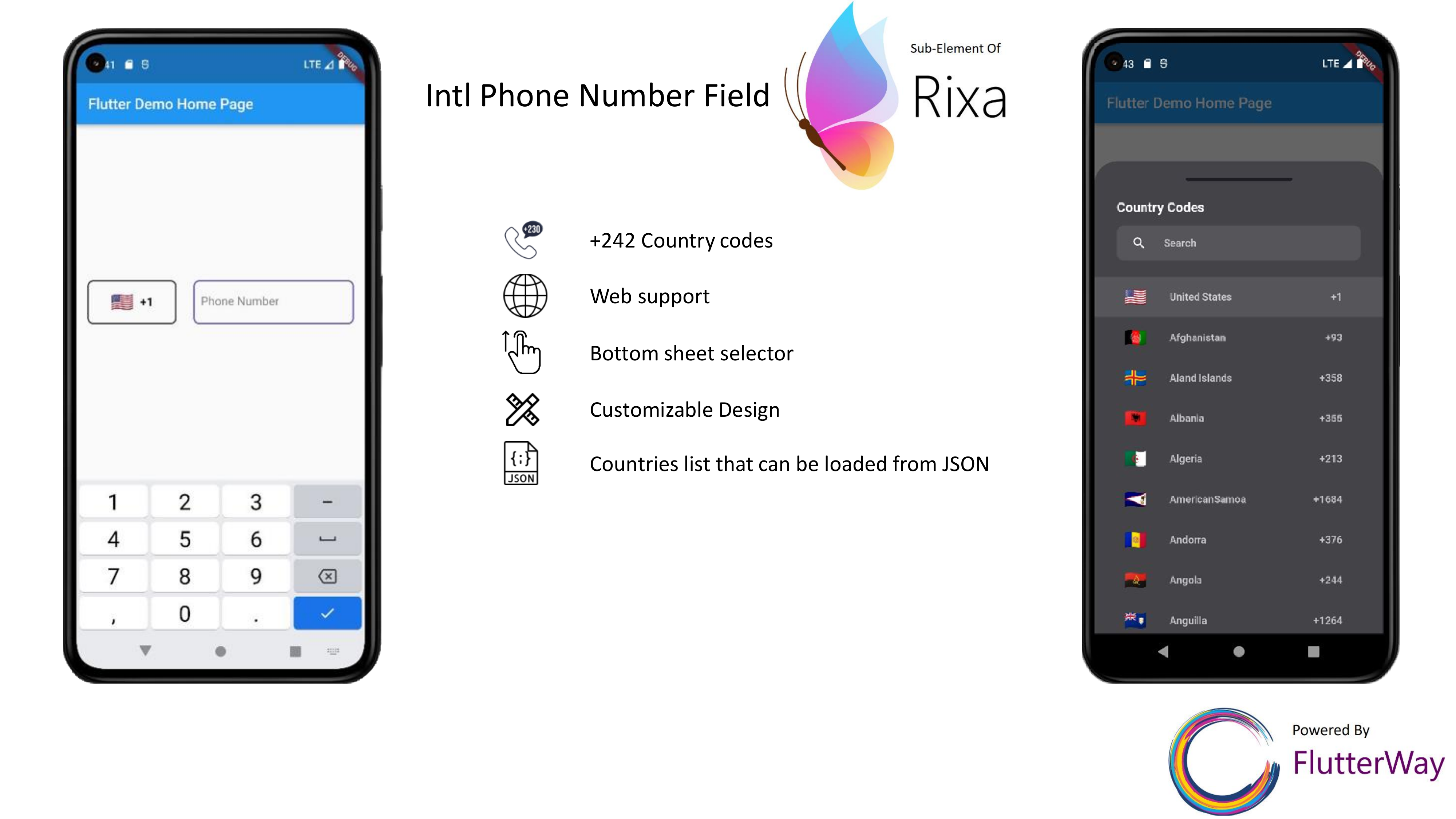
用法
InternationalPhoneNumberInput
可用参数
InternationalPhoneNumberInput(
  height: 60,
  controller: controller,
  inputFormatters: const [],
  formatter: MaskedInputFormatter('### ### ## ##'),
  initCountry: CountryCodeModel(
      name: "United States", dial_code: "+1", code: "US"),
  betweenPadding: 23,
  onChanged: (phone) {
    print(phone.code);
  },
  loadFromJson: loadFromJson,
  dialogConfig: DialogConfig(
    backgroundColor: const Color(0xFF444448),
    searchBoxBackgroundColor: const Color(0xFF56565a),
    searchBoxIconColor: const Color(0xFFFAFAFA),
    countryItemHeight: 55,
    topBarColor: const Color(0xFF1B1C24),
    selectedItemColor: const Color(0xFF56565a),
    selectedIcon: Padding(
      padding: const EdgeInsets.only(left: 10),
      child: Image.asset(
        "assets/check.png",
        width: 20,
        fit: BoxFit.fitWidth,
      ),
    ),
    textStyle: TextStyle(
        color: const Color(0xFFFAFAFA).withOpacity(0.7),
        fontSize: 14,
        fontWeight: FontWeight.w600),
    searchBoxTextStyle: TextStyle(
        color: const Color(0xFFFAFAFA).withOpacity(0.7),
        fontSize: 14,
        fontWeight: FontWeight.w600),
    titleStyle: const TextStyle(
        color: Color(0xFFFAFAFA),
        fontSize: 18,
        fontWeight: FontWeight.w700),
    searchBoxHintStyle: TextStyle(
        color: const Color(0xFFFAFAFA).withOpacity(0.7),
        fontSize: 14,
        fontWeight: FontWeight.w600),
  ),
  countryConfig: CountryConfig(
      decoration: BoxDecoration(
        border: Border.all(
            width: 2, color: const Color(0xFF3f4046)),
        borderRadius: BorderRadius.circular(8),
      ),
      noFlag: false,
      textStyle: const TextStyle(
          color: Colors.black,
          fontSize: 16,
          fontWeight: FontWeight.w600)),
  phoneConfig: PhoneConfig(
    focusedColor: const Color(0xFF6D59BD),
    enabledColor: const Color(0xFF6D59BD),
    radius: 8,
    hintText: "Phone Number",
    borderWidth: 2,
    textStyle: const TextStyle(
        color: Colors.black,
        fontSize: 16,
        fontWeight: FontWeight.w400),
    hintStyle: TextStyle(
        color: Colors.black.withOpacity(0.5),
        fontSize: 16,
        fontWeight: FontWeight.w400),
  ),
)
| 参数 | 数据类型 | 初始值 |
|---|---|---|
| 控制器 | TextEditingController | TextEditingController() |
| 高度 | 双精度 | 60 |
| inputFormatters | 列表 | [] |
| formatter | MaskedInputFormatter | MaskedInputFormatter(‘### ### ## ##’) |
| initCountry | CountryCodeModel | CountryCodeModel(name: “United States”, dial_code: “+1”, code: “US”) |
| betweenPadding | 双精度 | 23 |
| onInputChanged | Function(IntPhoneNumber number) | 空 |
| loadFromJson | Future<String?> Function() | 空 |
| dialogConfig | DialogConfig | DialogConfig() |
| countryConfig | CountryConfig | CountryConfig() |
| phoneConfig | PhoneConfig | PhoneConfig() |
IntPhoneNumber
函数“onInputChanged”将返回一个 IntPhoneNumber 类型的对象。IntPhoneNumber
print(phone.code);          //US
print(phone.dial_code);     //+1
print(phone.number);        //553 142 88 74
print(phone.rawFullNumber); //15531428874
print(phone.rawNumber);     //5531428874
print(phone.rawDialCode);   //1
加载 JSON 数据
您可以从自己的 json 文件中提取国家代码并上传到该包。为此,您必须以特定格式填写您的 json 文件。示例如下
[
    {
        "name": "Aland Islands",
        "dial_code": "+358",
        "code": "AX"
    },
    {
        "name": "Albania",
        "dial_code": "+355",
        "code": "AL"
    },
    {
        "name": "Algeria",
        "dial_code": "+213",
        "code": "DZ"
    }
]
InternationalPhoneNumberInput(loadFromJson: loadFromJson)
Future<String> loadFromJson() async {
   return await rootBundle.loadString('assets/countries/country_list.json');
 }
有关更详细的示例,请参阅 example 文件
贡献
- 如果您发现 bug 或有功能请求,请打开一个 issue。
- 如果您想贡献,请提交一个 pull request。


