
Flutter 应用开发终极指南
一份完整的综合指南,学习 Flutter,包含 Dart、Flutter、Firebase、状态管理等方面的解释、技巧、资源和示例。
Flutter 是一个强大而直观的框架,用于构建美观的跨平台移动应用程序,它使用 Dart 编程语言。
这基本上意味着 Flutter 可以用于编写一个应用程序的单一代码库,该应用程序可以在 iOS 和 Android 上原生运行。
随着 Flutter 和移动应用开发的热潮,学习 Flutter 本身就是一项有价值的技能,也是一项令人满意的追求。然而,由于这门语言非常新,学习 Flutter 的路径有些不清晰。
- 该语言不断更新(以至于几个月前的教程都已过时)
- 与一些其他更成熟的框架和语言(如 Python)相比,缺乏免费、经过深思熟虑且内容全面的课程或书籍
本指南汇集了教程、技巧、示例和资源,以帮助您更轻松地学习 Flutter。您可以是完全的初学者、中级甚至高级程序员来使用本指南。希望您觉得它有用!
入门
在开始学习 Dart 和 Flutter 之前,我们首先需要设置好编程环境,我们将使用它来编写 Flutter 应用程序。
对于 Dart 和 Flutter 提供最多功能的两个主要 IDE 是 Visual Studio Code (VS Code) 和 Android Studio。选择哪个都取决于您,但我对 VS Code 有一点偏好,因为它看起来很酷……
如果您有 coc 或原生 lsp 并安装了 Dart 和 Flutter 扩展,也可以使用 Vim。
选择正确的 IDE 对于充分利用 Dart 编程语言提供的所有功能至关重要。一旦您安装了 IDE / 文本编辑器,请确保安装 Dart 扩展和 Flutter 扩展。有了这些扩展,我们的 IDE / 文本编辑器将执行极其详细的错误检查、类型检查、空安全检查和格式化,使我们作为开发者的生活更加轻松。
设置好环境后,我们继续!
学习 Dart
Dart 是由 Google 开发的一种语言,它是 Flutter 框架的骨干。它是您在使用 Flutter 框架编写应用程序时将使用的语言。
如果您以前从未写过代码,或者对编程的经验较少,我建议您看看 Mike Dane 在 YouTube 上的这套出色的教程(请注意,不要一次性看完!在休息或做其他事情时,花一些时间在您的潜意识中思考编程概念)。
如果您有 JavaScript 或 Java 等语言的经验,以下是 Dart 的基础知识。
大纲
变量
Dart 中的变量是类型检查的,这意味着每个变量都必须声明为特定的类型,并且该类型必须与变量在程序中被赋值的内容相匹配。
以下是一些基本类型和示例
String foo = 'foo';
int bar = 0;
double foobar= 12.454;
bool isCool = true;
List<String> = ['foo', 'bar'];
Dart 中的字典(将键映射到值)被指定为 'Map' 类型。您必须指定键类型和值类型,如下所示。
Map<String, int> grades = {
  'John': 99,
  'Doe': 30,
}
如果您将不兼容的类型赋给同一个变量,您将收到一个错误。
String foo = 'foo';
foo = 2; // ERROR
您可以使用 'var' 和 'dynamic' 来使变量类型动态化,但这通常不是一个好主意,因为它可能导致后续出现令人沮丧的错误。
此外,Dart 具有独特的 'final' 和 'const' 运算符,可用于声明变量。 'final' 通常用于声明一旦声明就不会改变的变量。例如,如果用户输入他们的名字,我们将其保存到一个变量中,我们知道该变量(他们的名字)不会改变,所以我们可以这样初始化/声明它
final String name;
'const' 关键字的用途更具体一些——它只在编译时使变量成为常量。它稍后对 Flutter 框架很有用,但现在,请不要担心 'const'。
函数
函数通过指定返回类型、函数名称以及括号内的参数来声明。Void 用于指定不返回任何内容的返回类型。
// doesn't return anything but still executes some code
void main() {
  print('hello world');
}

// prints 'hello' but also returns the string 'complete'
String hello(int reps) {
  for (int i = 0; i < reps; i++) {
    print('hello');
  }
  return 'complete';
}

// returns a list of strings (List<String>)
List<String> people() {
  return ['John', 'Doe'];
}
异步函数是可以同时执行不同命令的函数——异步执行。
调用 API(基本上是从网络检索其他人编写的有用的信息或数据)就是异步函数如何有用的一个例子。如果我们的函数调用 API 并将一个变量赋值给 API 的响应,但是我们的整个应用程序都在等待该函数完成执行才能执行某些操作,那么效率就不高。如果我们使这个函数异步,那么调用 API 的函数就可以在应用程序允许其他函数执行的同时执行,或者在应用程序执行其他操作时执行。
在异步函数中,如果我们希望我们的函数在继续之前等待某一行代码完成,我们只需在代码前面加上 'await' 关键字。
对于 Dart 中的异步函数,在括号和花括号之间添加 'async' 关键字,并将返回类型包含在 'Future<[return type]>' 中。
Future<String> retrieveData() async {
  response = await someAPICall(); // assuming the api call returns a string
  return response;
}
条件语句
If 语句的写法如下
bool someCondition = true;

if (someCondition) {
  print('someCondition is true');
} else {
  print('someCondition is false');
}
循环
For 循环在所有编程语言中都非常重要,并且在 Dart 中有几种实现方式。
List words = ['hello', 'world', '!'];

// 1st way
// declare an int i, increment it by 1 until it is no longer
// less than words.length (3 in this case)
for (int i = 0; i < words.length; i++) {
  print(words[i]);
}

// 2nd way
// for each element in word, dart will take that element (in this case, a string, word)
// and will allow you to execute code using that element (here, we just print it out)
// the rocket notation (=>) allows us to write only a single statement to execute
// on the right side. otherwise, we would do (word) { print('hey!'); print(word); }
words.forEach((word) => print(word));

// 3rd way
// very similar to the 2nd way but a different syntax
for (String word in words) {
  print(word);
}
非常酷!
类、对象和构造函数
可以像这样创建和使用类。请注意,对象实例化的类型是如何声明的,以及对象是如何实例化的。
class Car {
  String name;
  int price;
  bool isMadeByElonMusk;
}

void main() {
  Car tesla = Car();
  tesla.name = 'Model S';
  tesla.price = 50000;
  tesla.isMadeByElonMusk = true;
}
这是构造函数和方法工作方式的示例。
class Car {
  Car(String name, int price, bool isMadeByElonMusk) {
    this.name = name;
    this.price = price;
    this.isMadeByElonMusk = isMadeByElonMusk;
  }
  String name;
  int price;
  bool isMadeByElonMusk;

  bool isExpensive() {
    if (this.price > 30000) {
      return true;
    } else {
      return false;
    }
  }
}

void main() {
  // instantiate the class by using its constructor
  Car tesla = Car('Model S', 50000, true);
  // returns true by using the Car class's method, isExpensive, because tesla.price = 50,000
  bool isCarExpensive = tesla.isExpensive();
}
更多资源
一如既往,请确保经常回顾这些概念以熟悉它们。以下是我在学习过程中发现非常有用的更多资源,可以帮助您将这些概念牢记于心。
学习 Flutter UI
现在您已经了解了 Dart 编程语言的一些基础知识,让我们来看看 Flutter 框架——首先,我们将为 Flutter 安装一个编程环境。
安装
根据操作系统不同,安装过程对某些用户来说可能有点棘手,但也不算太糟。请按照这些资源为您的操作系统安装 Flutter 和必要的工具(除了 Flutter 之外,您还需要一个模拟器/虚拟手机才能测试您的应用程序)。
Windows
MacOS
Linux
完成后,在终端中运行此命令以确保您的环境已准备就绪。
$ flutter doctor
使用以下命令创建一个 Flutter 项目。
$ flutter create <project_name>
文件夹结构看起来会是这样。我们将在 'lib' 文件夹中放置所有代码,稍后将在指南中解释其他文件夹。现在,只需按照指南中的代码进行操作,暂时不必担心项目设置。
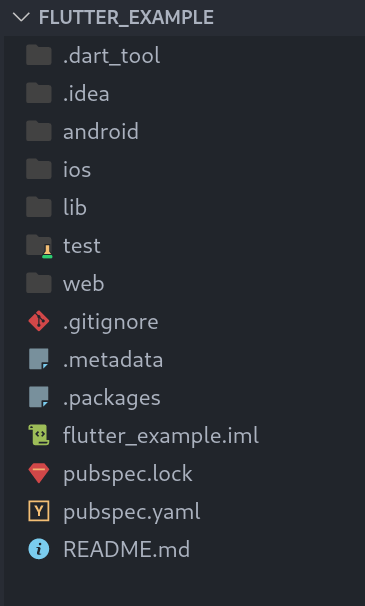
做得好!既然我们已经设置好了环境,就来看看应用程序在 Flutter 框架中的布局方式。
小部件
Flutter 应用程序是使用称为 Widgets 的东西构建的。如果您熟悉前端 JavaScript 框架,这些类似于组件,但许多都是由框架预先构建的。Widgets 也非常类似于 HTML 元素,如 'p'(段落)、'h1'(标题 1)等。
Widgets 本质上是 Flutter 为我们创建的应用程序的基本元素或构建块。它们通过 Flutter 期望您提供的特定属性或参数进行实例化。例如,要在应用程序屏幕上显示文本,我们使用一个名为 Text widget 的 widget,它类似于 HTML 的 'p' 元素,通过传递一个字符串来实例化。这是它在代码和应用程序中的样子。
// displays the text on the app screen
Text('Some string here');
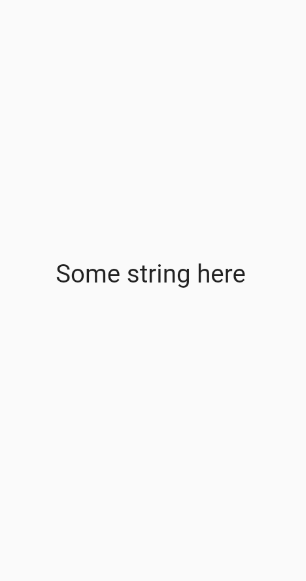
Flutter 库中还有一个预构建的按钮 widget,称为 ElevatedButton(只是一个 Material 主题按钮),它接受一个 onPressed 属性(按钮按下后要执行的代码)和一个 child 属性(显示按钮文本的 Text widget)。另一个是 TextField,它处理输入文本。
布局
Widgets 也用于比显示文本或按下按钮更复杂的事情。Flutter 在应用程序中布局事物的方式也通过 widgets 完成。例如,Container widget,它类似于 HTML 中的 'div',它将使我们能够将另一个子 widget 包装在一个容器中,以便添加填充、边距、颜色或其他内容。内部 widget 通常称为 'child' widget,容器将是 'child' widget 的 'parent' widget。有道理吧?
Container(
  child: Text('hello!' )
),
一些更重要的布局 widgets 是 Row 和 Column widgets。这些 widgets 允许您在屏幕上水平或垂直堆叠 widgets。它们通过传递一个子 widget 列表来实例化。以下是它们的工作方式。
Row(
  children: [
    // in the app, child widgets of a row are laid out left to right like so
    Text('left text'),
    Text('middle text'),
    Text('right text'),
  ],
)

Column(
  children: [
    // child widgets of a column are laid out top to bottom like so
    Text('top text'),
    Text('middle text'),
    Text('bottom text'),
  ],
)
左:Row,右:Column
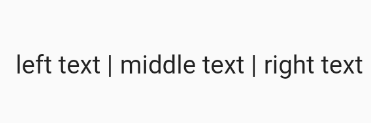
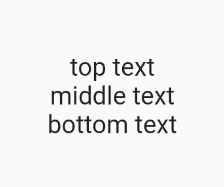
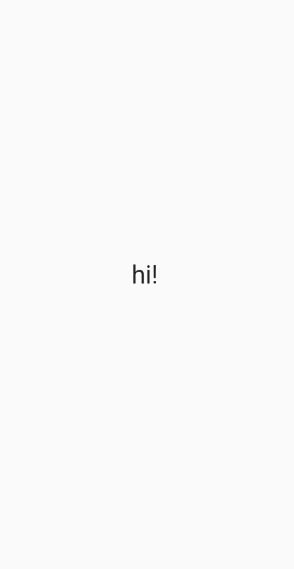
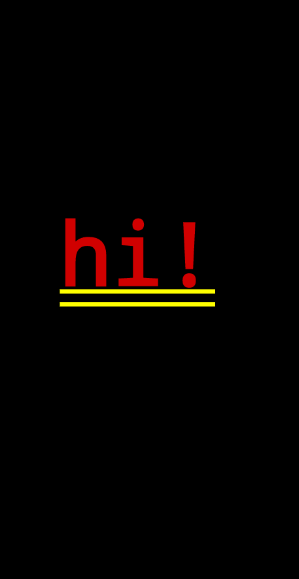
一些布局 widgets 被包装在我们在屏幕上放置的所有其他 widgets 周围。例如,Scaffold widget 通常用于为我们布局或“脚手架”屏幕,它的用法如下
Scaffold(
  body: Container(
    child: Text('hi!'),
  ),
)
左:有 Scaffold,右:没有 Scaffold
另一个有用的 widget 是 ListView.builder widget。ListView.builder widget 接受两个主要参数——itemCount(要构建的列表项数量)和 itemBuilder(将返回实际构建的内容)。这是它的样子。
List<String> people = ['John', 'Doe', 'Jane'];

ListView.builder(
  itemCount: people.length, // 3
  // index is the current index that the builder is iterating on. think of it like the
  // 'i' in the for loop,  for (int i = 0; i < whatever; i++)
  itemBuilder: (context, index) {
    return Container(
      child: Text(people[index]),
    );
  },
)
稍后我们将通过截图看到它们的样子。
属性 / 参数
Flutter 构建的每个 widget 都可以传递多个属性或参数。正如我们之前看到的,Container widget 接受 'child' 属性,它还可以接受 'color' 属性来定义 Container 的背景颜色。
每个 widget 都会有许多特定于该 widget 的参数,您可以通过阅读 Flutter 文档或使用 IDE / 文本编辑器的 IntelliSense 来了解它们。例如,在 VS Code 中,您可以在键入 Widget 后按 ctrl+space 或将鼠标悬停在其上,以查看它可以使用哪些属性。
通常,您也可以通过参数将所有样式传递给 widget。
许多这些参数只接受非常特定的类型或对象。Container widget 的 'child' 属性只接受另一个 Flutter widget。'color' 属性只接受 Flutter 预定义的(如 Colors.black, Colors.blue 等)或以特定方式实例化的对象(Color(0xFFFFFFFF),一种使用十六进制代码的方法)。
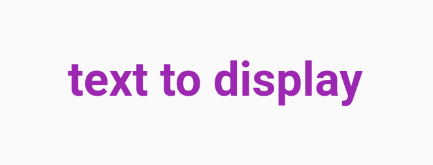
在 Text widget 中,我们可以通过将一个用我们的样式实例化的 'TextStyle' 对象传递给 Text widget 的 'style' 属性来设置文本样式。
Text(
  'text to display',
  style: TextStyle(
    // font color
    color: Colors.purple,
    // font size
    fontSize: 16.0,
    // font weight
    fontWeight: FontWeight.bold,
  ),
)
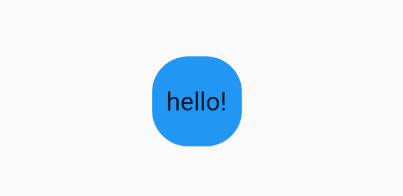
对于 Container widget 中的样式,我们使用 'decoration' 属性并传递一个用我们的样式实例化的 'BoxDecoration' 对象。
Container(
  // styling the container
  decoration: BoxDecoration(
    // you can define the background color in this object instead
    color: Colors.blue,
    // border radius - valid arguments must be of class BorderRadius
    borderRadius: BorderRadius.circular(20.0),
  ),
  height: 50.0,
  width: 50.0,
  // margin of the container - argument must be of class EdgeInsets
  margin: EdgeInsets.all(8.0),
  // child element (using the Center widget centers the Text widget)
  child: Center(
    Text('hello!')
  ),
)
在 Column widgets 中,您可能需要将对象垂直对齐到页面中心。您可以使用 Column widget 的 'mainAxisAlignment' 属性(列的主轴是垂直的)来做到这一点。您还可以使用 'crossAxisAlignment' 属性在列 widget 中水平对齐文本。
Column(
  // argument passed in must use the MainAxisAlignment object
  // can you start to see the practices and conventions Flutter everywhere?
  mainAxisAlignment: MainAxisAlignment.center,
  children: [
    Text('top text'),
    Text('center text'),
    Text('bottom text'),
  ],
)
左:无 MainAxisAlignment.center,右:有 MainAxisAlignment.center(如上面的代码示例)
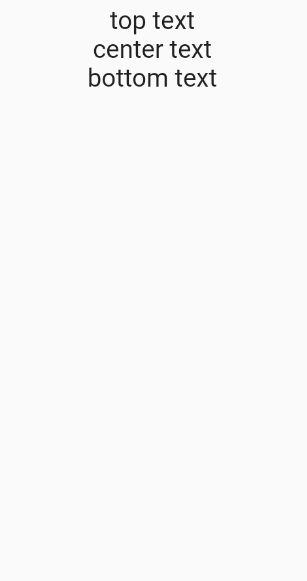
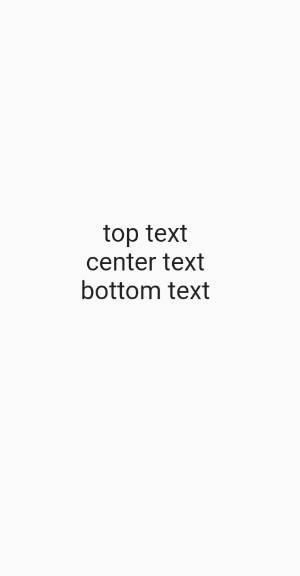
Column 的其他属性包括 crossAxisAlignment、mainAxisSize 等。很可能,如果您觉得需要对 widget 进行样式设置,只需谷歌搜索该 widget 的属性,或者谷歌搜索如何实现您需要的功能以找到要使用的属性。
您需要学习的属性和类的数量可能看起来有些令人生畏,但随着时间的推移,它会变得直观(而且,谷歌是您最好的朋友!)。
格式化
现在,您可能想知道,到处都是逗号和新行是怎么回事?我这样布局代码的原因是您的 IDE 会为您格式化代码。它通过检测尾部逗号并添加相应的新行来做到这一点。
遵循格式化程序将使您的代码对您和他人来说都更具可读性。这是一个简单的例子。
// weird code you might write totally without a formatter
// not very good, is it?
Column(children:[
  Container
  (child: Text
  (
    'hi!'
  )),
  Text(
    'hi'
  )
]
)

// code you might write with the formatter, but without adhering to the formatting guidelines
Column(children: [
  Container(color: Color(0xFFFFFF), child: Text('hey there'), margin: EdgeInsets.all(5.0), padding: EdgeInsets.all(5.0)),
  Text('hi')])

// code you write with the formatter, that adheres to the formatter
Column(
  children: [
    Container(
      color: Color(0xFFFFFF),
      child: Text('hey there'),
      margin: EdgeInsets.all(5.0),// add a trailing comma to the last parameter (margin)
    ), // add a trailing comma to the Widget
    Text('hi'), // add a trailing comma to the last child of the Column
  ], // add a trialing comma to the children parameter
)
您会同意我的说法,最后一个例子是最容易阅读和最容易编码的(忽略注释)吗?
只需在您的 widgets 和它们的参数中添加一个尾部逗号,保存,格式化程序就会为您处理其余的事情。随着时间的推移,您会做得越来越好。
无状态 Widgets
Stateless widgets essentially are widgets that do not change — they are static. One example of a stateless widget would be a page that displays the names of the states in the US in a list. Let's take a look at a more simple example by creating a stateless widget that simply returns a white container. Here's the syntax for defining a stateless widget.
class ListOfStates extends StatelessWidget {
  // this is the constructor, but don't worry about it right now
  const ListOfStates({Key? key}) : super(key: key);

  // @override is good practice to tell us that the following method (in this case,
  // the build method) is being overriden from the default build method
  @override
  // this build function returns a Widget
  Widget build(BuildContext context) {
    return Container(color: Color(0xFFFFFFFF));
  }
}
好消息——大多数 IDE 都包含代码片段,可以自动为您创建无状态 widget!只需在您的 IDE 中输入 stless,然后按 TAB 或 Enter 即可生成所有必需的代码。
如果您想为您的无状态 widget 添加参数(例如,创建一个 'message' 参数传递给显示该消息的无状态 widget),我们需要使用构造函数,就像类被构造一样。以下是方法。
class DisplayMessage extends StatelessWidget {
  // add it to the constructor here after the key, as 'required this.<parameter>'
  DisplayMessage({ Key? key, required this.message }) : super(key: key);

  // initialize it as a 'final' variable (it won't change)
  final String message

  @override
  Widget build(BuildContext context) {
    return Container(
      child: Text(message),
    );
  }
}
这个 widget 随后可以在另一个父 widget 中这样实例化
Scaffold(
  body: Column(
    children: [
      ...
      // instantiating the stateless widget we just created (which is in another file)
      // with string, the message we want to display
      DisplayMessage(message: 'Hello there!'),
      ...
    ],
  ),
)
有状态小部件
有状态 widgets 是可以对某些更改做出反应然后重新构建的 widgets。如果我们要让我们的应用程序具有交互性,这很有用。例如,假设我们想在应用程序中有一个计数器。每当用户按下 '+' 按钮时,我们希望应用程序显示我们定义的变量 'count' 的增加。以下是方法。
注意:每当我们希望我们的有状态 widget 对任何更改做出反应(这需要 Flutter 重新构建页面)时,我们都使用 setState(() {}) 方法。
class DisplayCount extends StatefulWidget {
  const DisplayCount({Key? key}) : super(key: key);

  @override
  _DisplayCountState createState() => _DisplayCountState();
}

class _DisplayCountState extends State<DisplayCount> {

  // defining a variable, count, inside our widget
  int count = 0;

  @override
  Widget build(BuildContext context) {
    return Column(
      children: [
        // display the count as a string
        Text(count.toString()),

        ElevatedButton(
          // the text displayed on the button
          child: Text('Click me to add +'),

          // the code that will execute when the button is pressed
          onPressed: () {
            // setState is called to signal to Flutter to rebuild the widget
            // count is incremented by 1, so the widget will be rebuilt with
            // a new value displayed in the text widget above
            setState(() {
                count += 1;
            });
          },
        ),
      ],
    );
  }
}
我们也有有状态 widgets 的 IDE 代码片段。只需输入 stful。
有状态 widget 中的构造函数是相同的,但它们只在 DisplayCount widget 中声明,而在 _DisplayCountState widget 中不声明。在您将代码放在其中的 _DisplayCountState widget 中,您可以将变量引用为 (widget.[variable])。
class DisplayCount extends StatefulWidget {
  const DisplayCount({Key? key, required this.message}) : super(key: key);

  final String message;

  @override
  _DisplayCountState createState() => _DisplayCountState();
}

class _DisplayCountState extends State<DisplayCount> {
  ...
  @override
  Widget build(BuildContext context) {
    return Column(
      children: [
        // refer to the 'message' attribute defined above as widget.message
        Text(widget.message),
        ...
      ],
    );
  }
  ...
}
有状态 widgets 的实例化方式与无状态 widgets 相同。
有状态 widgets 对于处理任何与业务逻辑、交互功能以及监听后端数据流相关的事务都非常有用,我们稍后会看到。
空安全
在 Flutter 的最新版本中,引入了空安全,以极大地帮助开发人员处理臭名昭著的空错误。
本质上,如果像 String 这样的东西被声明并应被赋予一个有效值,如 'Hi!',但如果它以某种方式被赋予了一个空值(基本上,被赋予了一个空值),那么各种问题就会开始发生——某些部分可能会开始丢失文本、功能等。
Flutter 的空安全通过使用强大的 IDE 功能来帮助开发人员修复这些问题,这些功能强制开发人员对空检查更加严格。这意味着开发人员必须考虑到他们声明的变量可能取空值的各种情况。
在空安全中,有 3 个重要的符号需要了解:'?' 符号、'!' 符号和 '??' 符号。
'?'
如果我们声明了一个我们认为可能会取空值的变量,我们在类型声明的末尾添加 '?' 运算符,以提醒我们和 IDE 对该变量执行严格的空检查。这是一个例子。
// initializing a string wih a nullable type and assigning it to the
// return value of this function, fetchSomeDataOrSomething()
String? response = await fetchSomeDataOrSomething();
// in the case that the function returned something null and response has a null value,
// it is now safely accounted for with this conditional statement
if (response != null) {
  print(response);
} else {
  print('error');
}
'!'
如果我们为变量声明了一个可空类型,但我们确信它不会为空,我们在变量名末尾使用 '!' 运算符。注意:尽量避免使用此方法,因为它会绕过 IDE 执行的所有空安全检查。
// fetchSomeData() returns type bool
bool? response = fetchSomeData();
// declaring that response will always be a valid value and not null
if (response! == True) {
  print('function has returned true');
} else {
  print('function has returned false');
}
'??'
当我们将值赋给变量时,我们可以检查它是否为空,并从中分配一个值。如果赋给它的值是空的,我们可以添加 '??' 运算符并在右侧添加一个默认值,以防它是空的。
String? response = fetchSomething();
// if response is not null, the 'something' variable will take on the value of response'
// if response is null, the 'something' variable with take on the value on the right side
String something = response ?? 'defaultValue';
学习 Firebase
由于 Flutter 是由 Google 开发的,而 Firebase 也由 Google 开发(专为应用程序开发人员打造),因此 Flutter 和 Firebase 作为前端和后端工具可以很好地协同工作。
大多数项目的主要后端将使用数据库,Firebase 通过其 Cloud Firestore 数据库提供。Firestore 数据库的基本结构非常简单,但与传统的实时数据库(如 SQL)有很大不同。相反,Firestore 是一个 No-SQL 数据库。
这个系列对于熟悉 Firebase 结构非常有帮助,请务必看看。特别是第一、二和四集非常重要。
本质上,Firebase Firestore 数据库是通过创建顶级“集合”来创建的,这些集合可以是“Users”、“Messages”、“Products”等。这些集合可以包含文档。
文档是其父集合的特定实例,可以分配给一系列具有相应值的“字段”。例如,这是 Macbook Pro 文档在 Products 集合中的样子
左侧:集合,中间:集合的文档,右侧:此文档中的字段
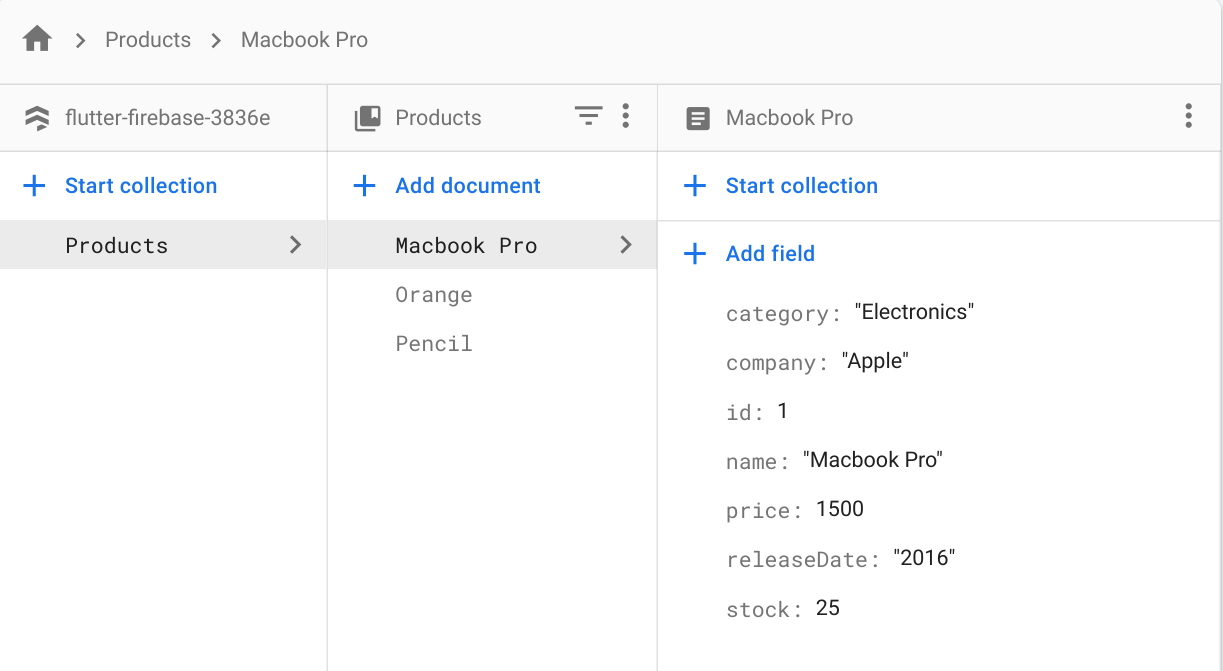
注意:我通过 Firebase Console 访问我创建的一个虚拟项目的 Cloud Firestore 数据库
No-SQL 数据库的特点是您可以在同一集合中创建没有相同字段的文档!!例如,“Pencil”文档可能缺少“rating”字段,但不会有任何错误。
关于 Firebase 的其他一些重要事情是账单和安全规则。
Firestore 的账单不是按数据库大小收费,而是按对数据库的读写次数收费。例如,如果您创建一个电子产品(以文档的形式)并将其添加到数据库,则算作一次写入。如果您想更新产品的价格,这也算作一次写入。
如果您需要加载“Food”集合的所有产品,Firebase 将向您收取每个集合中文档 1 次读取的费用。
但是,Firebase 在限制方面非常慷慨。但是,如果您想将应用程序投入生产(将其推向实际应用),最好注意账单工作方式以优化您的数据库调用。
查看 Firebase 定价页面 了解免费套餐的限制。
更多非常好的资源
将 Firebase 与 Flutter 连接
既然我们了解了 Firebase 最重要的部分(Firestore 数据库),我们如何在 Flutter 中访问这些数据呢?
StreamBuilder
我们可以为此目的使用 StreamBuilder。“Stream”本质上是我们不断监视变化的数据流。数据流的一端是 Firestore 数据库。数据流的另一端是我们的应用程序。
因此,当 Firestore 数据库中的某些内容发生变化时(例如,添加了新产品),该变化就会通过数据流传递到我们的 Flutter 应用程序并被注意到。一旦检测到该更改,StreamBuilder widget 就会重新构建自身以合并该更改(新产品现在会出现在我们的应用程序中)。
这是语法
StreamBuilder(
  // gets an instance of a Firestore database and retrieves 'snapshots' of the Macbook Pro document
  stream: FirebaseFirestore.instance.collection('Products').doc('Macbook Pro').snapshots(),
  // builder defines what will be built on the app using this 'snapshot' data (the stream data)
  // Firestore collections are of type QuerySnapshot
  // Firestore documents are of type DocumentSnapshot
  // Both are referred to as AsyncSnapshots because they are asynchronous snapshots
  builder: (BuildContext context, AsyncSnapshot<DocumentSnapshot> snapshot) {
    // check that there is data in the stream and that it has finished loading
    if (snapshot.hasData) {
      return Container(
        // snapshot.data gives you access to all the fields in the document
        // get the values of the fields by using square brackets and the
        // name of the field, like so
        child: Text(snapshot.data['name'])
      ),
    }, else {
      // if there's no data yet, show a loading sign
      return CircularProgressIndicator();
    }
  },
)
它可能看起来很复杂,但实际上并不复杂。一方面,您正在访问数据流,无论是集合还是文档,并且您正在构建一个通过“snapshot”变量访问该数据的 widget。如果 StreamBuilder 检测到 Firestore 端有任何更改,widget 将被重新构建。
FutureBuilder
StreamBuilders 很棒,但如果您不需要监视 Firestore 端的变化呢?如果您只想检索一些信息,比如 Macbook 的价格,然后就完成了(您可能知道这些值不会改变)?
我们可以使用 FutureBuilder 来实现。
FutureBuilders 将一个异步函数作为一个参数,以及一个构建器,一旦该函数执行完毕就构建一些东西(类似于 StreamBuilder)。在我们的例子中,我们的异步函数或“future”(正如 FutureBuilder 所称呼的)将是检索 Macbook 的价格,而我们的构建器将是显示该价格的 widgets。
// defining an async function that returns an int
Future<int> retrieveMacbookPrice() async {
  // PS here's how to retrieve a single document from Firestore -
  // in our case, the Macbook document
  var document = await FirebaseFirestore.instance.collection('Products').doc('Macbook Pro').get();
  // The data you get back (the document and its fields) will be a dictionary that maps
  // keys (type String) to values (type dynamic)
  Map<String, dynamic> macbookData = document.data();

  int macbookPrice = macbookData['price'];
}

FutureBuilder(
  // builder will only build after this 'future' function is done executing
  future: retrieveMacbookPrice(),
  // the 'snapshot' here refers to what is returned from the future!
  builder: (BuildContext context, AsyncSnapshot<int> snapshot) {
    if (snapshot.hasData) {
      // data from the snapshot is accessed like so
      int price = snaphot.data['price']
      return Container(
        // convert int to string
        child: Text(price.toString()),
      );
    } else {
      // if there's no data yet, show a loading sign
      return CircularProgressIndicator();
    }
  }
)
哇,这太多了!但猜猜怎么着……既然您了解了 Firebase、FutureBuilders 和 StreamBuilders 的工作原理,您在创建强大的 Flutter 应用程序的旅程中已经走了很远。
状态管理
状态管理是 Flutter 中的一个非常重要的概念,它的工作原理如下
假设您想创建一个跟踪用户个人资料和信息的应用程序。在他们使用用户名和密码登录后,您想在应用程序的每个页面上显示他们的用户名作为问候语(例如,说“你好,[姓名]!”)。您将如何做到这一点?如何将用户的“用户名”和“密码”值传递到整个应用程序?
您可以将用户名作为构成不同页面的所有无状态和有状态 widget 的参数传递。但实际上,您想要一些可以容纳该用户名值并在所有屏幕/页面中访问它的东西。
这可以通过使用内置的状态管理解决方案“Provider” widget 来实现。
Provider 被称为“Provider”,因为它是一个父 widget,它将一个值“提供”给子 widget,以便子 widget 可以访问该值/实体中的所有内容。在我们的例子中,如果我们有一个我们想要在子 widget 中访问的“Cart”类,它看起来像这样
Provider(
  create: (context) => CartModel(),
  child: MyApp(),
)
因此,在 MyApp 子 widget 中,我们将能够访问 CartModel 及其所有方法等。您可以通过两种方式实例化 CartModel 类来访问数据
// 1st way
Provider.of<CartModel>(context).removeAllItems();

// 2nd way
// context.watch listens for changes in CartModel - if data changes, the parent will rebuild
// whatever is necessary
context.watch<CartModel>().removeAllItems();
// context.read returns CartModel / the model of interest without listening to changes in
// the data
context.read<CartModel>().removeAllItems();
这会调用 Provider 来查看类型为 CartModel 的模型,并调用 removeAllItems() 方法。第二种方式是,CartModel 类型的对象(< 之间的任何内容 >)通过括号进行实例化 -> context.read< >()。
如果我们想访问另一个需要状态管理的数据——比如用户在应用程序中对颜色主题的偏好呢?我们可以创建一个名为 'UserPreferences' 的类,但我们如何在 CartModel 类之上访问它呢?
一种方法是嵌套 Providers。
Provider(
  create: (context) => CartModel(),
  child: Provider(
    create: (context) => UserPreferences(),
    child: MyApp(),
  ),
)
所以我们将能够在 MyApp 中访问 UserPreferences 模型和 CartModel。但您可能可以发现,这很快就会变得难以管理,对吧?这就是 MultiProvider 的用武之地。
“MultiProvider” widget 允许我们在应用程序的顶层(main.dart)定义多个“providers”,所有子 widget 都可以访问每个 provider。
MultiProvider(
  providers: [
    Provider<CartModel>(create: (_) => CartModel()),
    Provider<UserPreferences>(create: (_) => UserPreferences()),
  ],
  child: MyApp(),
)
多么自然的进程!
这就是状态管理的基础。查看下面列出的额外资源以更熟悉这些概念和语法。
最佳实践
在 Flutter 中开发任何大型项目时,始终牢记最佳实践非常重要。
文件夹结构
要维护一个大型项目,请确保您的文件夹结构组织正确。
文件夹通常是这样组织的
正如我们之前看到的,lib 是您将放置所有 Flutter 代码的地方。Flutter 然后将代码转换为 Android 和 iOS 代码以创建原生应用程序,这些代码可以在 android 和 ios 文件夹中找到。您使用的任何图像、SVG 或图片都应放在“assets”文件夹中,您需要创建它。
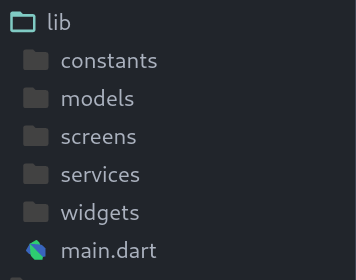
在 lib 文件夹中,您应该将代码分成 screens、models、services、widgets 和 constants。Main.dart 将是您的包装文件。
Constants 用于放置 constants.dart,它通常定义 ThemeData 和应用程序的颜色方案,以便您的应用程序更容易遵循特定的样式。例如,我通常在 constants.dart 文件中定义 kPrimaryColor 和 kSecondaryColor。您还可以使用 theme.dart 文件来创建 ThemeData 对象。
Models 是您想要创建的类,以便更轻松地使用 Flutter 中的数据。例如,您可能想创建一个具有 'username'、'nickname'、'age' 等属性的 User 类。在 models 文件夹中,根据您想调用的类来创建和命名您的文件。如果我想做一个……
class User {
  String usernamename;
  String nickname;
  int age;
}
那么我会将文件命名为 user.dart(如果它是两个单词,只需使用下划线而不是空格 -> food_item.dart)。
Screens 是您将放置大部分代码的文件夹——所有屏幕的 UI 代码。要创建一个新屏幕,请创建一个文件夹并将其命名为屏幕,然后将您的代码放在该子文件夹中。这样,您的所有屏幕都将在 'screens' 文件夹中的不同文件夹中。在您的特定屏幕文件夹中,将主文件名命名为 (name_of_screen).dart。
如果您的屏幕有很多组件,请在屏幕目录中创建一个 components 文件夹。
Services 用于放置包含任何业务逻辑的所有类。它们遵循与 models 文件夹相同的文件夹约定。
Widgets 用于放置您自定义创建的所有 widgets,您将其用于多个屏幕。例如,如果您创建了自己的 Button widget,您想在 login 和 sign_in 屏幕上都使用它,只需将该 Button 文件放入 widgets 文件夹中。
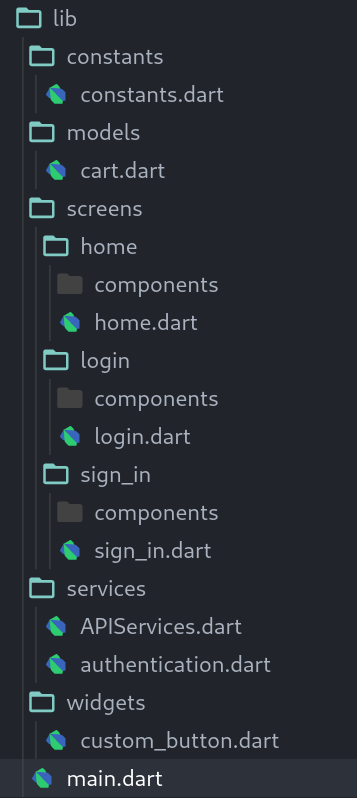
将业务逻辑与前端分离
业务逻辑本质上是与应用程序布局没有直接关系的任何代码。例如,如果您有一个登录屏幕,UI 将是 Column、TextField 和 ElevatedButton widgets。业务逻辑是如何让用户登录到您正在使用的后端服务器(例如,Firebase)。
通常最好将它们分开,这样您就不会混淆后端/处理数据和前端,这可能导致混乱的代码。如果我想查看 product_details 屏幕的代码,为什么我要查看产品在后端是如何处理的?将这两种范式分开会更干净。
这对我们来说意味着,我们应该尽可能多地将业务逻辑/后端代码放在 'services' 文件夹中,而不是放在 'screens' 文件夹中。我通常通过定义一个 'APIServices' 类来做到这一点,该类具有处理业务逻辑的许多方法。
尽可能抽象(创建更多 widgets)
在 Flutter 中,最好尽可能提取代码。这意味着每当您有一个专门用于单一用例的 widget 树部分时,就将其提取到自己的 widget 中并放在别处。这是一个例子。
// products_screen.dart

Scaffold(
  // Column widget to lay out everything on the page vertically
  body: Column(
    children: [
      // nested column widget dedicated to displaying electronics
      Column(
        children: [
          Container(child: Text('Electronics')),
          Text('Macbook pro'),
          Text('iPhone'),
          Text('Galaxy Buds'),
        ],
      ),
      // nested column widget dedicated to displaying food
      Column(
        children: [
          Container(child: Text('Food items')),
          Text('Jelly beans'),
          Text('Peanut Butter'),
          Text('Apples'),
        ],
      ),
    ],
  ),
)
这会将“Food items”部分和“Electronics”部分放入一个 widget 树中,如果项目变大,这会变得混乱和难以理解。作为最佳实践,以下是它应该是什么样子。
// screens/products/products_screen.dart

Scaffold(
  body: Column(
    children: [
      // Extracted widgets (put the widgets into their own file in the 'components' directory of this screen's directory)
      ElectronicsSection(),
      FoodItemsSection(),
    ],
  ),
)

// screens/products/components/electronics_section.dart

class ElectronicsSection extends StatelessWidget {
  const ElectronicsSection({ Key? key }) : super(key: key);

  // same widgets, just put into the build function as a returned value
  @override
  Widget build(BuildContext context) {
    return Column(
      children: [
        Container(child: Text('Electronics')),
        Text('Macbook pro'),
        Text('iPhone'),
        Text('Galaxy Buds'),
      ],
    );
  }
}


// screens/products/components/food_items_section.dart

class FoodItemsSection extends StatelessWidget {
  const FoodItemsSection({ Key? key }) : super(key: key);

  // same widgets, just put into the build function as a returned value
  @override
  Widget build(BuildContext context) {
    return Column(
      children: [
        Container(child: Text('Food items')),
        Text('Jelly beans'),
        Text('Peanut Butter'),
        Text('Apples'),
      ],
    );
  }
}
结果是更干净、更容易调试和编码。
测试
为您的 Flutter 应用程序创建单元测试是确保添加新功能不会破坏您代码的便捷方法。
测试是为了自动化检查应用程序中特定功能的流程。例如,您可以编写一个单元测试来确保登录屏幕和业务逻辑正常工作,您可能会在每次更改应用程序的其他部分时运行它。
查看这些资源以了解 Flutter 中的测试。
有用的资源
现在您已经了解了 Flutter 的基本语法和工作原理,您需要将这些知识付诸实践!我建议您跟随 Flutter App Build 教程,看看高级编码人员是如何开发应用程序的,然后尝试自己只使用 UI 组件编写一个应用程序(您可以在 dribbble 上查找 UI 灵感)。祝您好运!
这些都是编译的资源,从对初学者更友好到更高级。
Dart
Flutter
Flutter 应用教程
- Flutter 课程 - 对初学者进行完整教学 (构建 iOS 和 Android 应用)
- Flutter Chat UI 教程 | 从零开始构建应用
- Flutter 应用与 Firebase 身份验证和 Firestore 教程 - 加密钱包
- 植物应用 - Flutter UI - 快速编码
Firebase
状态管理
- Flutter 文档 - 简单的应用程序状态管理
- Flutter 中的 Stream Builder
- 理解所有那些 Flutter Providers
- Flutter Provider - 高级 Firebase 数据管理
如果这感觉有点不知所措,请不要气馁。我曾多次卡住,但一旦我理解了一个新概念,我就会迅速取得巨大进展。永远不会太晚。首先,很高兴您在这里!
希望您喜欢这份综合指南!


